




Website Audit Checklist for Singapore Business Owners
A website audit checklist for Singapore business owners: what to check, the free tool for each check, PDPA, accessibility, PayNow, and how to read the results.

The short answer
- 01
Check what costs you enquiries first. Make sure Google can index your key pages, every form and WhatsApp button works, and GA4 records the enquiries. A broken form costs more than any speed score.
- 02
Free tools cover most of the checklist. Google Search Console, PageSpeed Insights and a real phone do much of the work, and our free tools under Resources check sitemaps, redirects, titles, schema and colour contrast.
- 03
Add the Singapore checks most lists skip. A PDPA notice and an unticked marketing box at every form, Google Business Profile hours that include public holidays, GST-inclusive prices and a PayNow checkout tested on a phone.
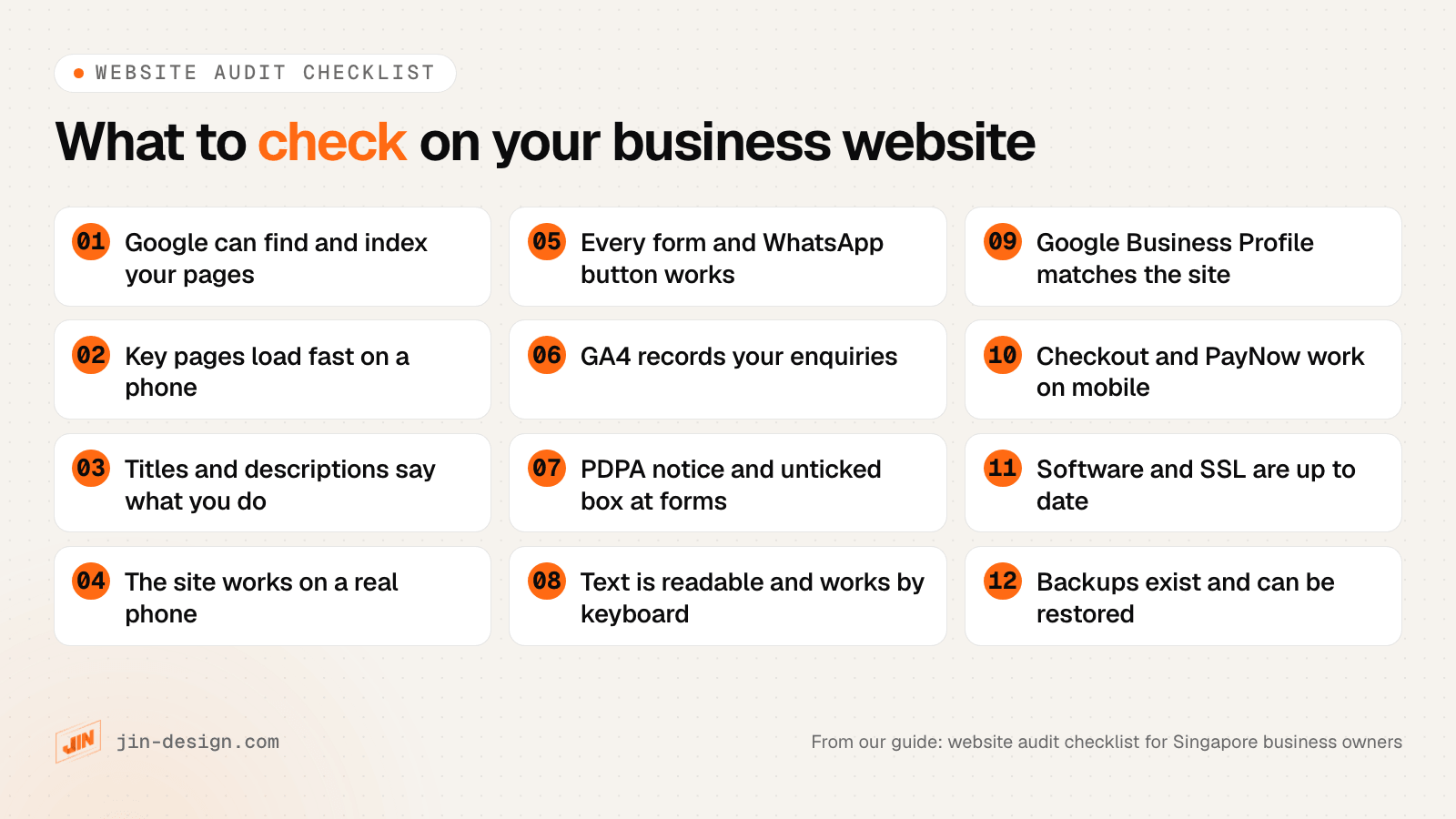
A website audit checklist for a Singapore business owner covers whether Google can index your pages, page speed on a phone, titles and descriptions, how the site works on a real phone, forms and WhatsApp buttons, enquiry tracking, PDPA notices at forms, accessibility, your Google Business Profile, checkout and PayNow for online stores, software and SSL, and backups. Free tools handle most of it, starting with Google Search Console, PageSpeed Insights and your own phone. Fix what blocks enquiries or sales first, and treat tool scores as a guide rather than a goal.
We build and maintain business websites in Singapore and carry out a full website audit for clients who want one done for them. This guide is the version you can run yourself. It stays at the level a business owner needs; it does not go deep into technical SEO. Each section names the free tool for the check, including our own free tools under Resources, and what a pass looks like.
What should a website audit checklist cover?
A website audit checklist should cover anything that stops people finding your site, trusting it or contacting you. The table lists each check in this guide, the free tool to use and what a pass looks like.
| Area | What to check | Free tool | A pass looks like |
|---|---|---|---|
| Indexing | Key pages are in Google; the sitemap lists only live pages | Google Search Console, our XML sitemap checker | Every service and product page indexed, no errors in the sitemap |
| Old addresses | Old URLs redirect in one step to the right page | Our redirect checker | One 301 redirect, no chains, no 404s |
| Speed | Core Web Vitals on real visits; what slows key pages | PageSpeed Insights | Field data passes on mobile for your key pages |
| Titles | Each page has its own title and description | Our title and meta description checker | Says what you offer and where, not cut off |
| Phone use | Menus, text, buttons and pop-ups on a real phone | Your phone | Everything readable and tappable without zooming |
| Forms and buttons | Every form sends; WhatsApp and call buttons open | Your phone and inbox | Test enquiries arrive, including on mobile data |
| Tracking | GA4 records form sends and WhatsApp taps | GA4 Realtime report | Each test shows up as a key event |
| PDPA | A purpose line and an unticked marketing box at forms | Our website PDPA checklist | Notice at every form, privacy policy matches your tags |
| Accessibility | Contrast, keyboard use, alt text, form labels | Our colour contrast checker, WAVE | Text meets WCAG AA contrast, every control works by keyboard |
| Local SEO | Google Business Profile matches the site | Your profile and our UTM link builder | Same name, address, phone and hours everywhere |
| Online store | Checkout and PayNow on a phone; GST-inclusive prices | A test order | Order completes, confirmation email arrives |
| Security and upkeep | Software, SSL, domain renewal, backups | Your CMS dashboard and registrar | Updates current, renewals on auto, a restore tested |
Before you start, open a spreadsheet with four columns: page address, problem, screenshot link and priority. Writing each issue down with its page address turns your notes into a list someone can fix.
How do you check that Google can find and index your website?
Open Google Search Console and look at the Page indexing report. It shows how many of your pages are indexed and, for the rest, why not. If you have never set up Search Console, do that first: it is free, and Google’s own data is the best starting point for any audit.
What to look for:
- Your key pages are indexed. Paste each important page (home, services, top products, contact) into the URL Inspection box at the top. It should say the page is on Google.
- “Excluded by noindex tag” on pages you want found. A setting used to hide a staging site, such as “Discourage search engines” in WordPress, is sometimes left on after launch.
- “Not found (404)” for old addresses. These are often pages from an old site that were never redirected. Run your old addresses through our redirect checker: each should reach its new page in one 301 redirect.
- Your sitemap is clean. Our XML sitemap checker fetches your sitemap and flags pages that redirect, return errors or are blocked, which should not be listed.
A quick extra test: search Google for your business name and your main service. If your own site does not appear for your own name, start there before anything else.
This guide stops at the owner-level checks. Crawl settings, canonical tags across large sites and JavaScript rendering are a job for a developer or a technical SEO audit.
How do you check your website’s speed and Core Web Vitals?
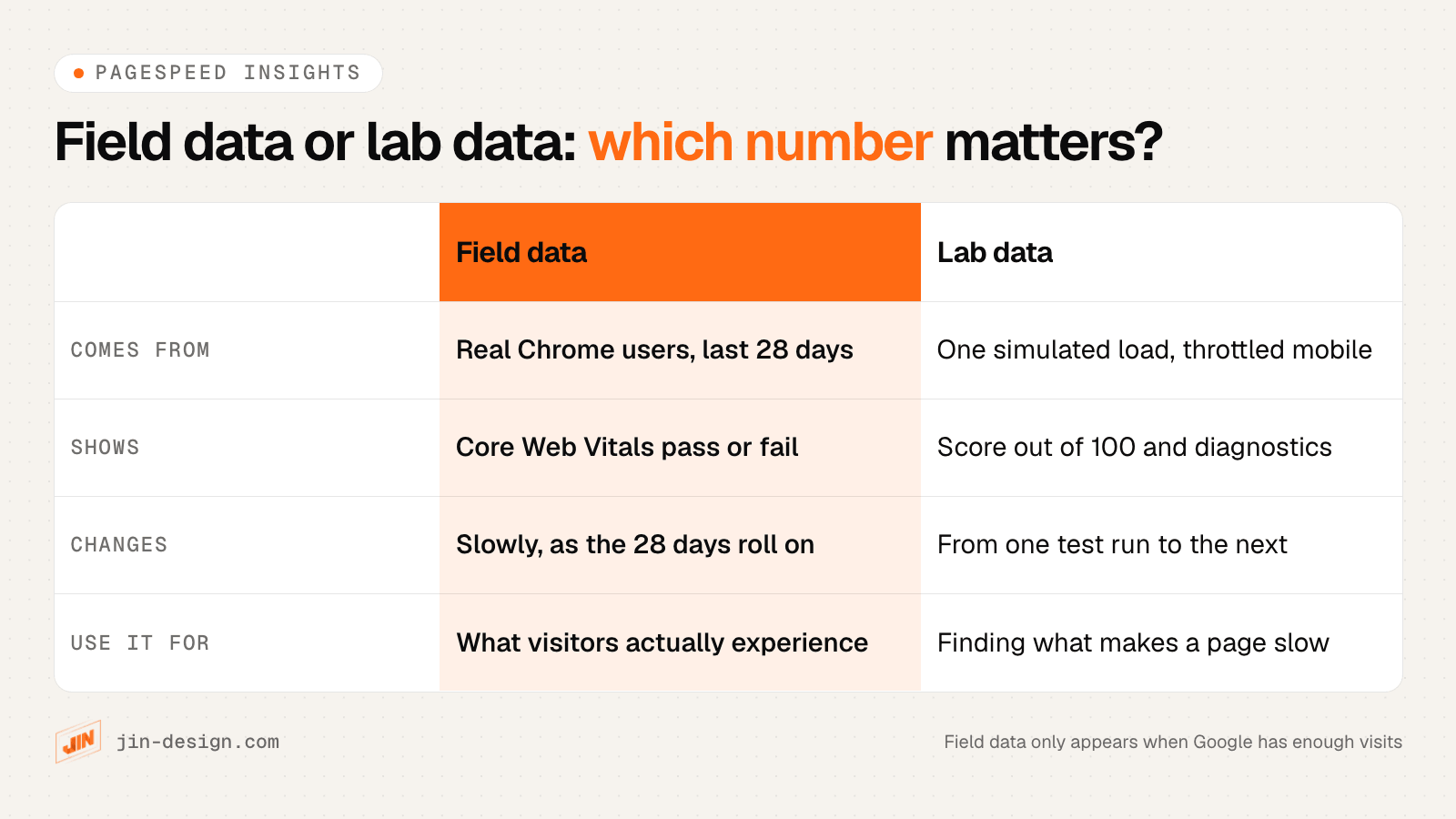
Run your home page and your most important service or product page through PageSpeed Insights, and read the top half of the report first. That top section is field data: how the page actually loaded for real Chrome users over the last 28 days. The score out of 100 underneath is lab data from a single simulated load.
Google’s Core Web Vitals guidance sets three measures. Each is judged at the 75th percentile of page loads, so at least three in four visits should meet the target:
| Measure | What it means | Good |
|---|---|---|
| Largest Contentful Paint (LCP) | How long the main content takes to appear | 2.5 seconds or less |
| Interaction to Next Paint (INP) | How quickly the page responds to taps and clicks | 200 milliseconds or less |
| Cumulative Layout Shift (CLS) | How much the layout jumps while loading | 0.1 or less |
Small business sites often have too few visits for field data on individual pages. In that case PageSpeed Insights shows data for the whole site, or none, and the Core Web Vitals report in Search Console groups similar pages together. Use the lab diagnostics to find the usual causes: oversized images, a heavy slider at the top of the page, chat widgets and ad tags loading early, and too many fonts.
Two habits make speed results easier to trust. Test the mobile result, not desktop, because most Singapore visitors arrive on phones. And run the lab test two or three times, because the score moves from run to run even when nothing has changed.
How do you check page titles, meta descriptions and AI search readiness?
Every page should have its own title that says what the page offers, in the words customers search for, and a description that tells them what happens after they click. Look at what Google shows by searching site:yourdomain.com, then paste each key page’s title and description into our title and meta description checker to see where Google is likely to cut them on a phone.
Common problems in a business owner’s audit:
- The same title on every page, often just the business name.
- “Home” or “Welcome” as the home page title, which tells searchers nothing.
- Service pages that never say where you work, such as Singapore or the areas you cover, when customers search with a location.
- Old services or prices still on the site that you no longer offer.
Structured data helps Google and AI assistants read facts such as your business name, address and opening hours. Our schema markup generator creates LocalBusiness markup, and Google’s Rich Results Test checks what is already on a page. To see whether AI assistants can read and quote your pages, run a page through our AI search visibility checker.
Does your website work properly on a phone?
The most reliable mobile test is your own phone, and someone else’s. Google retired its Mobile-Friendly Test tool and the Mobile Usability report in Search Console in December 2023, so older checklists that send you there will hit a dead end. Lighthouse, inside Chrome and behind PageSpeed Insights, covers some of the same checks, but nothing replaces using the site by hand.
On the phone, check that:
- The menu opens and every link in it works.
- Text is readable without zooming, and buttons are big enough to tap without hitting the one next to them.
- Pop-ups, cookie notices and chat bubbles do not cover the content or the main button, and can be closed.
- Tables and images do not run off the side of the screen.
- Phone numbers and addresses open the dialler and maps when tapped.
Try it on mobile data as well as office Wi-Fi. A page that feels quick in the office can be slow for a customer on the MRT.
How do you test contact forms, WhatsApp buttons and enquiry tracking?
Submit every form on the site yourself, from a phone, and check that the email arrives where it should. This is the single most valuable check in the whole audit, because a form can fail quietly for weeks while the rest of the site looks fine.
For each form:
- Send a real test entry with your own email, and check the inbox it should reach, including the spam folder.
- Check the thank-you message or page appears, and that you receive any confirmation email the customer would get.
- Test file uploads if the form has them, with a photo taken on the phone.
- Tap every WhatsApp and call button and confirm it opens the right number with any pre-filled message.
Then check your tracking. Open the Realtime report in GA4 while you submit a test form and tap the WhatsApp button. Each action should show up as an event, and the ones that matter (form sends, WhatsApp taps, calls, purchases) should be marked as key events. If they do not appear, you cannot tell which pages or campaigns bring in enquiries.
If you link to your website from your Google Business Profile, social profiles or email newsletters, tag those links with our UTM link builder so the visits show up under the right source in GA4 instead of being lumped together.
What PDPA checks belong in a website audit?
Every form that collects personal data needs a short line saying what the details will be used for, and marketing consent should be a separate box that is not ticked by default. Those two checks catch the most common PDPA gaps on Singapore business websites. Our guide to PDPA for websites in Singapore explains the rules behind them, with the PDPC sources.
During the audit, check:
- A purpose line at every form, next to the button, linking to your privacy policy.
- Marketing as an optional, unticked box. PDPC guidance says a pre-ticked box is not appropriate for marketing consent, and section 14(2)(a) of the Act bars making consent a condition of service beyond what is reasonable.
- Only the fields you need. Drop fields you never use. PDPC’s NRIC guidelines say organisations generally should not collect NRIC numbers unless the law requires it or identity must be verified to a high degree of fidelity.
- A privacy policy that matches the site. List the tags your site actually loads, such as GA4, Meta Pixel or a chat widget, and check each is named in the policy.
- Your data protection officer’s business contact is published, on the site or on BizFile+.
Our free website PDPA checklist covers the full list. It is general information, not legal advice.
How do you check website accessibility?
Check four things a visitor relies on: text contrast, keyboard use, alt text on images and labels on form fields. For contrast, put your text and background colours into our colour contrast checker; body text should reach the WCAG AA ratio of 4.5 to 1. Then put the mouse aside and press Tab through the page: you should always see where you are, and reach and use every link, menu and button.
WAVE, a free tool from WebAIM, flags missing alt text, empty links and form fields without labels on any page. Treat its list as a starting point; some items need a person to judge.
In Singapore, GovTech’s Digital Service Standards set the baseline for government digital services and incorporate WCAG Levels A and AA. They are aimed at government agencies and the partners who build government services; we know of no equivalent rule for private business websites. For a business website, WCAG AA is still the sensible target, because readable, keyboard-friendly pages work better for older customers and for people using screen readers.
How do you audit your Google Business Profile and local SEO?
Compare your Google Business Profile with your website line by line: the business name, address, phone number, opening hours and website link should match exactly. Then check the details Singapore customers notice:
- Public holiday hours. Add special hours for public holidays such as Chinese New Year, Hari Raya and Deepavali, so the profile does not show you as open when you are closed.
- The right primary category and the services you actually offer.
- Recent photos of the outlet, and replies to recent reviews.
- A tagged website link, made with the UTM link builder, so GA4 shows visits from the profile separately.
- The same details in your website footer, contact page and LocalBusiness schema.
If you have several outlets, each needs its own profile and its own page on your site. Our guide to local SEO in Singapore covers profiles, reviews and location pages in detail.
What should an online store check at checkout, including PayNow?
Place a test order from a phone, all the way through to the confirmation email, and pay with PayNow if you offer it. Use your gateway’s test mode if it has one, or a small real order you then refund, so you see exactly what a customer sees.
Checks for a Singapore online store:
- PayNow appears at checkout on mobile, the QR code loads, and the order is marked as paid once payment arrives. On Stripe, for example, a PayNow QR code expires after an hour, so check what happens if a customer pays late.
- Prices include GST if you are GST-registered. IRAS requires prices shown to customers to be GST-inclusive; the current rate is 9%.
- Delivery fees and the total are shown before the customer pays, not added at the last step.
- Order confirmation and shipping emails arrive and show the right details.
- GA4 records the purchase with the correct value, once per order.
- The name customers see in their banking app is explained at checkout if it is your gateway’s name rather than yours.
Our guide to planning an online store in Singapore explains PayNow through gateways and static QR codes, and our free online store launch checklist lists the checkout tests in full.
What security and maintenance basics should a website audit check?
Check that your site’s software is up to date, HTTPS works on every page, your domain and SSL certificate renew automatically and a recent backup exists that can actually be restored. These checks lower the risk of problems; they do not make any website immune to them.
- CMS, theme and plugins up to date. In WordPress, the dashboard lists pending updates. Remove plugins and themes you no longer use.
- Admin users. Remove accounts for staff and developers who have left, and make sure each person has their own login.
- HTTPS everywhere. Every page should load with the padlock, and the http:// version should redirect to https://.
- Domain renewal. Check the expiry date and auto-renewal with your registrar. For a .sg domain, the registrar is the one accredited by SGNIC that you bought it through; our list of domain registrars in Singapore explains how .sg registration works.
- Backups. Find out where backups are stored, how often they run and when someone last tested a restore.
- Hosting. Note your hosting provider, plan and who holds the login. If anything looks wrong at the server level, raise it with your host.
Our guide to website maintenance in Singapore and the free website maintenance checklist cover the ongoing side.
How do you read website audit results and decide what to fix first?
Sort every finding by what it costs you in enquiries or sales, then by the effort to fix it. A broken contact form outranks a hundred warnings about image file names, whatever severity label a tool gives them.
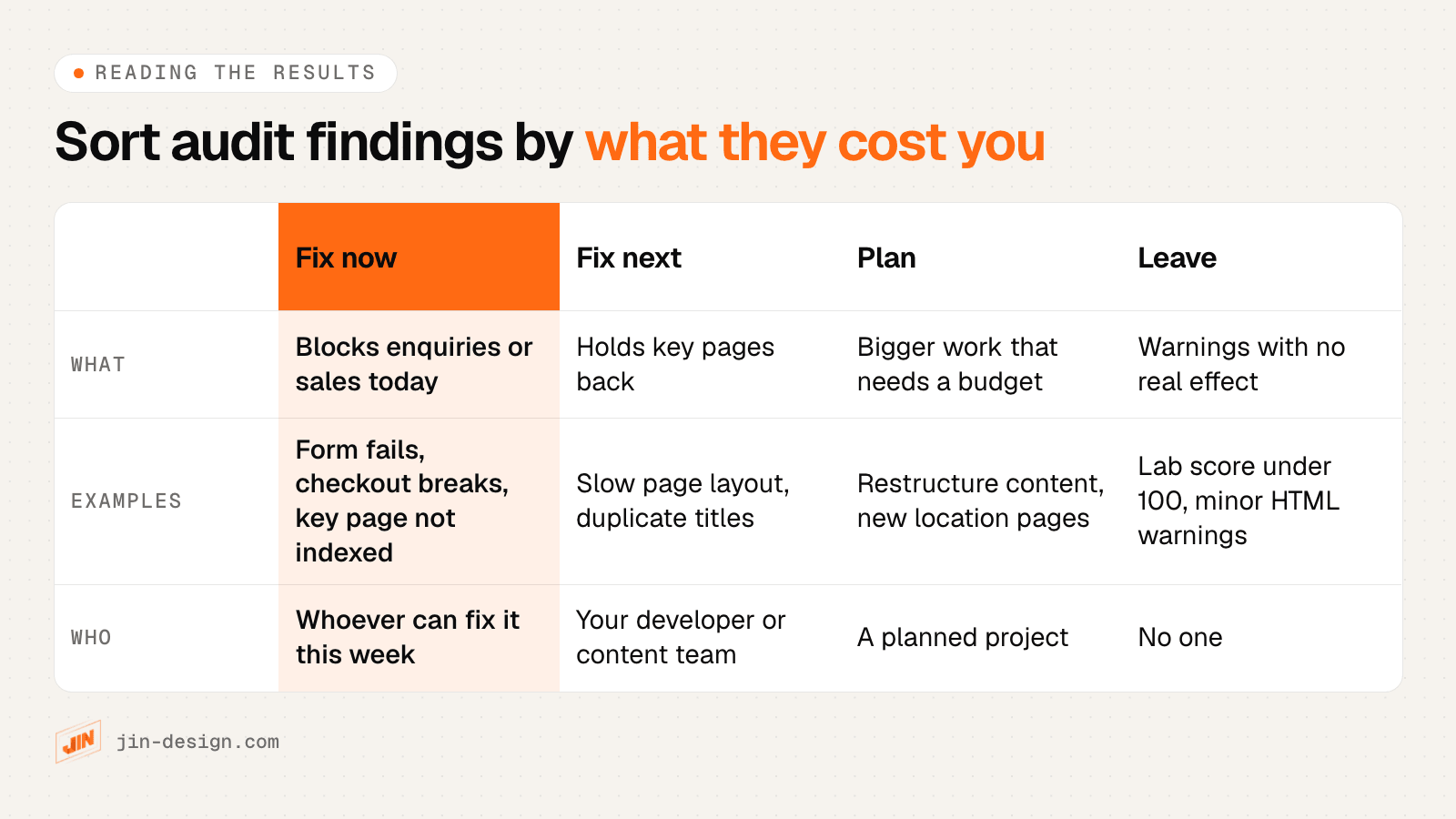
A few patterns help when the list looks overwhelming:
- Hundreds of identical warnings usually have one cause. If every product page has the same missing tag, the fix is in the product page layout, made once.
- Weigh issues by the pages they affect. Use the Performance report in Search Console and the pages report in GA4 to see which pages bring visits and enquiries. Problems there come first.
- A score is not a ranking. Audit tool scores and the lab score in PageSpeed Insights summarise each tool’s own rules. They are not Google rankings, and a better score does not guarantee better positions.
- Some warnings are fine to leave. Minor HTML validation notes, a lab score in the 80s on a fast-feeling page, or thin old blog posts that nobody visits rarely justify the cost of fixing.
Record each fix with the date it was made. If enquiries move afterwards, you will know what changed.
How often should you audit your website?
Run quick checks every month, a wider check every quarter and the full checklist once a year, and audit straight away after any big change. That rhythm catches a broken form within weeks rather than months, without turning the website into a weekly chore.
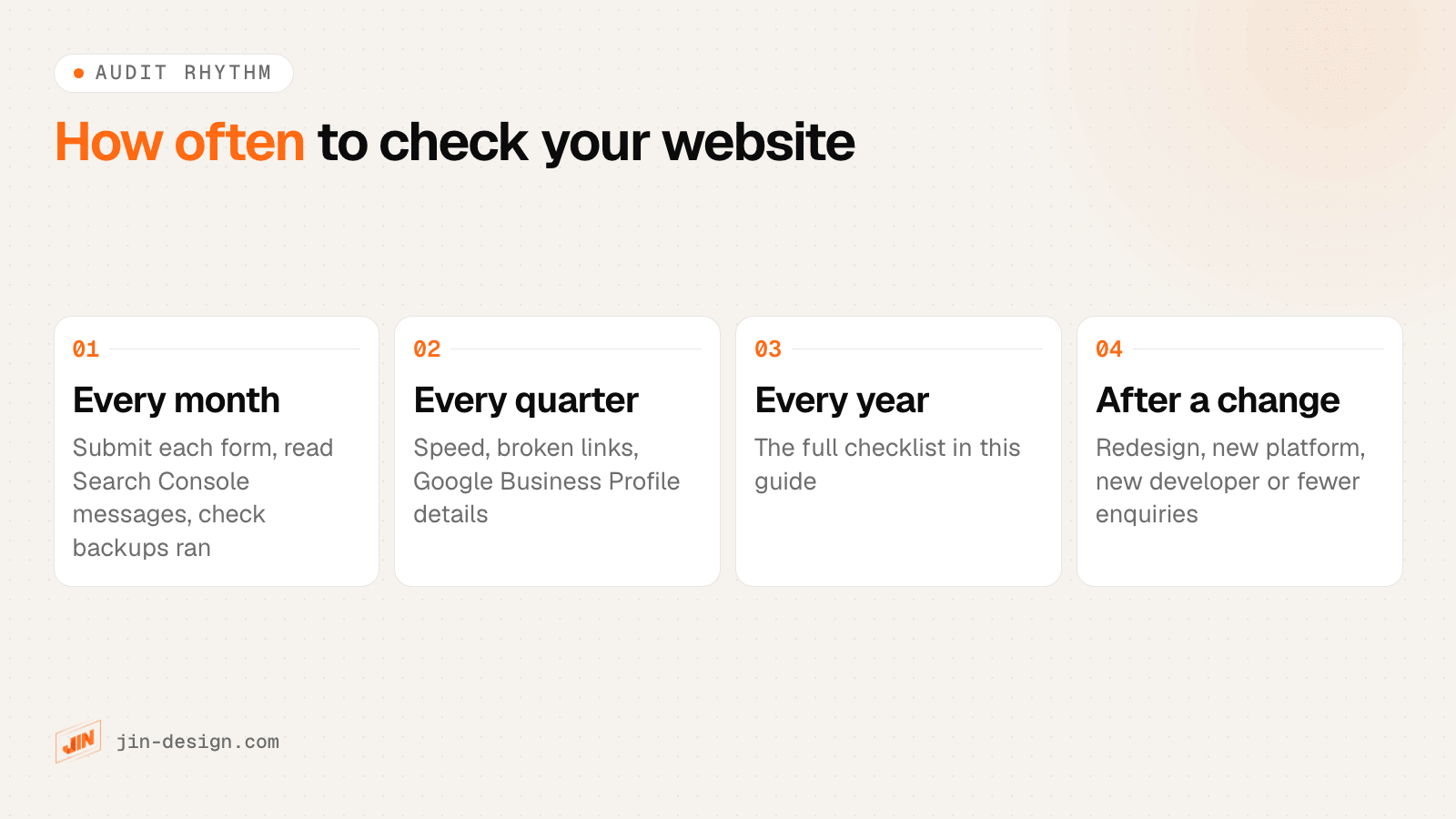
The big changes that call for an audit straight away are a redesign or platform move, a change of developer or agency, new tracking or ad campaigns, and an unexplained drop in traffic or enquiries.
When should you get help with a website audit?
Get help when the checklist turns up problems you cannot interpret, when the fixes need a developer, or when the stakes are high, such as before a redesign or after a sudden drop in enquiries. A professional audit adds a full crawl of every page, hands-on testing and a judgement on what to fix first.
Signs it is time:
- Search Console shows many pages not indexed and the reasons do not make sense.
- Core Web Vitals fail and the diagnostics point to your theme, page builder or scripts.
- Traffic or enquiries dropped and nothing obvious changed.
- You are planning a redesign or a move to a new platform, and need to know which pages and addresses to keep.
- You have taken over a site from a previous developer and do not know what you have inherited.
When you compare providers, ask what the audit covers beyond SEO, how findings are prioritised, whether you receive a fix list a developer can act on, and whether they will go through it with you.
How we audit websites for Singapore businesses
Our website audit covers everything in this checklist and goes further: a crawl of every page compared with your Search Console data, performance testing on your key page types, and hands-on checks of forms, tracking, PDPA notices, accessibility and checkout on a phone. You receive a written report and a fix list ranked by what each issue costs your business, and we go through it with you. Your own developer can work through it, or our team can make the fixes.
If you would rather start on your own, every free tool in this guide is on our Resources page, and the table near the top is the place to begin.
Frequently asked questions
What is a website audit?
A website audit is a structured check of how well a website works for search engines and for visitors. It usually covers indexing and technical SEO, page speed, content, mobile use, forms and tracking, security basics and, in Singapore, PDPA notices at forms. The result is a list of problems ranked by what to fix first.
How do I audit my own website for free?
Start with Google Search Console for indexing and Core Web Vitals, PageSpeed Insights for speed, and your own phone for forms, buttons and checkout. Then use free checkers for your sitemap, redirects, titles and descriptions, structured data and colour contrast. Work through one area at a time and write each problem down with the page address.
How long does a website audit take?
It depends on the size of the site and how deep you go. The owner-level checks in this guide can be done in a sitting for a small brochure site. A professional audit of a large site or online store, with a full crawl, hands-on testing and a written report, takes longer, and the provider should confirm the timeline after seeing the site.
How often should I audit my website?
Do quick checks every month (submit each form, read Search Console messages), a wider check every quarter (speed, broken links, Google Business Profile) and the full checklist once a year. Audit straight away after a redesign, a platform move, a change of developer or an unexplained drop in enquiries.
What is the difference between a website audit and an SEO audit?
An SEO audit looks at why pages are not found or chosen in Google: indexing, technical setup, titles, content and links. A website audit includes that and adds the things that cost enquiries even when rankings are fine, such as broken forms, missing tracking, slow pages, PDPA notices, accessibility and checkout.
Is a free website audit tool score enough?
No. Scores from audit tools are useful for finding issues, but they are not rankings and they do not know which pages bring you business. A site can score well and still have a broken contact form, or score poorly on warnings that make no difference. Read the issues behind the score and sort them by what they cost you.