What a Website Maintenance Plan Should Cover
A website maintenance checklist for Singapore businesses: what a care plan should cover on WordPress, Webflow, Shopify and custom sites, plus the PDPA side.
This is an archived article from 2026, kept for reference. Some details may be out of date. Read our latest articles.
The short answer
- 01
Maintenance is more than updates. It covers tested backups, security, uptime and SSL, speed, SEO hygiene, and checking that forms and tracking still work.
- 02
The platform sets the workload. WordPress needs weekly updates. Webflow and Shopify handle most of the software, but apps, theme feature updates, forms and tracking stay yours. Custom sites need their code packages kept up to date. On every platform, the server itself is your hosting provider's job.
- 03
Put it in writing. A care plan should say what counts as a fix, how fast problems are handled, that security is in scope, and that every login stays in your company's name.
A website maintenance plan should cover the routine work that keeps a business website updated, online and fast, and lowers the risk of problems. That covers software updates, backups you have actually restored, security and uptime monitoring, SSL and domain renewals, speed, SEO hygiene, and regular checks that forms and tracking still work. Because most Singapore business sites collect personal data through forms, it also covers your duty to protect that data under the PDPA.
How much work that is depends on the platform. A WordPress site needs updates every week, while Webflow and Shopify do most of the software for you and leave the rest. This guide explains what the work looks like week by week and month by month on each platform, and what a website maintenance plan should promise in writing. If you are comparing providers, our list of website maintenance companies in Singapore covers who offers what.
What does a website maintenance checklist cover?
Most people picture plugin updates. In practice the work falls into eight areas, and a site can fail in any of them while the others look fine.
| Area | What it covers | What goes wrong without it |
|---|---|---|
| Software | Core, plugins, themes, apps, framework packages | Known security holes stay open |
| Backups | Automatic off-site copies, kept long enough, restored on a test basis | A backup exists but cannot be restored |
| Security | Monitoring, admin access, two-factor login, malware scans | Spam pages or stolen form data |
| Uptime, SSL and domain | Outside monitoring, certificate expiry checks, domain renewals | The website or company email goes offline |
| Speed | Core Web Vitals, image sizes, third-party scripts | Pages slow down a little each month |
| SEO hygiene | Broken links, redirects, sitemap, indexing | Pages drop out of Google unnoticed |
| Tracking | Forms, GA4 key events, call and WhatsApp clicks | Enquiries arrive, or stop, and nobody can tell |
| PDPA | What personal data the site stores, who can see it, breach response | A breach that is slow to assess and report |
Free download
Our website maintenance checklist in Excel lists weekly, monthly, quarterly and yearly tasks with why each matters and how to check it, a platform note for WordPress, Webflow, Shopify and custom sites, status dropdowns and an incident log.
How does website maintenance differ on WordPress, Webflow, Shopify and custom sites?
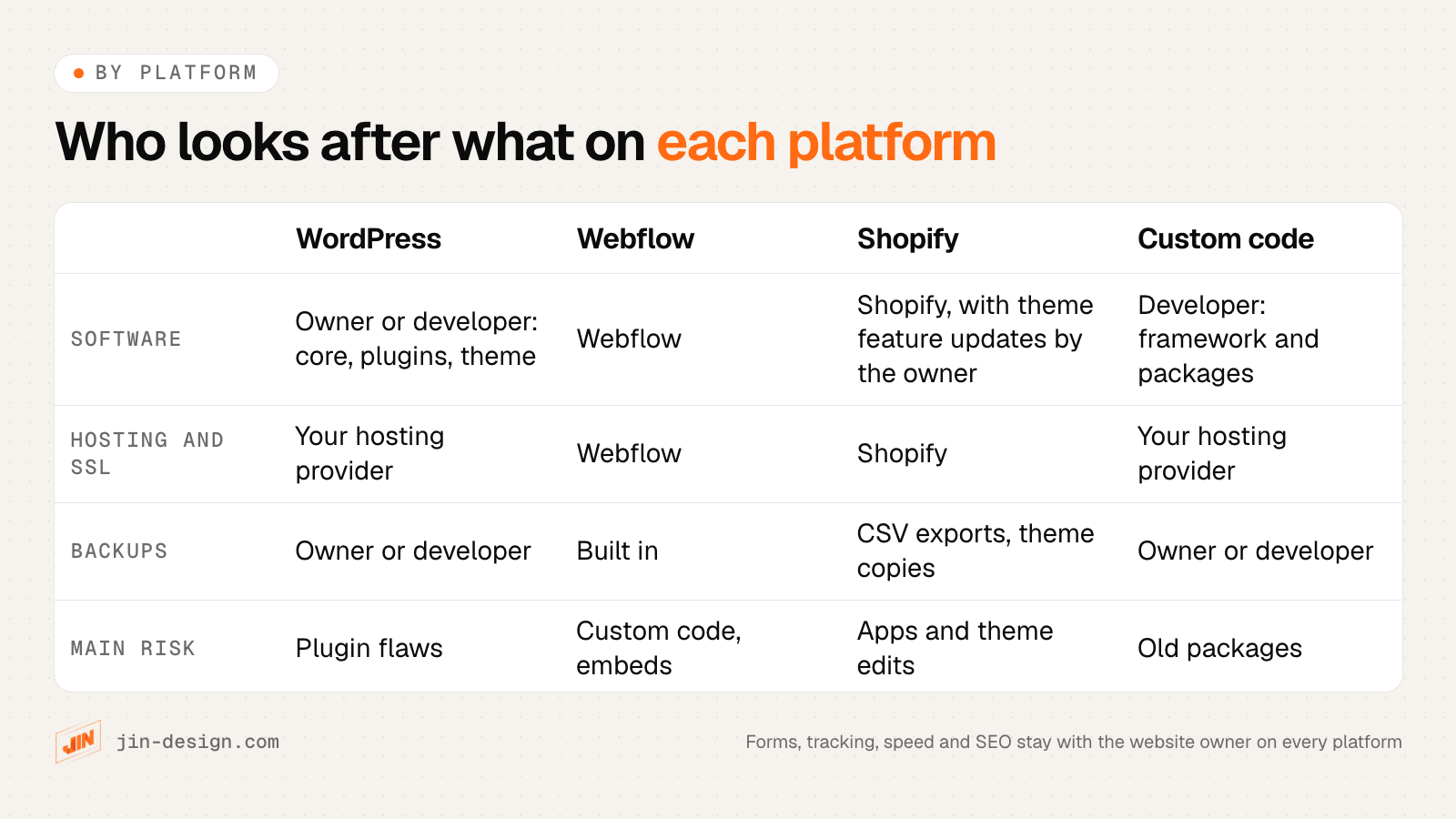
The platform decides who updates the software and who keeps the backups. It does not change who is responsible for forms, tracking, speed and SEO. That part is always yours, or your agency’s.
WordPress maintenance
WordPress applies minor core updates by itself, but plugin and theme auto-updates are opt-in, switched on one plugin or theme at a time. The server matters too. WordPress recommends PHP 8.3 or newer, and the PHP version is set by your hosting provider, so ask them to keep it current.
Plugins are where the risk sits. Patchstack’s State of WordPress Security in 2026 counted 11,334 new vulnerabilities in the WordPress ecosystem in 2025. It found 91% of them in plugins, 9% in themes and 6 in WordPress core. It also reports that 46% had no fix from the developer by the time they were made public.
Core is not immune either. WordPress 7.1.2 fixed a high-severity flaw on 22 September 2026, and Patchstack saw the first exploitation attempts the same day. Singapore’s Cyber Security Agency followed with alert AL-2026-128 on 24 September, advising everyone on an earlier version to patch immediately.
A realistic WordPress routine:
- Weekly: read the changelogs, update on a staging copy, test, then update live. Check key pages and submit the main form.
- Monthly: remove plugins you no longer use, replace any that have stopped receiving updates, review admin users and confirm with your hosting provider that PHP is on a supported version.
- Quarterly: restore a backup to a test location and time how long it takes.
Webflow maintenance
Webflow runs the hosting, SSL and software, so there is nothing to patch. Backups are built in. You can preview and restore them from Site settings, and Webflow’s help page on saving and restoring backups lists what a restore changes, including form spam protection settings. Save a named backup before any big change, and test every form after a restore.
What stays yours on Webflow is the custom code and third-party embeds (chat, booking, reviews, tracking), form notifications and where submissions go, CMS content, speed and SEO.
Shopify maintenance
Shopify runs the platform and checkout, but a few jobs stay with you. The first is theme updates. For themes from the Theme Store, Shopify’s guide to updating themes says bug and security fixes are applied automatically. Feature updates are different. You add them as an “Updated copy of” your theme in Draft themes, and code edits that conflict with the update “could not be included” in that copy. Themes bought outside the Theme Store get no updates from Shopify at all. Plan feature updates like a small project, copy back any custom code, and check every customisation before you publish.
There is also no one-click restore of store data. Shopify’s own guide to duplicating a store relies on CSV exports of products, customers and orders, with the theme downloaded separately. Duplicate the theme before editing it, and export your key data on a schedule.
Apps are the other job. Each one can add scripts to your pages, so review installed apps every quarter and remove the ones nobody uses.
Custom-coded and AI-powered website maintenance
A custom site, including the AI-powered websites we build, has no plugin stack. The server and SSL are looked after by the hosting provider. The website upkeep moves to the framework and its packages, backups and the way new versions are released.
A weekly test enquiry through the live contact form is a simple habit for any custom site. Check that it arrives and is tracked.
Who looks after the server?
On every platform, the server belongs to your hosting provider. They look after the server software, its settings and security, PHP versions and the network. A maintenance plan looks after the website that runs on it. If something on the server needs changing, your hosting provider makes that change.
Why are website backups only useful if you test a restore?
A backup proves something was copied. A restore test proves you can get your site back, and how long it takes. These are the questions to answer before you need them:
- Where is the copy? Off the server, ideally with a different provider. A backup on the same server disappears with the server.
- How far back can you go? Hacks are often found weeks after they happen, so keep enough history to reach a clean version.
- What is included? Files and database on WordPress and custom sites. On Shopify, your CSV exports and theme copies.
- Has anyone restored one? Do it every quarter to a private test location, and write down how long it took.
Keep that test location private. The PDPC’s handbook on common types of data breaches describes an organisation that left a file of personal data on a publicly reachable test server, where search engines indexed it. The same applies to staging sites, so password-protect them, keep them out of search results, and avoid copying real customer data into them where you can.
How do you update plugins, themes and apps safely?
Most updates are harmless. The few that are not tend to break a form, a checkout step or a page layout, and those are exactly the things you notice last. A staging copy lets you find the problem before customers do.
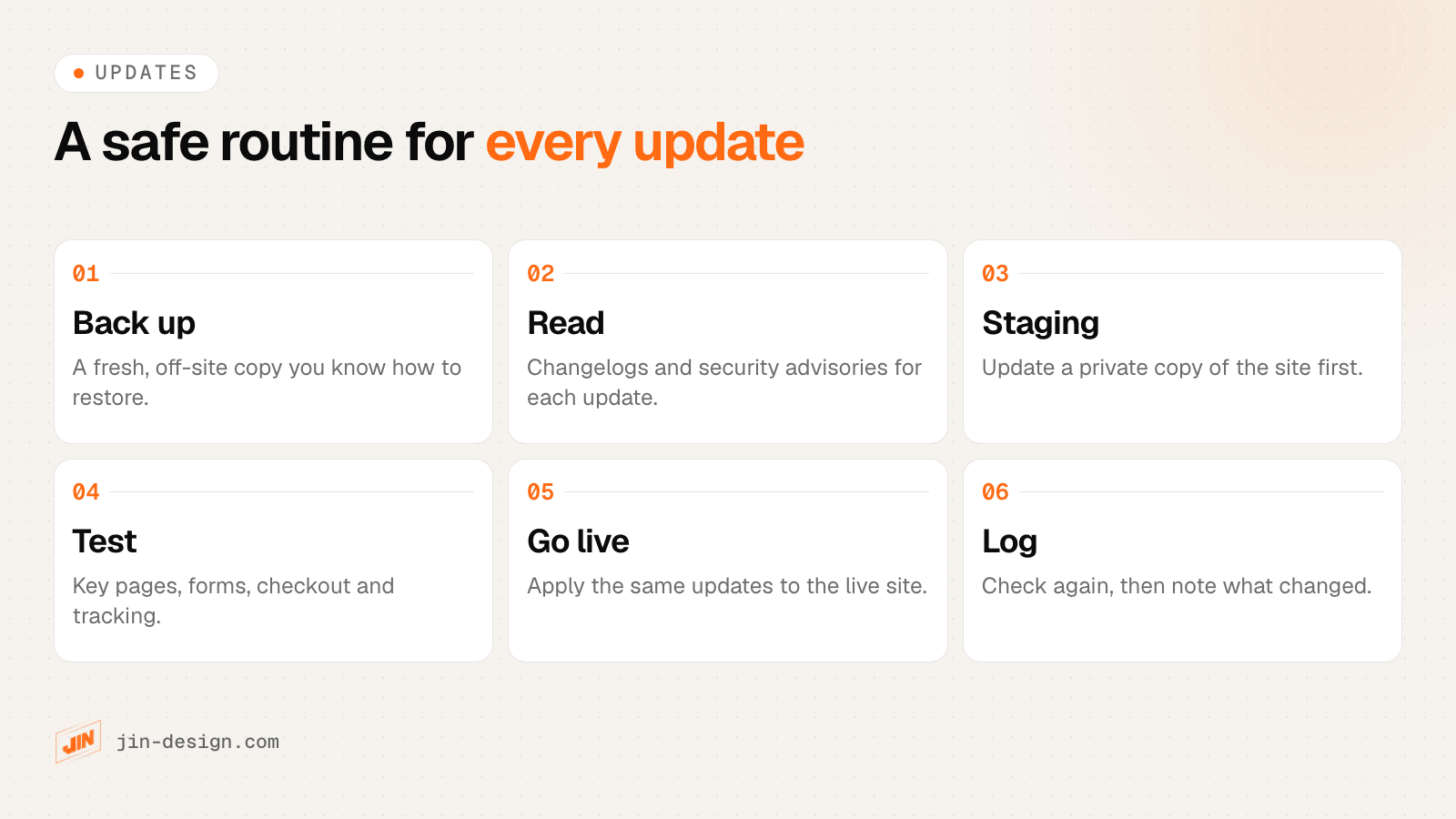
Three rules make this routine work:
- Security fixes for actively exploited flaws go first. When CSA or the plugin developer says a flaw is being exploited, update that day rather than waiting for the weekly slot.
- Test what earns money. The contact or quotation form, checkout, booking and the thank-you page that fires your tracking.
- Replace abandoned plugins. If a plugin has stopped receiving updates, it will not receive the next security fix either.
What does the PDPA mean for website maintenance in Singapore?
If your website has a contact form, a booking system, member accounts or an online store, it holds personal data, and the PDPA expects you to protect it with reasonable security arrangements. That responsibility stays with you when a vendor runs the site.
The PDPC’s handbook on common data breaches includes cases that read like maintenance failures:
- Patching stopped when staff left. One organisation did no patching for 12 months after its IT staff left, and ransomware locked it out of its personal data.
- The contract only covered reported issues. Another kept paying a vendor for maintenance, but the scope only covered fixing problems the organisation reported. Nobody did security maintenance, and personal data became easily accessible from the internet.
- A WordPress plugin was set up wrongly. A third used a plugin for customer registration, assumed the data was private, and did not configure it properly, so the data became publicly accessible.
The handbook’s advice is to give ICT security a named owner and, where a vendor does it, to state the scope of work and responsibilities clearly in the contract.
PDPA breach rules to know (checked October 2026)
- Once you have credible grounds to believe a breach happened, you must assess whether it is notifiable, within 30 calendar days.
- A breach is notifiable if it is likely to cause significant harm to the people affected, or affects 500 or more individuals.
- A notifiable breach must be reported to the PDPC as soon as practicable, and no later than 3 calendar days after you decide it is notifiable.
- A data intermediary that processes personal data for you, such as a vendor handling your form data, is also required to tell you about a breach it detects.
Source: PDPC Guide on Managing and Notifying Data Breaches. Check the current rules and the PDPC's breach reporting page before relying on them.
In practice, PDPA-minded maintenance means a few habits. Know which forms store data and where. Delete old form entries you no longer need. Give every person and vendor their own login with two-factor authentication, and remove access when someone leaves. Keep a log of incidents so that, if something happens, you can show the steps you took.
How do you keep uptime, SSL and the domain from catching you out?
Uptime monitoring should run from outside your server, so it still works when the server is down. It should alert a named person, not a shared inbox nobody reads.
SSL certificates already need more attention than they used to. Under the CA/Browser Forum’s ballot SC-081v3, public SSL certificates issued since 15 March 2026 can last at most 200 days. The limit falls to 100 days on 15 March 2027 and to 47 days on 15 March 2029. A certificate bought once a year and installed by hand no longer works, so confirm your host or platform renews automatically, and keep an expiry alert as a backstop.
Domains need a yearly check too. An expired domain takes your website and your company email down together. For a .sg domain, SGNIC’s VerifiedID@SG scheme requires the administrative contact to verify the registrant’s identity. It covers names registered from 2 May 2013, and older names once the registrant’s details change, and a name that is not verified cannot be renewed. Make sure the registrant is your company and the administrative contact is someone who still works there.
How do you keep website speed and Core Web Vitals healthy over time?
Sites rarely launch slow. They get slower as images are uploaded at full size, tracking tags and chat widgets are added, and plugins pile up. Google’s Core Web Vitals set the bar at a Largest Contentful Paint of 2.5 seconds or less, Interaction to Next Paint of 200 milliseconds or less and Cumulative Layout Shift of 0.1 or less, measured at the 75th percentile of real visits.
The field data behind those numbers covers the previous 28 days, so a slow widget added today shows up gradually. Check Search Console’s Core Web Vitals report every month, and test key pages on a phone straight after adding any new tag, app or plugin.
Third-party scripts are often the culprit. Loading marketing and tracking tags after the page itself has loaded usually helps. If your site needs more than routine care, our speed optimisation work covers it.
Which SEO checks belong in website maintenance?
These are the quiet failures. Nothing looks broken, but pages slowly drop out of search results.
- Broken links. Pages you deleted or renamed, still linked from menus, footers and old posts.
- Redirects. Every changed address needs a permanent redirect. Google advises keeping redirects after a site move generally for at least a year. Our free redirect checker tests a list in one go.
- Sitemap. It should list only live pages at their final addresses. Run the free sitemap checker monthly, and after any redesign.
- Indexing. Look at Search Console’s page indexing report for pages that dropped out, and for a staging “noindex” setting left switched on.
- AI search. Check that your robots.txt still lets the search and AI crawlers you want reach the site. The AI search readiness checker shows this in a few seconds.
For the full technical list, see our technical SEO checklist.
Why does website tracking break without anyone noticing?
Tracking fails silently because the site still looks fine. Common causes, most of them triggered by an update:
- A form plugin update changes the confirmation step, so the thank-you page that fired your GA4 key event never loads.
- A consent banner update blocks tags it used to allow.
- A theme update or restore drops custom code, including tracking snippets.
- Someone changes the WhatsApp or phone button, and the click event no longer matches.
- Form notification emails start landing in spam, so enquiries are stored but nobody reads them.
Once a month, submit every form yourself. Confirm the email arrives, the entry is stored where it should be, and the key event shows up in GA4. While you are in GA4, check the data retention setting. Standard properties can keep event-level data for 2 or 14 months, and it affects explorations and funnel reports. Our tracking and analytics service sets this up properly if it was never done.
What should a website care plan contract cover?
The PDPC case above, where maintenance covered only reported issues, shows why scope matters. Put these points in writing before you sign.
| Clause | What to agree | Why it matters |
|---|---|---|
| Scope | Website updates, security plugin monitoring and backups are included. Server and hosting security stays with the hosting provider | Every task has a clear owner |
| Response and resolution | Separate target times for each, by severity, including whether weekends count | A quick reply is not the same as a fix |
| Fix or new work | Agreed examples of each | Fewer disputes over invoices |
| Backups | Frequency, storage location, retention period and restore testing | Proof the website can be restored |
| Logins and ownership | Domain, hosting, website admin, GA4 and Search Console held in the company’s name, with a named login for the maintenance provider | The company can change provider at any time |
| Breach notice | How quickly the maintenance provider reports a suspected breach | The 30-day PDPA assessment period may already have started |
| Reporting | Contents of the monthly report | A clear record of the work done |
| Exit | Notice period and a handover deadline for files and logins | A clean handover when changing provider |
What counts as a fix and what counts as new work?
The simplest rule is that if something that used to work stops working, it is a fix. If you want the site to do something it never did, it is new work. Agree the grey areas up front.
| Situation | Usually |
|---|---|
| The contact form stopped sending after an update | Fix |
| A page layout broke after a plugin update | Fix |
| An SSL expiry alert was missed | Fix |
| Add a new field or a new form | New work |
| Build a new landing page for a campaign | New work |
| A plugin was abandoned and needs replacing | Agree in advance |
| A hosting change forces a theme or plugin upgrade | Agree in advance |
Our guide to website maintenance companies in Singapore includes a contract and ownership checklist with the handover points in more detail.
What are the signs your website maintenance is failing?
You do not need to read code to spot most of these. Check them on your own site today.
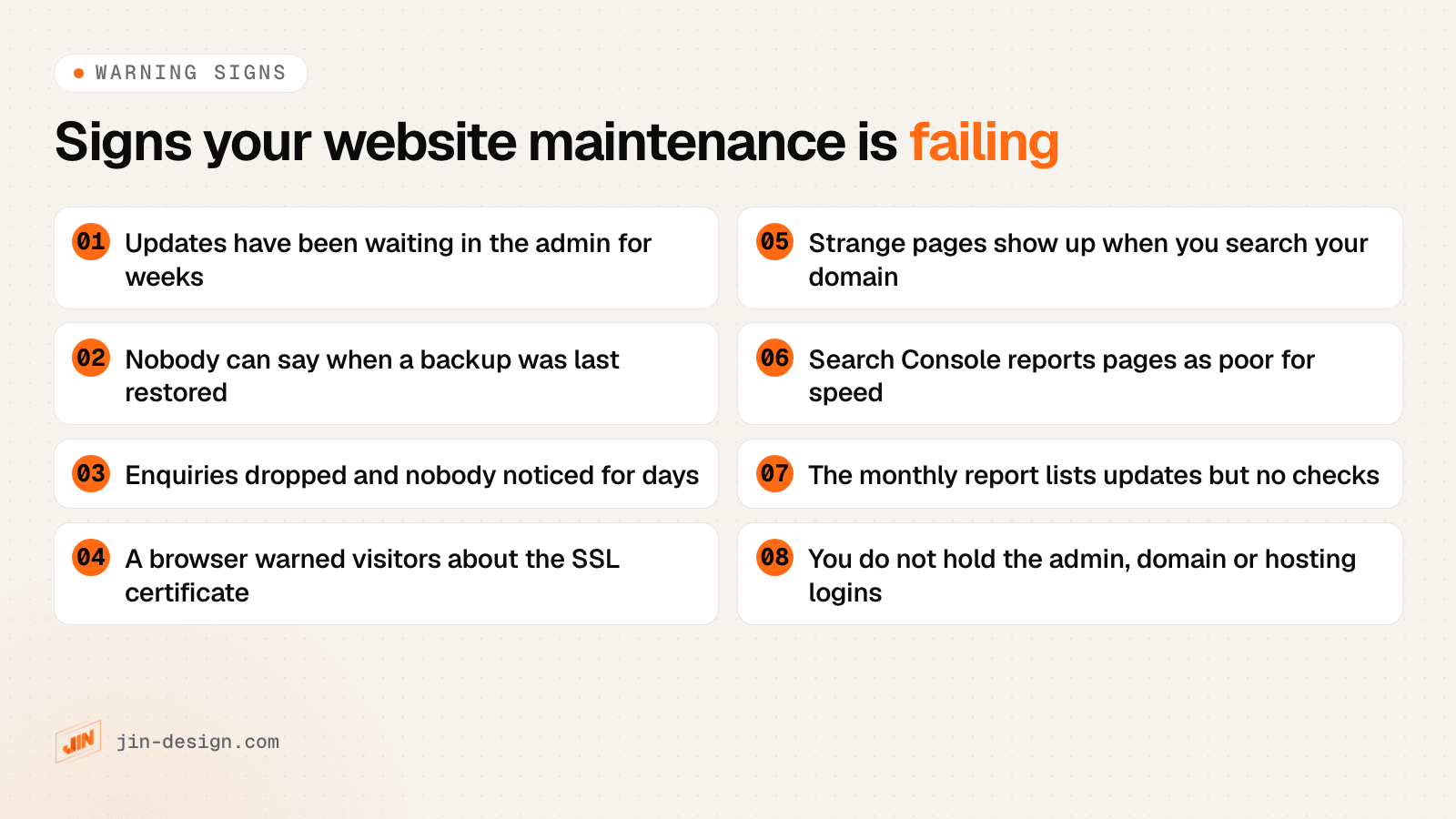
A quick test for strange pages: search Google for site:yourdomain.com.sg and look for pages in languages or topics you never published. Spam pages added by a hack often show up there before anywhere else.
Should you do website maintenance yourself or get a care plan?
Doing it yourself works when the site is simple and someone has a fixed slot for it every week. It stops working when that person is busy, on leave or leaves the company, which is exactly the situation in the PDPC’s 12-month patching case.
| Situation | Suggested approach |
|---|---|
| Small Shopify or Webflow site, few apps or embeds | In-house with the checklist, with a developer for theme feature updates |
| WordPress site with a handful of plugins, low traffic | In-house, if one person owns the weekly slot and has practised a restore |
| WordPress site that brings in most of your enquiries | A care plan with written response times |
| Online store, member accounts or stored customer data | A care plan that puts security, backups and breach notice in scope |
| Custom or AI-powered site | Maintained by the team that knows the code |
| Already hacked once | A security review first, then a care plan |
Two fictional examples show how this plays out.
A coffee roaster on Shopify. A small Singapore roaster sells beans online with a handful of apps. Shopify handles the software and checkout. The owner spends a short session each week placing a test order and checking that order emails arrive, exports products and orders each month, and asks a developer to handle theme feature updates because the theme has custom code. Doing it in-house is a sensible choice here.
A renovation contractor on WordPress. A contractor’s WordPress site brings in most of its leads through a quotation form, with a project gallery and a booking plugin for showroom visits. The form stores names, phone numbers and addresses. Nobody in the office has time for weekly updates, and a broken form would cost leads for days before anyone noticed. This site needs a care plan with security in scope, weekly tested updates, a monthly form and tracking check, and a clear breach notice clause.
Still choosing a platform for a rebuild? Our comparison of WordPress, Webflow and AI-powered websites includes the upkeep each one needs.
Website maintenance for your business
Our website maintenance plans keep WordPress sites updated, backed up and checked every week, including online stores and sites we did not build. Every month you get a plain-English report of what changed. Your hosting stays with your hosting provider, who looks after the server.
If you would rather hand the checklist to a team, see what our website maintenance services cover, or talk to us about your site. If you are not sure what state it is in, a website audit is a good place to start.
Frequently asked questions
What should a website care plan include?
Tested software updates, off-site backups with regular restore tests, security monitoring, uptime and SSL checks, monthly checks of speed, links, forms and tracking, a plain-English report, written response and resolution times, a clear line between fixes and new work, and a handover clause so you keep every login.
What counts as a fix and what counts as new work in a care plan?
If something that used to work stops working, such as a form that no longer sends after an update, it is a fix. If you want the site to do something it never did, such as a new form field or landing page, it is new work. Agree the grey areas in writing, such as replacing an abandoned plugin.
How often should I test restoring a website backup?
Every quarter, and after any big change to hosting or the site. Restore to a private, password-protected location, check that pages and forms work, and write down how long it took. Do not copy real customer data into test sites where you can avoid it.
Does my maintenance provider have to tell me about a data breach?
If the provider processes personal data on your behalf, the PDPC's breach guide says it is required to tell you about a breach it detects. Your own deadlines start from there, so put a time limit for that notice in the contract. Check the current rules on pdpc.gov.sg.
Do Shopify themes update automatically?
Partly. For themes from the Shopify Theme Store, Shopify applies bug and security fixes automatically. Feature updates arrive as an Updated copy of your theme in Draft themes, and code edits that conflict with the update are not included in that copy. Themes from outside the Theme Store get no updates from Shopify.
Can I maintain my website myself?
Yes, if the site is simple, someone on your team has a fixed slot every week, and you have practised a restore. Sites that bring in most of your enquiries, sell online, store customer data or run many plugins usually justify a care plan with written response times.