





Free website maintenance checklist (Excel)
A ready-to-use Excel checklist for looking after a business website. Each task says why it matters, how to check it and which platforms it applies to, with an incident log for anything that breaks.
Free downloadExcel fileNo sign-upBy JIN Design
What is inside
- A Start here tab for your site details, with progress worked out for each checklist
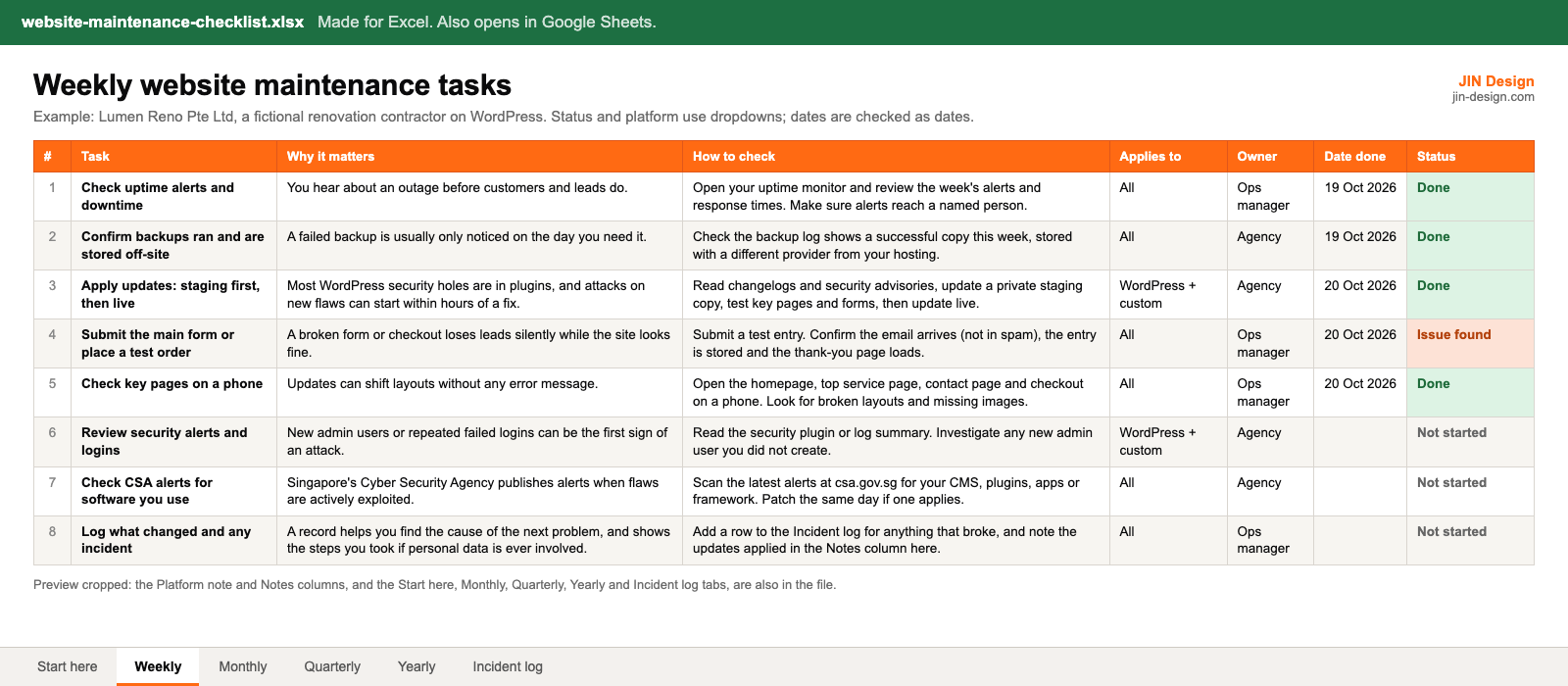
- Weekly, monthly, quarterly and yearly tabs: task, why it matters, how to check, owner, date done and status
- A platform note on each task for WordPress, Webflow, Shopify and custom-coded sites
- Dropdowns for status, platform and severity, with colour coding
- An incident log that separates fixes from new work and prompts the PDPA steps when personal data is involved
- Example rows for a fictional Singapore renovation contractor, ready to replace with your own
Made for Excel. Also opens in Google Sheets. Free to use for your own website and for websites you manage for clients; please do not resell the file.
How to use the website maintenance checklist
- Download the file and open it in Excel or Google Sheets. Start on the Start here tab and fill in your website details and platform.
- Go through each tab and mark any task that does not apply to your platform as Not applicable. The platform note on each row tells you what changes for WordPress, Webflow, Shopify or a custom site.
- Give every task an owner. If an agency maintains the site, agree which rows are theirs and which stay with your team.
- Each time you complete a task, add the date and set the status. Anything marked Issue found goes into the incident log with what happened and how it was fixed.
- At the start of each new period, copy the tab or clear the date and status columns. The Start here tab shows how far along each checklist is.
What should a website maintenance checklist include?
Updates are only one part of keeping a website healthy. A complete checklist covers software updates, backups that have been restored at least once, security and user access, uptime, SSL and domain renewals, speed, SEO hygiene such as broken links, redirects and the sitemap, and regular checks that forms and tracking still work.
Because most business websites collect personal data through forms, it should also cover the PDPA side: knowing what the site stores, deleting entries you no longer need, controlling who can log in and knowing what to do if something goes wrong. Our guide to what a website maintenance plan should cover explains each area and what a care plan should cover.
How often should each website maintenance task be done?
The checklist is split by how often each task needs doing:
- Weekly: uptime alerts, backup checks, updates (staging first), a test of the main form or checkout, key pages on a phone, security alerts and CSA alerts for software you use.
- Monthly: remove unused plugins and apps, review user access, Core Web Vitals, broken links, the sitemap, Search Console, a test of every form and its GA4 key event, old form entries and the monthly report.
- Quarterly: a restore test, a private staging site, third-party scripts, content, redirects, crawler access, login ownership, accessibility and GA4 settings.
- Yearly: domain and SSL renewals, hosting, licences, theme and version upgrades, the care plan contract, the privacy policy and your breach response plan.
Security fixes for flaws that are being actively exploited should not wait for the weekly slot. Apply them the same day.
How do you adapt the checklist for WordPress, Webflow, Shopify or a custom site?
WordPress and custom-coded sites use nearly every row, because you are responsible for the software and the backups. On Webflow and Shopify, the platform updates the software and runs the hosting and SSL, so mark those rows Not applicable and focus on the rest.
Two platform tasks are easy to miss. For Theme Store themes, Shopify applies bug and security fixes automatically, but feature updates arrive as an "Updated copy of" your theme in Draft themes, and code edits that conflict with the update are not included in that copy. Plan those updates on the draft and copy back any custom code. Themes bought outside the Theme Store get no updates from Shopify. Shopify also has no one-click restore of store data, so the monthly tab includes CSV exports of products, customers and orders. On Webflow, check forms after restoring a backup, and keep the staging subdomain out of search results.
How does the incident log help with the PDPA?
When something breaks, the log records when it was found, who found it, whether personal data was involved, what was done and how long the fix took. If you mark personal data as involved, it shows the next step.
Under the PDPA, once you have credible grounds to believe a data breach happened, you are expected to assess within 30 calendar days whether it is notifiable. A notifiable breach must be reported to the PDPC no later than 3 calendar days after you decide it is notifiable. A written record of the steps you took helps show that the assessment was done properly. Check the current rules in the PDPC's guide on managing and notifying data breaches.
The log also has a column for fix or new work. If something that used to work stops working, it is a fix. If you want the site to do something new, it is new work. Keeping that line clear avoids disagreements with whoever maintains your site.
Website maintenance checklist questions
Is the website maintenance checklist free?
Yes. Download it with no sign-up. It is free to use for your own website and for websites you manage for clients. Please do not resell the file.
Does it work in Google Sheets?
It is made for Excel. It also opens in Google Sheets, because the formulas are standard ones such as COUNTIF and IF. Check the dropdowns and colours after converting, as other spreadsheet apps can show them differently.
Should I keep passwords in the checklist?
No. Note where logins are kept, such as your company password manager, but never store passwords in a spreadsheet.
Can I use it if an agency maintains my website?
Yes. Use the owner column to split the tasks, and compare the checklist with your care plan to see which tasks the agency covers and which stay with your team.
More free templates
All templates →Start with a free consultation
Tell us about your website and we will tell you what we would change first.