WooCommerce vs Shopify for Singapore Online Stores
WooCommerce vs Shopify for a Singapore store: fees in SGD from Shopify's own pricing page, how PayNow gets in, GST settings, delivery, PDPA and lock-in.
The short answer
- 01
Shopify suits teams that want a hosted store; WooCommerce suits stores that want control. Shopify runs the platform for a monthly fee. WooCommerce is free software on hosting you choose, with you or your developer looking after updates.
- 02
PayNow changes the Shopify maths. PayNow is not among the Shopify Payments methods for Singapore, so it comes through a third-party provider, and Shopify adds 2% (Basic), 1% (Grow) or 0.6% (Advanced) on those payments. WooCommerce adds no platform fee to any gateway.
- 03
GST, delivery and PDPA work on both. Each platform can show GST-inclusive prices, connect local couriers and ask for marketing consent. The difference is how much is built in and how much comes from apps, plugins or your developer.
For most Singapore online stores, the choice comes down to who runs the platform. Shopify is a hosted platform on a monthly plan that looks after hosting, security and checkout for you. WooCommerce is free, open-source software that turns a WordPress site into a store, on hosting you choose, with you or your developer responsible for updates.
The Singapore details shift the balance. PayNow reaches Shopify only through a third-party provider, which adds a Shopify fee of up to 2% on those payments, while WooCommerce adds no platform fee to any gateway. This guide compares fees in SGD from Shopify’s own pricing page, PayNow, GST settings, local delivery, PDPA consent and what happens if you leave. We build stores as part of our ecommerce website design service and WooCommerce development work, and we recommend Shopify when it fits a client better.
Fees and features checked on 18 October 2026 on Shopify's Singapore pricing page and help centre, and on WooCommerce's own documentation. Platforms change their pricing, so confirm on the official pages before you sign up.
What is the difference between WooCommerce and Shopify for a Singapore store?
Shopify is a complete hosted service: you pay a monthly plan and Shopify runs the software, servers and checkout. WooCommerce is a plugin you install on your own WordPress site, so you choose the hosting, own the software and database, and can change almost anything.
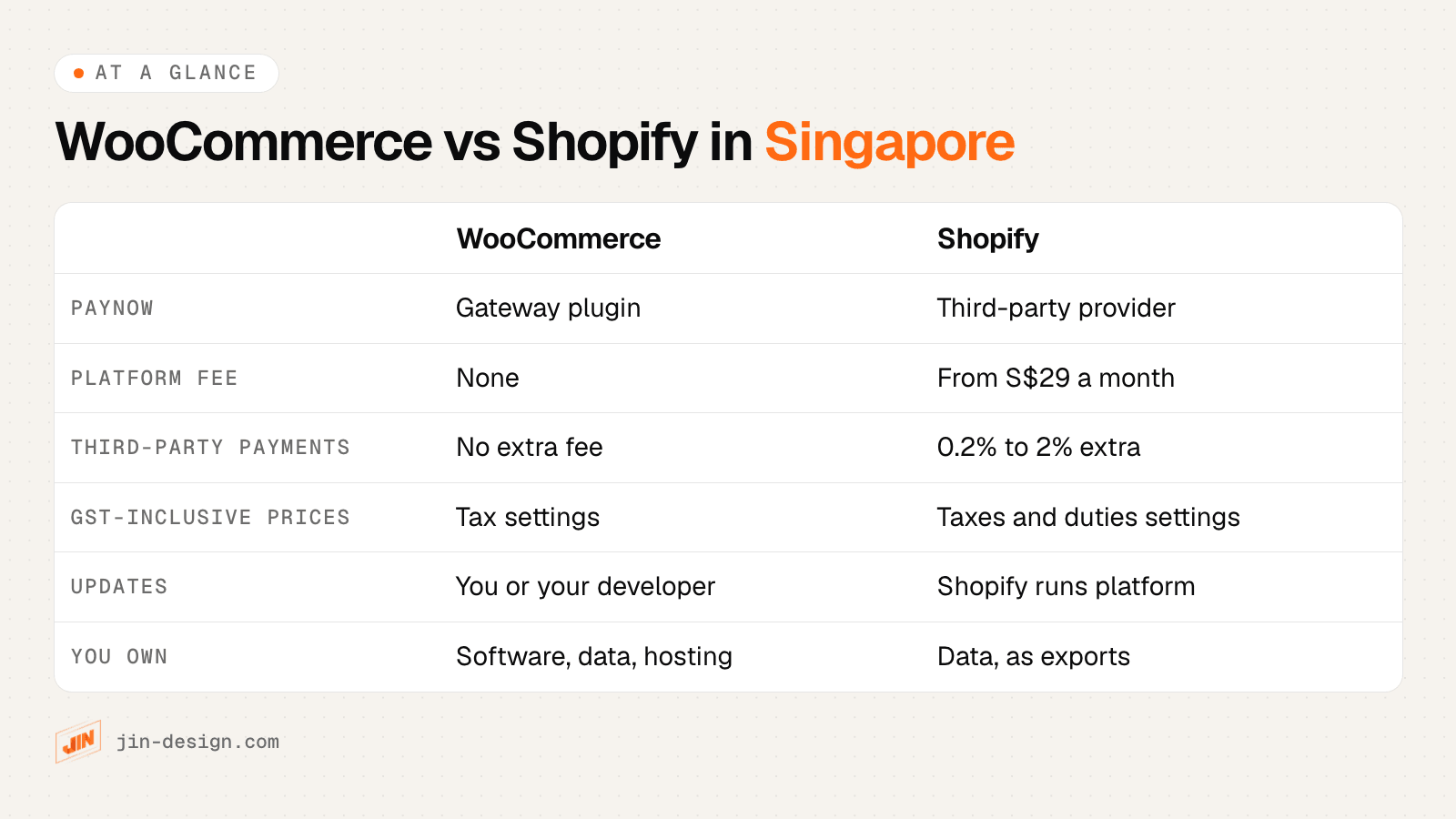
| WooCommerce | Shopify | |
|---|---|---|
| What you pay for | Hosting, any paid extensions and themes, payment gateway fees, and updates by you or a developer | A monthly plan, paid apps and theme, card fees, and an extra fee on third-party payments |
| PayNow | Through a payment gateway plugin that supports it | Through a third-party payment provider |
| GST-inclusive prices | WooCommerce tax settings | Shopify’s Taxes and duties settings |
| Local couriers | Courier plugins, APIs or a shipping service | Courier apps from the Shopify App Store, or a shipping service |
| Shopee and Lazada | Third-party connectors or a custom integration | Third-party apps |
| Changes and custom rules | Almost anything, with extensions or custom code | Within what the platform, apps and theme allow |
| Updates and security | You or your developer update WordPress, WooCommerce, plugins and theme | Shopify runs the platform; you review apps and theme updates |
| What you own | The software, database and hosting account | Your data, exported as files; the store runs only on Shopify |
A practical way to read the table: Shopify takes work off your hands in exchange for fees and limits, while WooCommerce gives you control in exchange for upkeep. Neither is better for every store. Our guide to planning an online store in Singapore also covers custom builds and trade pricing.
How much do Shopify and WooCommerce cost in Singapore?
Shopify’s Singapore plans start at S$29 a month paid yearly (S$39 paid monthly), and WooCommerce itself is free. The real comparison is the running cost over two or three years, including payment fees, apps or extensions, hosting and upkeep.
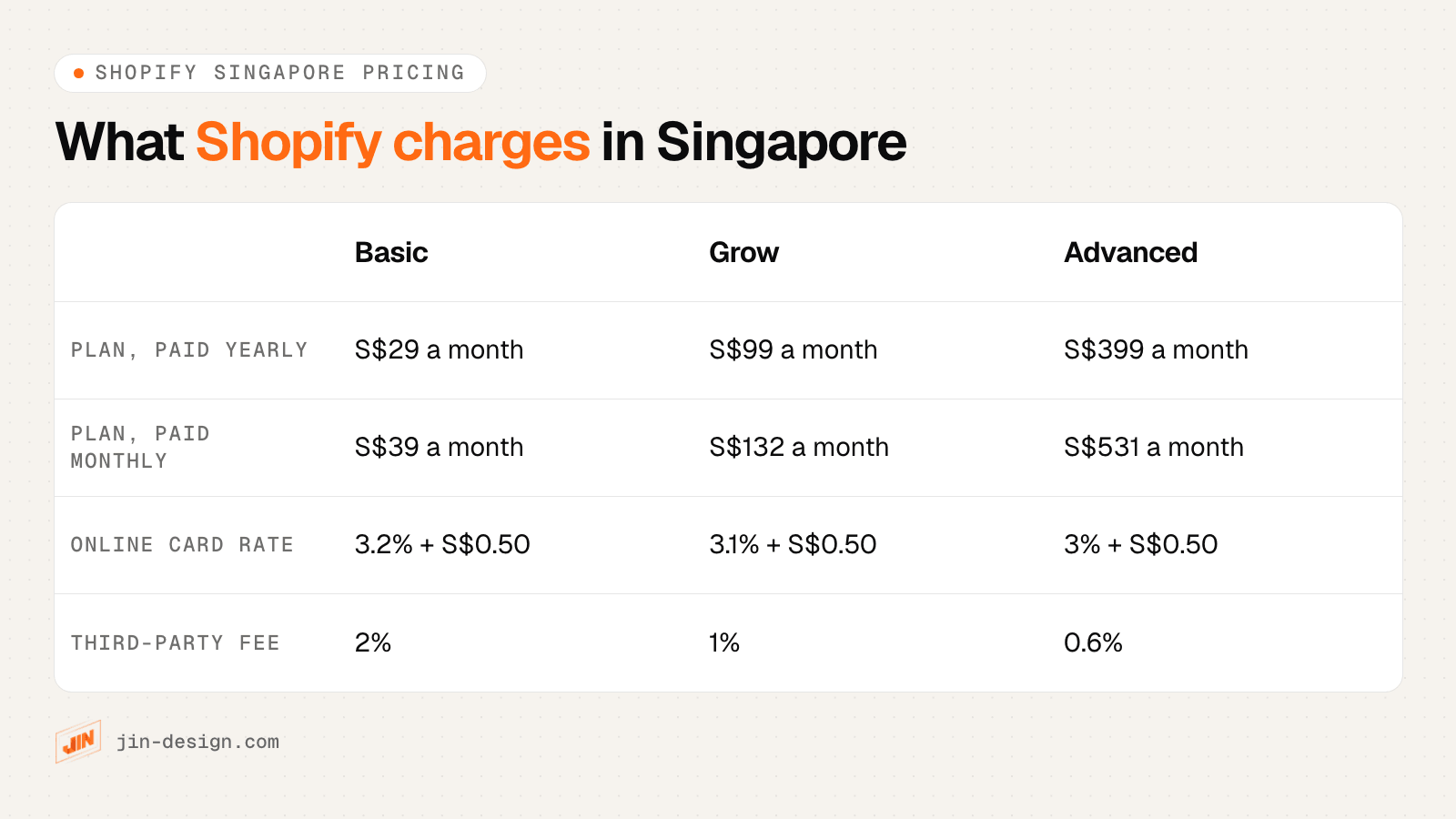
Shopify fees in Singapore
| Shopify plan | Paid yearly | Paid monthly | Online card rate (Shopify Payments) | Third-party transaction fee |
|---|---|---|---|---|
| Basic | S$29 a month | S$39 a month | 3.2% + S$0.50 | 2% |
| Grow | S$99 a month | S$132 a month | 3.1% + S$0.50 | 1% |
| Advanced | S$399 a month | S$531 a month | 3% + S$0.50 | 0.6% |
| Plus | From US$2,300 a month | 2.9% + S$0.50 | 0.2% |
Source: Shopify Singapore pricing, checked 18 October 2026. Online Amex and international cards cost more on every plan (3.6% + S$0.50 on Basic). Paid themes and apps are extra.
WooCommerce costs in Singapore
WooCommerce has no monthly subscription. You pay for:
- Hosting. WooCommerce’s own pricing page estimates $25 to $350 a month for most stores, without naming a currency. A store needs managed WordPress hosting with backups and enough capacity for sales peaks; our WordPress hosting comparison covers what to look for.
- Paid extensions. The same page puts extensions at $29 to $299 a year each. Many stores need only a few, such as subscriptions, bundles or advanced shipping rules.
- Payment fees. Set by your gateway. For reference, WooPayments lists 3.4% + $0.50 per card payment for Singapore accounts in its fee documentation, plus 1.5% for international cards. WooCommerce adds no fee of its own on top of any gateway.
- Upkeep. Tested updates of WordPress, WooCommerce, plugins and theme, backups and security plugin monitoring, by you or a maintenance plan.
The design and build itself costs money on either platform. Our guide to website cost in Singapore shows what moves the price of an online store.
How does PayNow work on Shopify and WooCommerce?
On both platforms, PayNow comes from a payment provider, not from the platform itself. The difference is the fee: Shopify adds its third-party transaction fee to payments through a provider other than Shopify Payments, and WooCommerce adds nothing.
- Shopify: PayNow is not among the Shopify Payments methods for Singapore, so you add a third-party provider that offers it. Shopify says its third-party transaction fees apply to those payments: 2% on Basic, 1% on Grow and 0.6% on Advanced, on top of the provider’s own fee.
- WooCommerce: You install the gateway’s WooCommerce plugin. Check that the specific plugin lists PayNow, because a gateway can offer PayNow on its own checkout without supporting it in every plugin. The checkout then shows a QR code for each order, and the order is marked paid when the customer approves the payment in their banking app.
Most Singapore stores we build offer PayNow alongside cards. The share of your sales paid by PayNow decides how much Shopify’s third-party fee costs you, which is why it is the first question on our checklist below. Our list of payment gateways in Singapore shows which providers list PayNow and which store plugins each one offers.
Which costs less for a typical Singapore store? A worked example
For a fictional store selling S$20,000 a month in 400 orders, with 40% of sales paid by PayNow, Shopify’s Grow plan works out slightly cheaper than Basic, because the lower third-party fee more than covers the higher plan price.
The example assumes every card is a local card on Shopify Payments, and Shopify plans paid yearly. Figures come from Shopify’s Singapore pricing page.
| Monthly cost paid to Shopify | Basic | Grow |
|---|---|---|
| Plan (paid yearly) | S$29 | S$99 |
| Cards through Shopify Payments: S$12,000 in 240 orders | 3.2% + S$0.50 = S$504 | 3.1% + S$0.50 = S$492 |
| Shopify fee on S$8,000 of PayNow through a third-party provider | 2% = S$160 | 1% = S$80 |
| Total paid to Shopify | S$693 | S$671 |
On top of both totals come the PayNow provider’s own fee, paid apps and the theme. On WooCommerce, the same store pays no plan fee and no third-party fee, but pays its gateway’s card and PayNow fees, hosting, any paid extensions and upkeep.
What to take from it:
- Run the numbers with your own PayNow share. The higher it is, the more the third-party fee matters, and the earlier a higher Shopify plan pays for itself.
- Compare over three years, not one month. Add apps, extensions, hosting and maintenance for 36 months to every quote you receive.
- Fees are not the only cost. A WooCommerce store needs someone to test updates; a Shopify store can need paid apps for features WooCommerce extensions or custom code would cover.
How do you set up 9% GST on Shopify and WooCommerce?
Only GST-registered businesses charge GST. If you are registered, IRAS requires prices shown to the public, including on websites, to include GST, so set either platform to enter and display prices inclusive of the 9% rate.
GST settings on each platform (checked 18 October 2026)
- WooCommerce. Under WooCommerce settings, turn on "Enable tax rates and calculations", choose "Yes, I will enter prices inclusive of tax", add a standard rate of 9 for country code SG, and set prices to display including tax in the shop and during cart and checkout. Core WooCommerce does not set rates for you.
- Shopify. In Settings, under Taxes and duties, turn on including tax in product prices. Unless that setting is on, Shopify adds tax at checkout on top of the listed price, so check it before launch (see Shopify's help page on including taxes in product prices). Filing GST with IRAS stays your job on either platform.
- Both. Check that the product page, cart, checkout, order email and invoice all show the same GST-inclusive total, and that exported orders shipped overseas use a separate zero-rated tax rule with the export documents IRAS requires.
Sources: WooCommerce, setting up taxes; Shopify, Singapore taxes; IRAS, displaying and quoting prices. This is a summary, not tax advice.
GST registration becomes compulsory when taxable turnover exceeds S$1 million in a calendar year, or is expected to in the next 12 months, according to IRAS. IRAS also treats “no GST” promotions as misleading, because a discount equal to the GST amount still leaves GST in the price.
How do Shopify and WooCommerce handle local delivery in Singapore?
Both can offer courier delivery, self-collection, delivery slots and overseas shipping. Shopify connects couriers mainly through apps, while WooCommerce uses courier plugins, a courier’s API or a shipping service that books several couriers.
- Check what your courier offers. Some Singapore couriers have their own Shopify app; Ninja Van, for example, publishes a Shopify integration guide. Others offer a WooCommerce plugin or an API. Ask before you choose the platform if one courier matters to you.
- Ask for Singapore addresses the way they are written. Separate fields for block or house number, street, unit number (such as #05-123) and the 6-digit postal code make labels and deliveries easier on both platforms.
- Show delivery charges before checkout. In the Baymard Institute’s survey of US online shoppers, extra costs such as shipping were the most common reason for leaving a checkout, and the same applies on either platform.
Which works better with Shopee, Lazada and a physical shop?
Both platforms connect to Shopee and Lazada through third-party connectors, and to point-of-sale systems through apps or integrations. The platform matters less than how the connector handles stock.
Before launch, agree which system holds the stock count, how often the connector syncs, and what happens when an item sells out on one channel while an order arrives on another. Some connectors rely on the platform to notify them of each change, so ask what happens when a notification fails or is delayed. Shopify’s built-in point of sale is an advantage if you also run a shop counter and want one system for both. Our guide to e-commerce platforms in Asia covers the marketplaces themselves.
What do PDPA rules mean for Shopify and WooCommerce checkouts?
Under the PDPA, you cannot make marketing consent a condition of buying, so both checkouts should ask for it with a separate checkbox that customers tick themselves. How you set that up differs by platform.
- Shopify: Marketing consent sits under the checkout settings. Shopify lets merchants pre-select the consent checkbox by region; for Singapore customers, we recommend leaving it unticked, so consent is an action the customer takes.
- WooCommerce: Core WooCommerce has no marketing checkbox; it usually comes from your email marketing plugin, which you configure to be unticked and to record when consent was given.
- Both: If customer data is stored or processed outside Singapore, the PDPA’s transfer limitation obligation applies to you as the business. Shopify’s privacy policy explains where it processes store data; on WooCommerce, the data sits with the hosting you choose.
Our guide to PDPA for websites in Singapore covers consent wording, privacy policies and data breach rules in full.
Shopify or WooCommerce: which is better for your Singapore store?
Choose Shopify if you want a hosted store your team can run without a developer, sell mainly to consumers and accept the monthly fees and app costs. Choose WooCommerce if you want full control, custom pricing or product rules, a content-heavy site, or ownership of the software and data, and have someone to keep it updated.
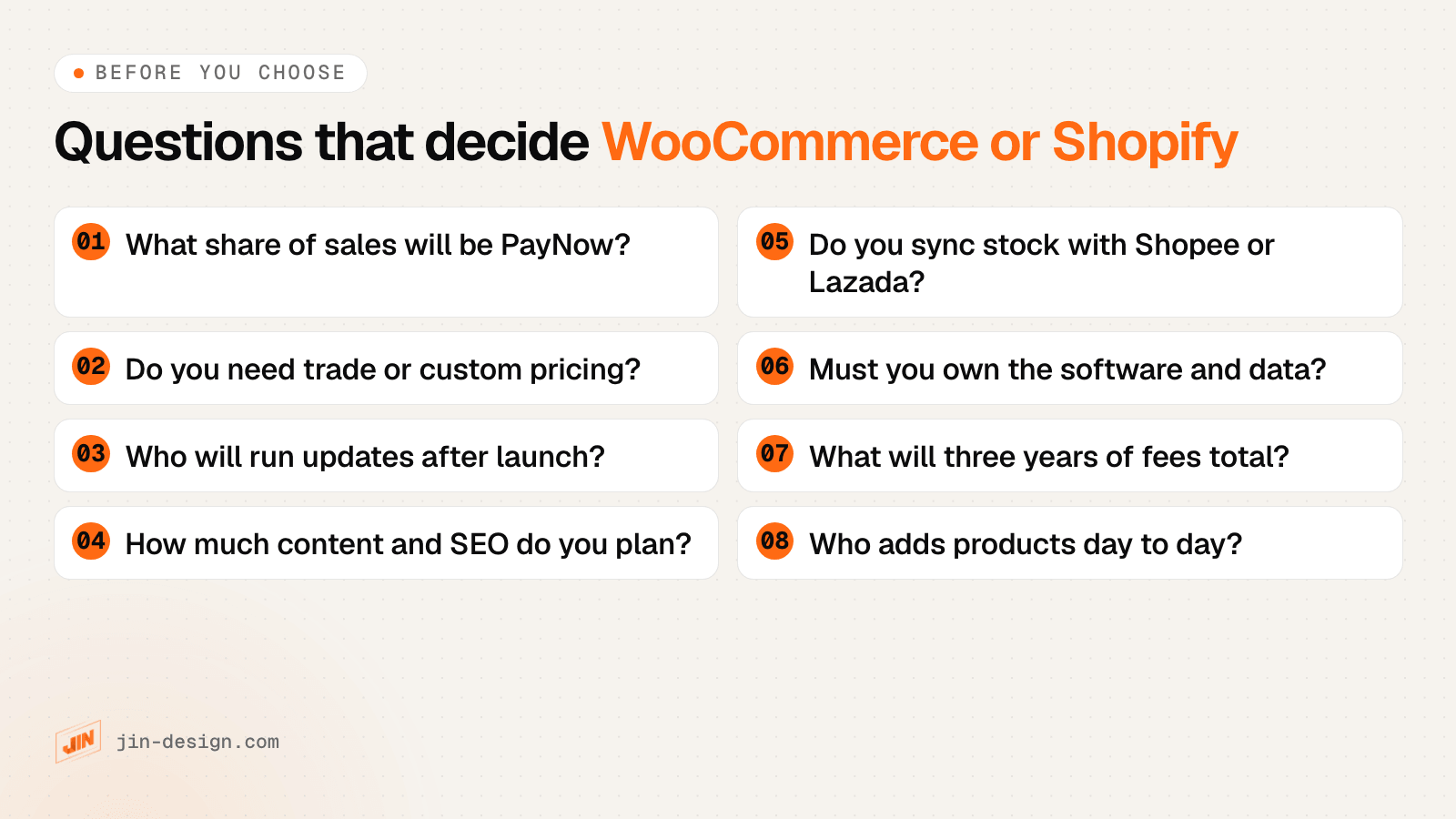
| Your situation | Usually points to |
|---|---|
| A small team selling to consumers, no developer on hand | Shopify |
| A high share of PayNow payments on a lower Shopify plan | Worth pricing WooCommerce, or a higher Shopify plan |
| Trade customers with their own prices, or unusual product rules | WooCommerce, or Shopify Plus if the budget allows |
| A blog, guides or many content pages alongside the store | WooCommerce, as it runs on WordPress |
| A shop counter and an online store on one system | Shopify, with its point of sale |
| A need to own the software, database and hosting | WooCommerce |
| Staff without technical skills adding products every day | Either, after a short handover; Shopify’s admin needs less setting up |
Whichever you choose, a move later is possible but costs time. Products, customers and orders export from either platform, but the design is rebuilt and every old URL needs a redirect to keep search rankings. If grants are part of your budget, our guide to website and AI grants in Singapore explains what the EDGE grant does and does not cover for an online shop.
How we help Singapore businesses choose and build their store
We design and build online stores on WooCommerce, with PayNow through a supporting payment gateway, GST-inclusive pricing, Singapore address fields, delivery options and GA4 tracking tested before launch. If Shopify suits your catalogue and team better, we will tell you so at the start.
See our WooCommerce development and ecommerce website design pages, or talk to us about your store.
Frequently asked questions
Is WooCommerce cheaper than Shopify in Singapore?
Not always. WooCommerce has no platform fee, but you pay for hosting, paid extensions and someone to keep it updated. Shopify's Singapore plans start at S$29 a month paid yearly, plus card fees and an extra fee on third-party payments such as PayNow. Add up three years of every cost for your own sales mix before deciding.
Does Shopify support PayNow in Singapore?
Yes, through a third-party payment provider. PayNow is not among the Shopify Payments methods for Singapore, so Shopify's third-party transaction fee of 2% on Basic, 1% on Grow or 0.6% on Advanced applies to those payments, on top of the provider's own fee.
Can WooCommerce accept PayNow?
Yes, through a payment gateway whose WooCommerce plugin supports PayNow. Check the plugin itself lists PayNow before signing up, because a gateway can offer PayNow on its own checkout without supporting it in every plugin.
Do I need to charge GST on Shopify or WooCommerce?
Only if your business is GST-registered. If it is, IRAS requires prices shown to the public, including on websites, to include GST, currently 9%. Both platforms have a setting to enter and show prices inclusive of tax. A business that is not GST-registered must not charge GST.
Can I move from Shopify to WooCommerce later?
Yes. Products, customers and orders can be exported from Shopify and imported into WooCommerce, but the design is rebuilt and old URLs need redirects to keep search rankings. Moving the other way works the same way. Plan the move for a quiet sales period.
Which is better for selling on Shopee and Lazada too?
Both connect to Shopee and Lazada through third-party connectors. Decide which system holds the stock count, ask the connector how often it syncs and what happens when a sync fails, and test an item selling out on one channel before you go live.