





Free online store launch checklist (Excel)
A ready-to-use Excel checklist for launching an online store in Singapore. It covers setup, the catalogue, test orders including PayNow and refunds, GA4 tracking, launch day and the first 30 days, with a platform note on each task for Shopify, WooCommerce or a custom build.
Free downloadExcel fileNo sign-upBy JIN Design
What is inside
- A Start here tab for your store details and launch date, with progress worked out for every tab
- Setup tasks for legal, payments, delivery and tax, including PayNow, GST settings and marketing consent
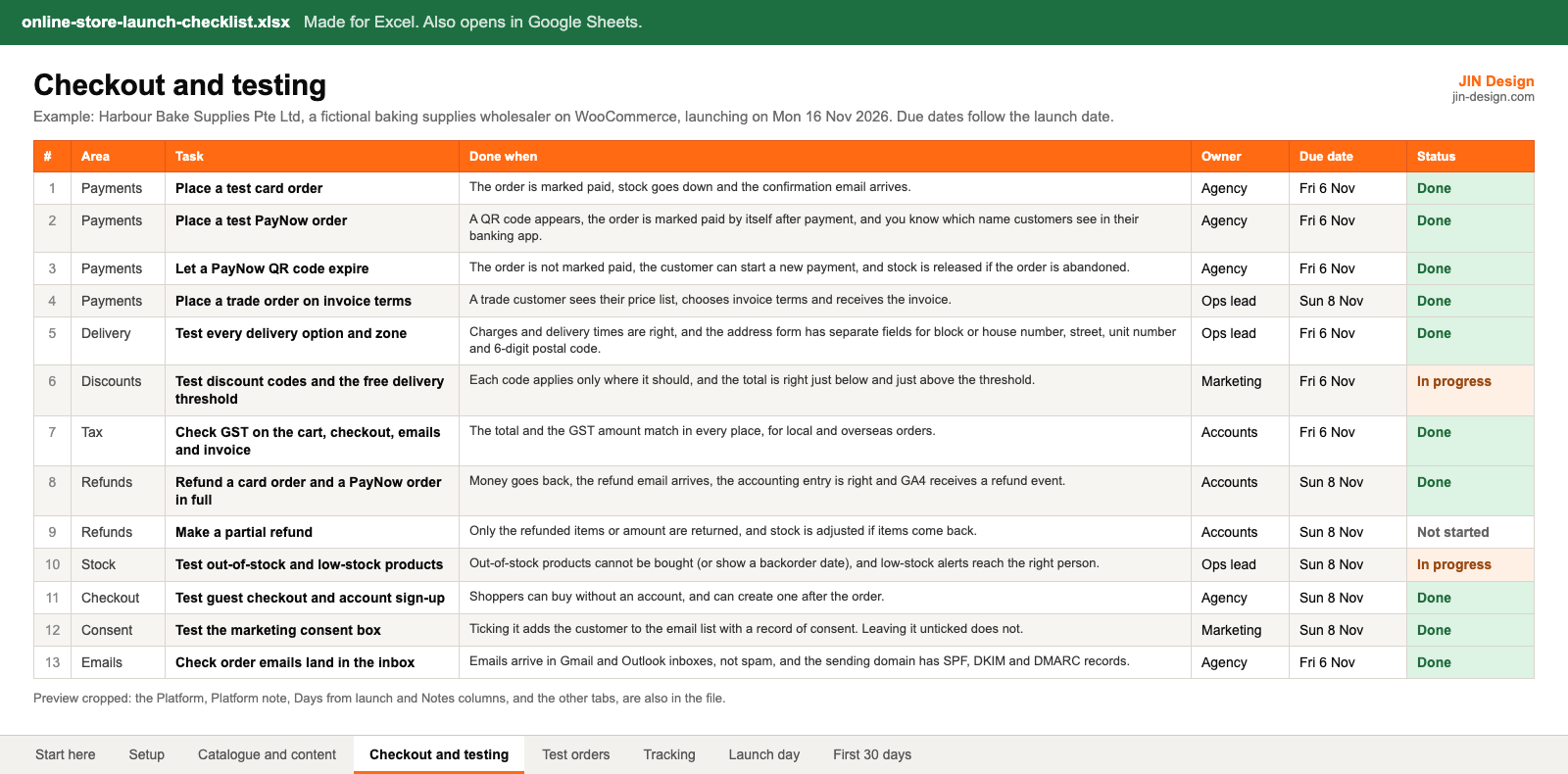
- Catalogue and content, Checkout and testing, Tracking, Launch day and First 30 days tabs
- A platform note on tasks that differ on Shopify, WooCommerce or a custom build
- Due dates that move when you change the launch date, plus owner, status dropdowns and notes
- A test order log that flags when the charged total does not match the expected total
- Example rows for a fictional Singapore baking supplies wholesaler, ready to replace with your own
Made for Excel. Also opens in Google Sheets. Free to use for your own website and for websites you manage for clients; please do not resell the file.
How to use the online store launch checklist
- Download the file and open it in Excel or Google Sheets. On the Start here tab, enter your store details and your launch date.
- Go through each tab and mark tasks that do not apply to your store as Not applicable. The platform note tells you what changes on Shopify, WooCommerce or a custom build.
- Give every task an owner. If an agency builds the store, agree which rows are theirs and which stay with your team. Change Days from launch where a task needs more time.
- Place your test orders and log each one on the Test orders tab: every payment method including PayNow, every delivery option, a discount code and at least one refund.
- After launch, work through the First 30 days tab and compare orders in your store admin with GA4 every week.
What should an online store launch checklist include?
A store launch is a switch from test payments to live ones, so the checklist covers everything a customer touches and everything that has to be true behind it. That means your policies and privacy notice, payment methods, delivery options and charges, tax settings, the catalogue and its pages, test orders and refunds, order emails, GA4 and ad tracking, the launch day switch-over and the checks in the weeks after.
Singapore adds a few items that generic checklists miss: PayNow at checkout, GST-inclusive prices if you are GST-registered, a separate marketing consent box under the PDPA, and Singapore address fields with unit numbers and 6-digit postal codes. Our guide on how to plan an online store in Singapore explains each decision before you get to the checklist.
Which test orders should you place before an online store launches?
Test every way a customer can pay, receive and return an order. At a minimum:
- A card order and a PayNow order, checking the order is marked paid by itself and the confirmation email arrives.
- A PayNow QR code left to expire, so you know the order is not marked paid and stock is released. On Stripe, for example, PayNow QR codes are valid for 1 hour, according to Stripe's PayNow documentation.
- Every delivery option, including self-collection, and an order just above and just below any free delivery threshold.
- A discount code and, if you sell to businesses, a trade order on their price list.
- A full refund and a partial refund, checking the money, the email, the stock, the accounting entry and the GA4 refund event.
The Test orders tab works out whether the charged total matches the total you expected, and counts passes and fails on the Start here tab.
How do you check GA4 ecommerce tracking before launch?
Open GA4 DebugView and place a test order. You should see the recommended ecommerce events from Google's ecommerce guide in order, ending with purchase, which should carry the store's order number as transaction_id, the order value and the currency SGD.
Check PayNow separately. The customer pays in their banking app, and if they never return to the browser tab, a purchase event that only fires on the thank-you page is lost. Place a PayNow test order, close the tab after paying and check it still appears in GA4. If it does not, send the purchase from the server when the payment gateway confirms the payment. After launch, compare orders in your store admin with GA4 every week for the first month.
How do you adapt the checklist for Shopify, WooCommerce or a custom store?
Most tasks apply to every platform, and the platform note says what changes. On Shopify, PayNow is not among the Shopify Payments methods for Singapore, so it comes from a third-party provider, and B2B, available on the Basic, Grow, Advanced and Plus plans, is limited to 3 active catalogs below Plus. On WooCommerce, PayNow comes from your payment gateway's own plugin, and you or your agency keep plugins and themes updated, and your hosting provider looks after the server. On a custom build, payments, tax rules and tracking are all in the code, so test them as carefully as the design.
On every platform, keep your logins in the company's name and never store passwords in the spreadsheet.
Online store launch checklist questions
Is the online store launch checklist free?
Yes. Download it with no sign-up. It is free to use for your own website and for websites you manage for clients. Please do not resell the file.
Does it work in Google Sheets?
It is made for Excel. It also opens in Google Sheets, because the formulas are standard ones such as COUNTIF and IF. The links on the Start here tab that jump between tabs work in Excel only. Check the dropdowns and colours after converting, as other spreadsheet apps can show them differently.
How do the due dates work?
Each task has a number of days from launch, such as -14 for two weeks before or 7 for a week after. The due date is your launch date on the Start here tab plus that number, so changing the launch date moves every due date.
Can I use it if an agency builds my store?
Yes. Use the owner column to split tasks between your team and the agency, and ask the agency to update the status as they go. Tasks such as policies, GST status and marketing consent usually stay with you.
More free templates
All templates →Start with a free consultation
Tell us about your website and we will tell you what we would change first.