How to Plan an Online Store in Singapore: Platforms, PayNow and GST
Plan an online store in Singapore: Shopify, WooCommerce or custom, PayNow at checkout, GST prices, PDPA consent, delivery, GA4 tracking and launch checks.

The short answer
- 01
Pick the platform by how you sell. Shopify suits a consumer brand that wants hosting and checkout looked after. WooCommerce suits stores that need trade pricing, deep changes or full control of their data. A custom build suits products or checkouts that no platform handles well.
- 02
Plan PayNow, GST and delivery before the design starts. PayNow reaches Shopify and WooCommerce through a payment provider's plugin, GST-registered sellers must show GST-inclusive prices, and delivery options and charges should be clear before checkout.
- 03
Test and track before launch day. Place test orders with every payment and delivery method, refund one, and confirm each order reaches GA4 once, with the right value.
Planning an online store in Singapore starts with choosing a platform that fits how you sell: Shopify, WooCommerce or a custom build. Then come the local parts that shape the design: PayNow and cards at checkout, GST-inclusive prices if you are GST-registered, delivery to Singapore addresses, consent for marketing under the PDPA, and GA4 tracking that records every order once.
This guide covers each of those decisions, with the official rules linked, worked examples for fictional Singapore stores, and a free launch checklist. It comes from the stores we design and build as part of our ecommerce website design service, where checkout and tracking are tested before anything goes live.
What should you plan before building an online store in Singapore?
In our experience, store projects slow down when a decision about payments, delivery or product data comes after the pages are designed. Settle these first:
- What you sell and how: number of products and variants, made-to-order items, subscriptions, bundles, gift cards.
- Who buys: consumers, trade customers with their own prices, overseas buyers paying in other currencies.
- Where else you sell: marketplaces, a physical shop or market stalls, and whether stock has to stay in sync across them.
- How customers pay: PayNow, cards, wallets, Buy Now Pay Later, invoices for trade accounts.
- How orders reach customers: courier delivery, same-day delivery, parcel lockers, self-collection, overseas shipping.
- Tax and rules: whether you are GST-registered, what your returns policy says, and how you ask for marketing consent.
- Who runs it after launch: who adds products, answers order emails, processes refunds and keeps the software updated.
Write the answers down before you brief a designer. They decide the platform, and the platform decides much of what the design can do.
Shopify, WooCommerce or custom: which ecommerce platform suits a Singapore store?
All three can run a successful store. The right one depends on your products, your customers and who will look after the site.
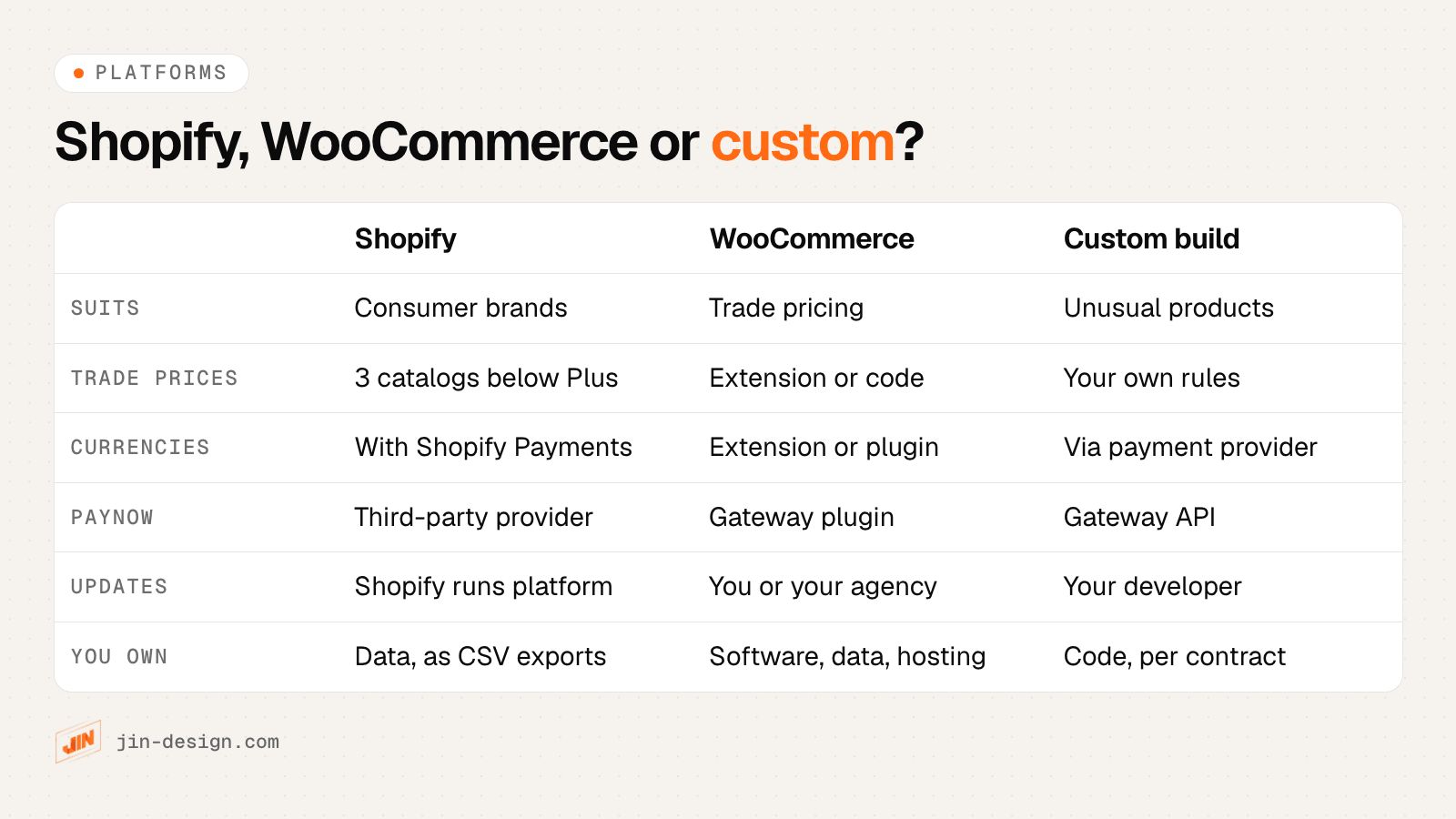
| Shopify | WooCommerce | Custom build | |
|---|---|---|---|
| What it is | Hosted platform on a monthly plan | Free, open-source plugin that adds a store to WordPress, on hosting you choose | A store coded for you, usually connected to a commerce engine or a payment provider |
| Catalogue | Small to large catalogues, managed in the Shopify admin or by CSV | Large catalogues run well on good hosting; speed depends on hosting and plugins | Any size, with a data model built around your products |
| Trade (B2B) pricing | Available on the Basic, Grow, Advanced and Plus plans; below Plus you get up to 3 active B2B catalogs | Through extensions or custom code | Built to your pricing rules |
| Multi-currency | Built in through Shopify Markets; full functionality needs Shopify Payments | Needs an extension or plugin | Built with your payment provider |
| PayNow | Through a third-party payment provider | Through a payment gateway’s plugin | Through a payment gateway’s API |
| Marketplace stock sync | Apps from the Shopify App Store | Plugins or third-party connectors | Marketplace APIs or a connector service |
| Updates and security | Shopify runs the platform; you review apps and theme updates | You or your agency update WordPress, plugins and theme, and your hosting provider looks after the server | Your developer looks after the code, and your hosting provider the server |
| Who can run it day to day | A non-technical team | A team comfortable in the WordPress admin, with a developer for plugins and updates | Your team for products and orders; a developer for most other changes |
| What you own | Your data, exported as CSV; the store itself runs only on Shopify | The software, database and hosting account | The code, if your contract says so |
| Running costs to price | Plan, paid apps and theme, plus transaction fees on third-party gateways | Hosting, paid plugins and a care plan | Hosting and developer care |
Checked on the platforms' own help pages in October 2026. B2B limits: Shopify B2B plan features. Multi-currency: Shopify international pricing. For plan and app prices, use each platform's own pricing page, and add three years of them to every quote.
A few points from that table are worth spelling out:
- Trade pricing is where the platforms differ most. On Shopify, deposits, partial payments and catalogs assigned directly to specific companies are only on Shopify Plus. A wholesaler with many customer-specific price lists should check the plan limits before choosing.
- PayNow and multi-currency interact on Shopify. Shopify ties full multi-currency functionality to Shopify Payments, while PayNow has to come from a separate provider. If you sell to Singapore and overseas, test both together before you commit.
- Ownership matters when you leave. A WooCommerce store moves to any hosting with its database. A Shopify store moves out as CSV exports of products, customers and orders, with the design rebuilt on the new platform.
Webflow is another option for small catalogues. Its e-commerce plans cap the number of items (500, 5,000 or 15,000 depending on the plan), as our WordPress vs Webflow comparison explains. For a wider view of platforms used across the region, see our guide to e-commerce platforms in Asia.
How do you add PayNow and local payment methods to an online store?
PayNow lets customers pay from their banking app by scanning a QR code. Businesses receive PayNow by linking their UEN to a bank account, and the PayNow QR is part of the national SGQR standard, according to the Association of Banks in Singapore.
There are two ways to offer it online, and they create very different work after launch:
- Through a payment gateway. The checkout shows a QR code for that order, and the gateway tells your store when the payment arrives, so the order moves to “paid” by itself. Refunds are made from the gateway.
- With a static PayNow QR code. The customer pays your UEN and types an order number. Someone then matches each bank transfer to an order by hand before it can be packed, and refunds are manual bank transfers.
A static QR works for a handful of orders a week. Once orders pick up, matching transfers by hand slows down fulfilment and invites mistakes.
How PayNow reaches each platform:
- Shopify: PayNow is not among the Shopify Payments methods for Singapore, which include cards, Apple Pay, Google Pay, Shop Pay and GrabPay (in early access). PayNow comes from a third-party provider, and Shopify says its third-party transaction fees apply to payments through third-party gateways.
- WooCommerce: PayNow comes from the gateway’s own plugin. The official WooCommerce Stripe extension did not list PayNow among the payment methods it supports when we checked, even though Stripe itself offers PayNow, so confirm the exact plugin you will install lists it.
- Custom: PayNow comes through the gateway’s API, which gives you the most control over the checkout and the most testing to do.
PayNow facts for online stores (checked 15 October 2026)
- No surcharges. The ABS states that entities are prohibited from imposing surcharges on consumers for PayNow transactions.
- Singapore customers and SGD only. Stripe lists PayNow for customers in Singapore paying in SGD, so a store showing prices in another currency, such as ringgit, will not offer PayNow at checkout for those orders.
- QR codes expire. On Stripe, a PayNow QR code is valid for 1 hour. After that the customer starts a new payment.
- Refunds have a window. Stripe allows PayNow refunds up to 90 days after the payment. Later refunds need another way to pay the customer.
- Subscriptions work differently. On Stripe, PayNow subscriptions are paid by sending an invoice each time, not charged automatically like a card.
- The name customers see may not be yours. Stripe's company name appears in the customer's banking app, so mention it on the checkout page to avoid confused emails.
Sources: ABS, PayNow; Stripe, PayNow payments. Other gateways set their own rules, so ask yours the same questions.
Things to check with any gateway, beyond its published fees:
- Ask which methods work on your platform’s plugin, not only on the gateway’s website.
- Confirm how a PayNow order is marked as paid, and what happens if the customer pays after the QR code expires.
- Ask how refunds and partial refunds work for PayNow, cards and wallets, and how long each takes.
- Ask when money reaches your bank for each method.
- Look the provider up in the MAS Financial Institutions Directory.
Our list of payment gateways in Singapore shows which providers list PayNow and which store plugins each one offers.
Do you need to charge GST on online sales in Singapore?
Only if your business is GST-registered. Registration becomes compulsory when your taxable turnover was more than S$1 million in a calendar year, or when you can reasonably expect it to exceed S$1 million in the next 12 months, according to IRAS. A business that is not registered must not charge GST.
Once you are registered, GST changes the store itself, not only your accounts:
GST rules that affect an online store (checked 15 October 2026)
- Show GST-inclusive prices. IRAS says prices shown to the public must include GST, and this applies to all price displays, including websites. You may also show the price before GST, but the GST-inclusive price must be at least as prominent. Breaking the price display rules can lead to a fine of up to S$5,000.
- Do not advertise "no GST". A discount equal to the GST amount still leaves GST in the price, so IRAS treats a "no GST" promotion as misleading.
- Local deliveries are standard-rated. Goods sold online and delivered in Singapore carry GST, currently 9%.
- Exports can be zero-rated. Goods you ship overseas can be charged 0% GST if you keep the export documents IRAS requires.
- Overseas sellers have their own regime. An overseas business must register for GST in Singapore if its global turnover exceeds S$1 million and its sales of remote services or low-value goods to Singapore consumers exceed S$100,000 a year. Low-value goods are those up to S$400, delivered by air or post.
Sources: IRAS, displaying and quoting prices, GST for e-commerce, overseas businesses and current GST rates. This is a summary, not tax advice.
In the design, this means entering product prices with GST included, setting the store’s tax settings to match, and checking that the cart, checkout, order emails and invoices all show the same total. If you sell overseas, set up a separate tax rule for exported orders and keep the shipping records together with each order.
What do the PDPA and consumer protection rules mean for an online store?
An online store collects names, addresses, phone numbers and order histories, so the PDPA applies from the first order. The PDPC’s data protection obligations cover consent, telling people why you collect their data, keeping it secure and not keeping it longer than you need.
Marketing consent at checkout
The rule that matters most for checkout design: you cannot make consent to marketing a condition of buying, because the PDPA does not allow a business to require consent beyond what is reasonable to provide the product (section 14(2)(a), explained in the PDPC’s Advisory Guidelines on Key Concepts). In practice:
- Use a separate marketing checkbox that is not ticked in advance, and name the channels, such as email and SMS.
- Keep a record of who agreed, when and to what. Most platforms store this against the customer record.
- Do not treat silence as agreement. In its Do Not Call guidelines, the PDPC gives the example of a retailer that emailed customers saying they would get SMS offers unless they replied, and says a customer who did not reply would not be considered to have given clear and unambiguous consent.
Marketing by SMS, phone call or fax to Singapore numbers falls under the Do Not Call provisions. You must check the DNC Registry before sending, unless you hold clear and unambiguous consent, and DNC check results stay valid for 21 days. Messages whose only purpose relates to an ongoing relationship with the customer, such as a membership or subscription, are outside the DNC rules (PDPA Eighth Schedule, paragraph 1(1)(e)), but the PDPC says once-off transactions are not enough to count as an ongoing relationship, so a single purchase does not qualify. A message that also promotes something else is still covered. Unsolicited marketing email sent in bulk falls under the Spam Control Act, which requires an unsubscribe option and an <ADV> label, according to IMDA’s guidance. Even with consent, include an unsubscribe link in every marketing email so customers can withdraw it.
Prices, add-ons and reviews
The Consumer Protection (Fair Trading) Act covers how you present prices and products. The Competition and Consumer Commission of Singapore (CCS) Guidelines on Price Transparency apply to online stores as well as physical shops:
- Include unavoidable charges in the headline price. Where a charge cannot be worked out in advance, say clearly that it exists, next to the price.
- Let customers choose add-ons. Suppliers are encouraged to adopt an “opt-in” or “opt-neutral” approach for optional extras such as gift wrapping or extended warranties, rather than pre-ticked boxes.
- Make “free” mean free. Any conditions on a free item or free delivery should sit next to the offer.
Reviews need the same care. In September 2026, CCS took action against 45 businesses and a provider of fake online reviews. Collect reviews from real customers after delivery, and never buy or write them.
Write your returns and refunds policy with the lemon law in mind. Under the CPFTA, goods that do not conform to the contract within six months of delivery are presumed not to have conformed at delivery (section 12B(3), Part 3 of the Act on Singapore Statutes Online). The consumer can first ask for a repair or replacement, and can ask for a price reduction or a refund if that is not possible or not done within a reasonable time. Customers who need help with a dispute can contact CASE. Link the policy from every product page and the checkout.
How should you plan delivery and fulfilment for a Singapore online store?
Delivery is part of the design, because customers decide whether to buy partly on when and how the order will arrive. Common options for Singapore stores:
- Standard courier delivery to the door, with tracking.
- Same-day or on-demand delivery for urgent orders, gifts or food.
- Parcel lockers for customers who are out during the day.
- Self-collection from your shop, office or warehouse.
- Scheduled delivery slots for bulky items, with your own team or a courier that installs.
- International shipping with customs forms, if you sell overseas.
Courier rates and service areas change often, so compare current quotes from each provider for your parcel sizes. Then design around these points:
- Show delivery options and charges before checkout. In the Baymard Institute’s survey of US online shoppers, extra costs such as shipping, tax and fees were the most common reason for leaving a checkout. The same principle sits behind the CCS price guidelines.
- Ask for Singapore addresses the way they are written. Use separate fields for block or house number, street, unit number (such as #05-123) and the 6-digit postal code. OneMap, the national map from the Singapore Land Authority, offers address search by postal code and free APIs, which some stores use to fill in the street from the postal code.
- Say when the order will arrive, using a range you can keep, and note cut-off times and public holidays.
- Send tracking automatically. Fewer customers then email to ask where their order is.
What makes ecommerce product pages and checkout convert?
Most of what works is unglamorous: customers can see what they are buying, what it costs in total and when it will arrive, and can pay without friction. We do not quote conversion rates here, because they vary too much between products and audiences to be useful as a target.
On product pages:
- Photos that answer questions: scale, texture, the product in use, every colour or variant.
- The facts people check before buying: size or dimensions, materials or ingredients, care, compatibility, what is in the box.
- Price, stock and delivery estimate near the Add to cart button, including any delivery charge or free-delivery threshold.
- Returns policy and reviews within reach, not hidden in the footer.
- Product structured data, so search engines can read the name, price in SGD and availability. Our free schema generator builds Product markup and checks Google’s required properties.
In the checkout:
- Offer guest checkout, with an option to create an account after the order. In the Baymard survey, being asked to create an account was another common reason for leaving.
- Keep the form short, and only ask for what you need to deliver the order.
- Show PayNow and the card brands you accept before customers reach the payment step.
- Design for phones first, with large tap targets and the right keyboard for each field (numbers for phone and postal code).
- Check accessibility, such as readable contrast and labelled form fields. Our contrast checker tests your brand colours.
These are also the things we test on every store we build: we run test orders across combinations of products, discount codes, currencies, delivery zones and payment methods, so problems surface before customers find them.
How do you track ecommerce sales in GA4?
GA4 can show where shoppers drop out, which products sell and which campaigns bring revenue, but only if each step sends the right event. Google’s ecommerce guide lists the recommended events.
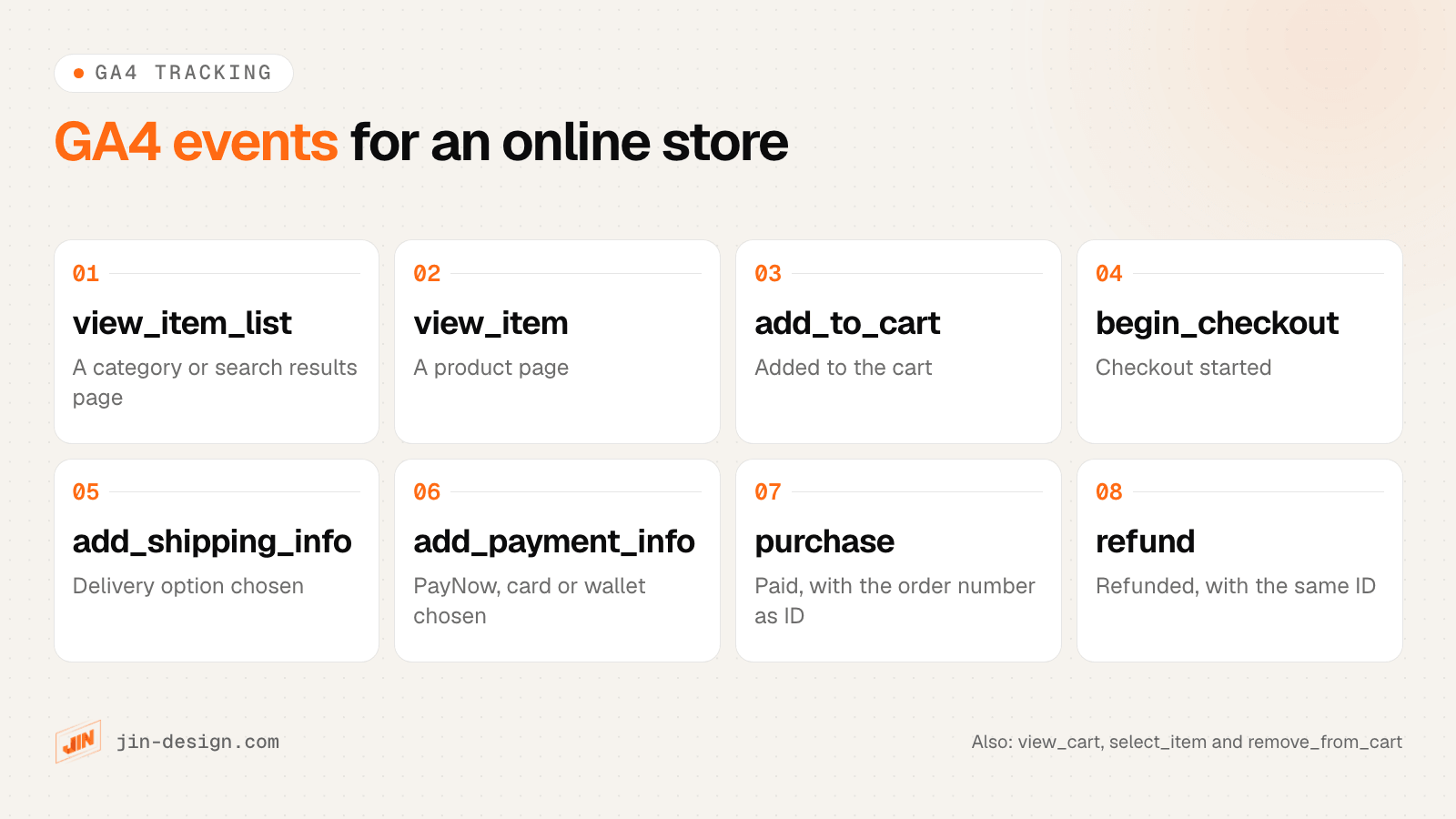
Shopify and most WooCommerce setups send many of these events through an app, plugin or Tag Manager. Whichever method you use, check these before launch:
- Every order has its own transaction ID. Google deduplicates purchases that share a transaction ID, which stops a reloaded thank-you page counting twice. An empty ID, or one reused across orders, makes GA4 drop real orders as duplicates, so use the store’s order number.
- PayNow orders are counted. A PayNow customer approves the payment in their banking app. If they never return to the browser tab, a purchase event that only fires on the thank-you page never fires. Test a PayNow order, and compare GA4 purchases with the orders in your store admin every week for the first month. If the numbers drift, send the purchase from the server when the payment is confirmed.
- Values match the order. Revenue should use the same total as the order, in SGD, with tax and shipping in their own parameters.
- Refunds are sent too, so GA4 revenue goes down when you refund an order.
- Ad platforms receive each order once. Send every purchase to Google Ads and Meta with its own unique ID, so a repeat is ignored rather than counted twice.
- Campaign links do not mislabel themselves. In GA4, a campaign name containing “shop” or “shopping”, such as
cny-shop-sale, lands in the Shopping channels even when it comes from an email. Our UTM builder explains the naming traps and builds clean links.
If you want this set up and tested event by event, see our GA4 setup service.
How do different Singapore stores choose a platform?
These are fictional businesses. Each one ends up on a different platform for a different reason.
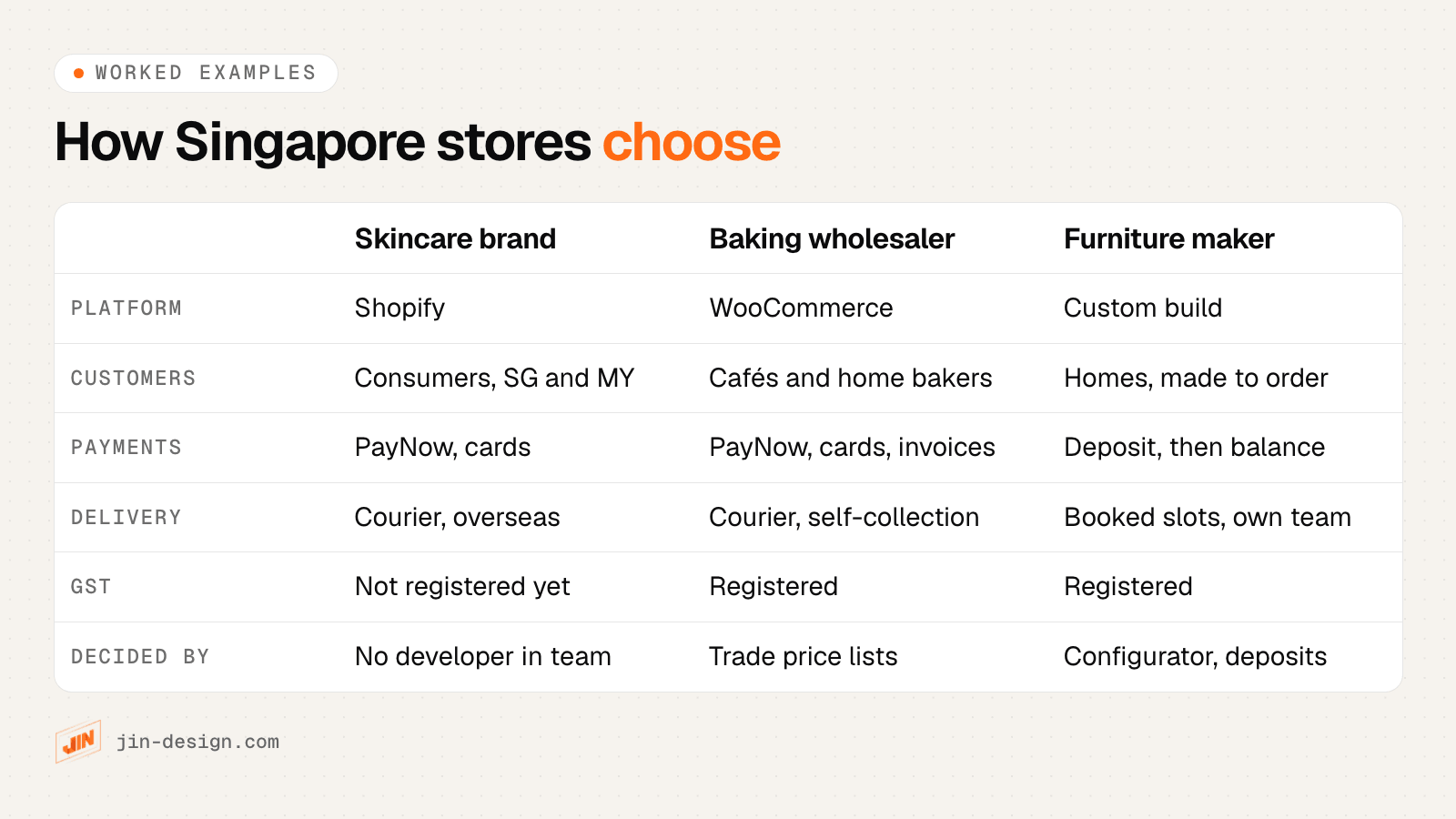
A skincare brand selling in Singapore and Malaysia
A two-person team sells about 60 products to consumers in Singapore and Malaysia, and also lists them on marketplaces. Nobody on the team writes code, and the owners want to spend their time on product and content.
Platform: Shopify, because the team wants hosting, security and checkout handled, and can run the store from the admin.
What to plan: PayNow comes from a third-party provider, so the team tests it together with Malaysian ringgit pricing, because Shopify ties full multi-currency functionality to Shopify Payments. PayNow moves Singapore dollars, so Malaysian shoppers paying in ringgit pay by card. A marketplace connector keeps stock in sync. The brand is not GST-registered yet, so it charges no GST, and it watches its turnover against the S$1 million test. Marketing consent is a separate unticked box at checkout.
A baking supplies wholesaler with trade customers
The business sells about 900 products to cafés and bakeries at trade prices on credit terms, and to home bakers at retail prices. Orders need to flow into the accounting software, and the office team already uses WordPress.
Platform: WooCommerce, because the business needs several trade price lists, custom order statuses and an accounting integration, and wants to own its customer and order data.
What to plan: trade pricing through an extension, with invoices on credit terms for approved accounts. PayNow and cards through a gateway plugin for retail orders. The business is GST-registered, so retail prices are entered with GST included. Self-collection from the warehouse sits beside courier delivery, with cut-off times shown on product pages. A care plan covers plugin and theme updates, and the hosting provider looks after the server.
A made-to-order furniture maker
The maker is GST-registered and sells around 30 designs, each in several sizes, fabrics and finishes. Customers pay a deposit, the piece is made over several weeks, and the in-house team delivers and assembles it in a booked slot.
Platform: a custom build, because the product configurator with a live price, the deposit and balance payments, and the delivery slot booking would each need heavy customisation on a standard platform.
What to plan: the configurator rules and pricing data, PayNow and card payments through a gateway API for both the deposit and the balance, and clear written terms on deposits, lead times, cancellations and what happens if a piece arrives damaged. Each configuration is sent to GA4 as an item variant, so the maker can see which options sell.
What should you check at launch and in the first 30 days?
A store launch is a switch from test payments to live ones, so plan it like one. Most of the work happens before launch day.
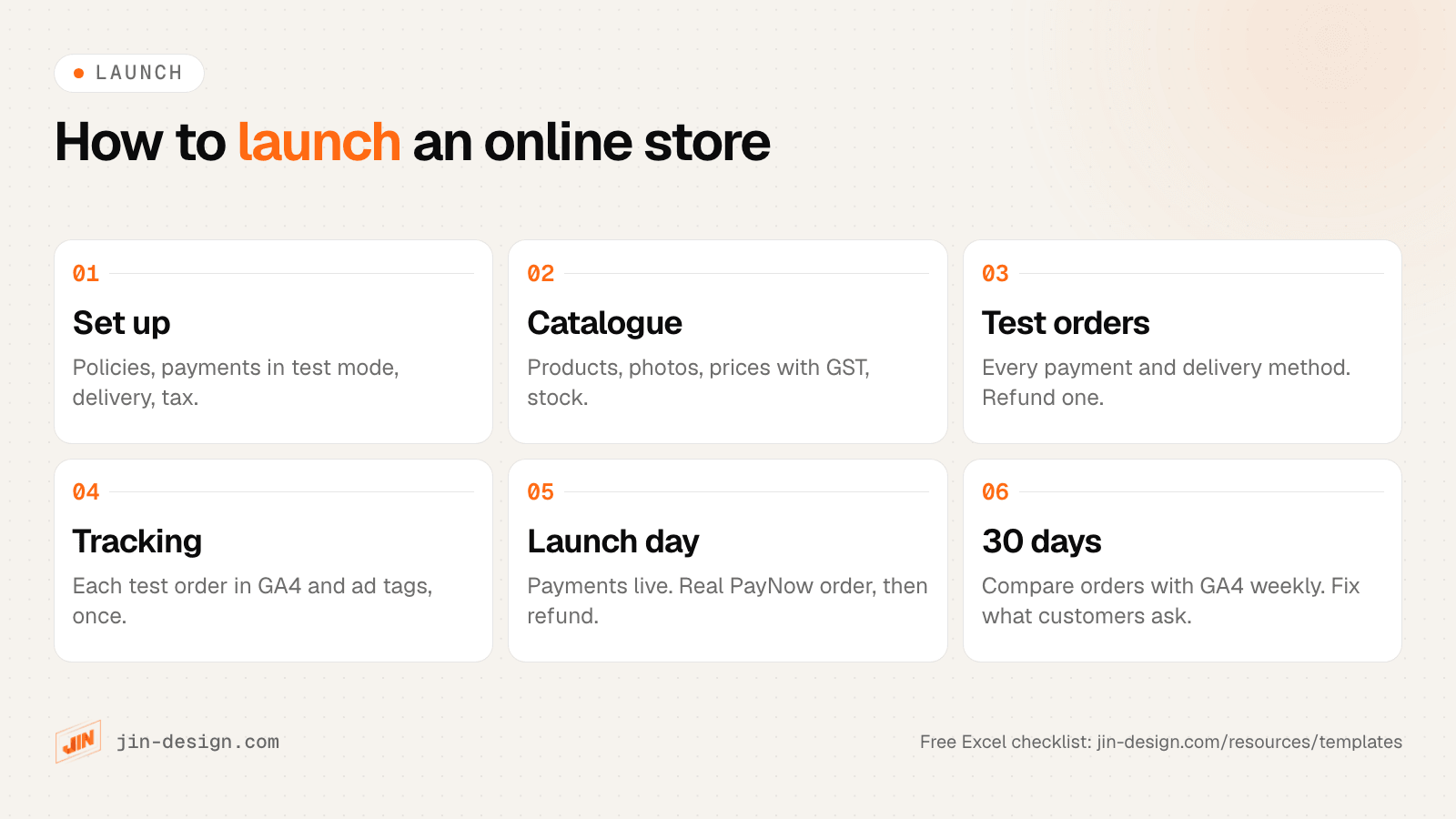
- Two to three weeks before: policies published, payments in test mode, delivery rates and zones set, tax settings checked, catalogue loaded and proofread.
- One to two weeks before: test orders with every payment method, including PayNow, every delivery option and a discount code. Refund at least one. Check every order and shipping email, and confirm GA4 and ad tags record each test once.
- Launch day: switch payments to live, place a real order with your own card and with PayNow, refund it, and check the sitemap, redirects from any old store and the robots settings.
- First 30 days: compare orders in the store admin with GA4 every week, read every customer email about orders, watch Search Console for errors, and fix the questions customers keep asking on the product pages.
Free download
Online store launch checklist (Excel). Setup, catalogue, checkout testing with a test order log, GA4 tracking, launch day and the first 30 days, with an owner, a status and a platform note for Shopify, WooCommerce or custom on every task. Due dates update from your launch date.
If you are moving from an old store, keep your product and category URLs where you can, and redirect the ones that change. Our redirect checker tests a list of old addresses in one go.
Can you get a grant for an online store in Singapore?
Possibly, if a pre-approved package fits. Enterprise Singapore’s Productivity Solutions Grant (PSG) ceased on 29 September 2026, and new applications have gone under the EDGE Grant since 30 September. Applications made before then are still processed under the old scheme. Under EDGE, an E-Commerce Online Shop (B2C) package from a vendor listed on IMDA’s SMEs Go Digital can get up to 50% support for SMEs, on software costs capped at S$5,000 for up to 12 months. GST and maintenance are not supported, and you must not start work or pay a deposit before you apply.
Sellers who manage several marketplaces may also look at the pre-approved Multichannel E-commerce Software packages, which have the same S$5,000 cost cap (up to S$2,500 for SMEs). A custom-designed store outside those packages is your own spend. Our guide to website and AI grants in Singapore covers the rules in full, and our guide to website cost in Singapore shows what moves the price of an online store.
How we design and build online stores in Singapore
We design and build online stores on WooCommerce and Webflow, set up the payment gateway you choose, including PayNow integration, connect delivery, email and accounting tools, and wire up GA4 ecommerce tracking. Before launch, we test checkout across products, discount codes, currencies, delivery zones and payment methods, then stay on to look after the store.
If you are weighing Shopify or a custom build, we will tell you which fits your catalogue and team. See our ecommerce website design service and WooCommerce development pages, or talk to us about your store.
Frequently asked questions
Is Shopify or WooCommerce better for an online store in Singapore?
Neither is better for everyone. Shopify suits a small team selling to consumers that wants the platform to handle hosting, security and checkout. WooCommerce suits stores that need trade pricing, unusual product rules, deep integrations or full ownership of the software and data, and that have a developer or agency to look after updates.
How do I accept PayNow on my online store?
Use a payment gateway that offers PayNow and has a plugin or app for your platform. The gateway shows a QR code at checkout and marks the order as paid when the customer approves the payment in their banking app. PayNow is not among the Shopify Payments methods for Singapore, so Shopify stores add it through a third-party provider.
Do I have to show GST-inclusive prices on my online store?
Yes, if your business is GST-registered. IRAS requires prices shown to the public, including on websites, to include GST. You can show the GST-exclusive price as well, but the GST-inclusive price must be at least as prominent. A business that is not GST-registered must not charge GST.
Can I send marketing emails to everyone who buys from my store?
Only with their consent. Under the PDPA, you cannot make marketing consent a condition of buying, so ask for it with a separate checkbox that is not ticked in advance. Put an unsubscribe link in every marketing email, which the Spam Control Act requires for unsolicited bulk messages. Before marketing by SMS or phone call, check the Do Not Call Registry unless you hold clear consent; a one-off purchase does not count as an ongoing relationship.
Can I get a grant for an online store in Singapore?
Possibly. Enterprise Singapore's PSG ceased on 29 September 2026, and new applications have gone under the EDGE Grant since 30 September. Under EDGE, an E-Commerce Online Shop (B2C) package from a pre-approved vendor on IMDA's SMEs Go Digital can get up to 50% support for SMEs, on software costs capped at S$5,000. A custom-designed store outside those packages is not covered.
Should I sell on my own website or on marketplaces?
Many Singapore sellers do both. Marketplaces bring shoppers who are already searching there. Your own store lets you set the design, keep the customer relationship and run your own promotions. If you use both, plan how stock and orders stay in sync before you launch.