





Free website PDPA checklist (Excel)
A ready-to-use Excel checklist for checking a Singapore business website against the PDPA. List every form and tag with its purpose, where the data goes and the basis you rely on, then work through notices, security, retention, breach response and access requests, with the PDPA section or PDPC guideline behind each check.
Free downloadExcel fileNo sign-upBy JIN Design
What is inside
- A Start here tab for your website and DPO details, with progress worked out for every tab and the key PDPA timings
- Forms and consent: what each form collects, the notice, the basis, the marketing opt-in and whether NRIC is involved
- Notices and privacy policy checks, each with the PDPA section or PDPC guideline behind it
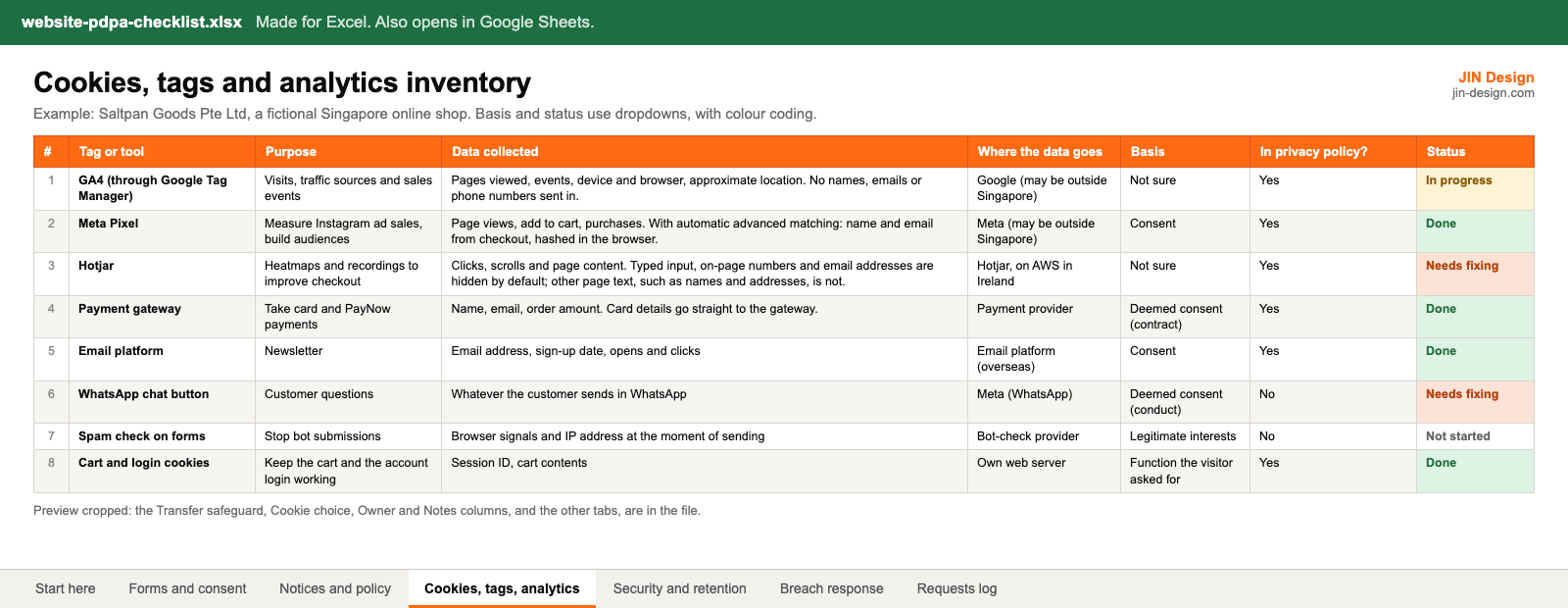
- A cookies, tags and analytics inventory: purpose, data collected, where the data goes, transfer safeguard and basis
- Security and retention checks, and a breach response plan whose log works out the 30-day assessment and 3-day PDPC dates
- An access and correction requests log with the 30-day reply date
- Example rows for a fictional Singapore online shop, ready to replace with your own
Made for Excel. Also opens in Google Sheets. Free to use for your own website and for websites you manage for clients; please do not resell the file.
How to use the website PDPA checklist
- Download the file and open it in Excel or Google Sheets. On the Start here tab, fill in your website details and who your data protection officer is.
- On Forms and consent, list every form on the site, including checkout, sign-ups and file uploads. Note what each one collects and what you tell people next to the button.
- On Cookies, tags, analytics, list every tag, plugin and tool that receives visitor or customer data. If you cannot say where a tag sends data, find out before you keep it.
- Work through Notices and policy and Security and retention. Give each row an owner and a status, and write what needs fixing in Notes.
- Keep Breach response and Requests log ready. When something happens, the log works out the assessment and notification dates for you. Review the whole file after any website change that collects data.
What should a website PDPA checklist cover?
Everything on the site that collects or passes on personal data, and what you do with it afterwards. That means each form and what it says to people, your privacy policy, every cookie, tag and third-party tool, security for form entries and admin logins, deleting what you no longer need, a breach plan, and a way to answer requests for access or correction.
Each row in the checklist names the PDPA section or PDPC guideline behind it, so you can check the source yourself. Our guide to the PDPA for websites in Singapore explains each area with worked examples.
How do you fill in the cookies, tags and analytics inventory?
Open your tag manager and your website's plugin or app list, and add one row for each tool that receives data about visitors or customers: analytics, ad pixels, heatmaps, chat buttons, payment and email tools, and spam checks on forms. For each one, write what it is for, what it collects, where the data goes and what protects it there, such as a data processing agreement.
The basis column has a dropdown. PDPC's Advisory Guidelines on Selected Topics say cookies that collect no personal data need no consent, functions the visitor asked for may not need consent, and targeted advertising through cookies does, with cookie preference settings as good practice. If you are not sure, choose Not sure and ask your data protection officer.
How does the breach response tab work out the PDPA dates?
Enter the date you found the breach and the log adds 30 days as an assessment target, because PDPC's Key Concepts Guidelines say the assessment should generally be done within 30 calendar days. When you decide the breach is notifiable, enter that date and the log adds 3 days: section 26D of the PDPA says to notify the PDPC no later than 3 calendar days after that decision.
The log also flags breaches that affect 500 or more people, or that involve prescribed data such as a username with its password, as notifiable. Breaches that meet neither still need a judgement on whether significant harm is likely. Report through the PDPC's data breach e-service.
Is the checklist legal advice?
No. It is general information to help you organise what your website does with personal data, checked against the PDPA and PDPC guidance in October 2026. Where the PDPC has not said something directly, the article marks it as our reading. If your site handles sensitive data, such as health details or children's information, check your approach with your data protection officer or a lawyer.
Website PDPA checklist questions
Is the website PDPA checklist free?
Yes. Download it with no sign-up. It is free to use for your own website and for websites you manage for clients. Please do not resell the file.
Does it work in Google Sheets?
It is made for Excel. It also opens in Google Sheets, because the formulas are standard ones such as COUNTIF and IF. The links on the Start here tab that jump between tabs work in Excel only. Check the dropdowns and colours after converting, as other spreadsheet apps can show them differently.
Should I put personal data in the checklist?
Keep it out. The checklist records what kinds of data your website collects, not the data itself. In the requests log, use initials and keep the full request in your inbox.
Can I use it if an agency runs my website?
Yes. Use the owner column to split the rows. Tags, security and updates often sit with the agency, while the privacy policy, the DPO and decisions on breaches stay with your business.
More free templates
All templates →- Website scope worksheetList your pages, features and content, total three years of running costs, and compare up to three agency quotes side by side.
- Website maintenance checklistWeekly, monthly, quarterly and yearly website tasks with why each matters and how to check it, plus an incident log.
- Online store launch checklistEvery task from setup to the first 30 days after launch, with owners, due dates from your launch date and a test order log.
Start with a free consultation
Tell us about your website and we will tell you what we would change first.