WordPress vs Webflow vs AI-Powered Website: Which to Choose in 2026
WordPress, Webflow or a custom AI-powered website? Compare editing, design, speed, SEO, upkeep and ownership to see which suits your business.
The short answer
- 01
Choose WordPress if your team publishes often, you sell online with WooCommerce, or you need lots of ready-made integrations.
- 02
Choose Webflow if you want a design-led marketing site that your team edits visually, with hosting and updates handled for you.
- 03
Choose an AI-powered website if you want a fast, custom site with no plugin stack, and you update content occasionally or let your agency handle changes.
Most businesses we speak to end up choosing between three options for a new website: WordPress, Webflow, or a site custom-coded with AI. All three can work well, and none is right for everyone.
This guide is written for the person who has to make the call. Each option gets its strengths, its trade-offs and the kind of business it suits, followed by the practical questions that usually settle it.
What we mean by an AI-powered website: a site custom-coded on a modern framework. It is not an AI website builder that generates a site from a prompt.
The three options side by side
| WordPress | Webflow | AI-powered website | |
|---|---|---|---|
| What it is | Open-source software on hosting you choose | Visual builder with hosting included | Custom code on a modern framework |
| Who edits | Your team, in a familiar admin | Your team, visually on the page | Your team for content; your agency for bigger changes |
| Upkeep | Plugin and theme updates, server by your hosting provider | Handled by Webflow | Framework and package updates by your agency, server by your hosting provider |
| Strongest at | Content, blogs, online stores, integrations | Design-led marketing sites | Speed, custom features, AI tools |
| Main trade-off | Plugins need regular care | Plan limits and harder to leave | Larger changes need a developer |
Facts worth knowing (checked 13 October 2026)
- WordPress installs minor core updates automatically by default. Plugin and theme updates are not automatic unless you switch them on for each one.
- WordPress recommends PHP 8.3 or newer on your server, so ask your hosting provider to keep it current.
- Webflow's Basic site plan has no CMS. A site with a blog or other collections needs Premium or above.
- Webflow online stores use separate e-commerce plans, each with a limit on products: 500, 5,000 or 15,000 items depending on the plan.
- Webflow code export is only on paid workspace plans, and it does not include the CMS, e-commerce, forms or site search.
- Webflow now has its own AI tools, including a way for AI coding assistants to work inside Webflow projects.
Sources: WordPress.org documentation and requirements; Webflow pricing and help centre.
WordPress
WordPress is open-source software that you install on hosting you choose, then extend with a theme and plugins. It is the most widely used website platform, so almost any feature you need already exists as a plugin.
Strengths
- Huge range of plugins and integrations
- Familiar editor, good for frequent publishing
- WooCommerce for online stores of any size
- You hold the software and the data
Things to consider
- Plugins and themes need regular updates and testing
- Speed depends on the theme, plugins and hosting
- Security depends on how well the site is looked after
Often a good fit for:
- A clinic publishing health articles every week
- An online store with a growing catalogue
- A business that needs booking, CRM or membership plugins
See our WordPress design and development page for how we build on it.
Webflow
Webflow is a visual website builder with a CMS and hosting in one subscription. A designer builds the site in Webflow’s Designer, and your team edits content in an editor that keeps the layout intact.
Strengths
- Hosting, updates and backups handled by Webflow
- Visual editing that protects the design
- SEO settings built in
- Strong for animation and design-led sites
Things to consider
- Plans set limits on CMS items and products
- Each site needs its own site plan
- The CMS and e-commerce do not come with you if you leave
Often a good fit for:
- A design-led marketing site for a startup
- A marketing team that wants to edit pages visually
- A business that wants no technical upkeep at all
See our Webflow design and development page.
AI-powered website
An AI-powered website is coded from scratch on a framework such as Astro or Next.js.
Strengths
- Very fast pages, with only the code each page needs
- No plugin stack to patch
- Any design or feature, including AI tools for visitors
- You own the code
Things to consider
- New layouts and features need a developer
- The framework and its packages still need regular updates
- Less suited to teams who rebuild pages themselves every week
Often a good fit for:
- A brand that wants the fastest possible site
- A business that wants AI search or an assistant on its site
- A company moving off a slow, plugin-heavy WordPress site
This website is built this way. See our AI-powered website page.
Who will edit the site?
This one question settles most projects.
| How your team works | Usually the best fit |
|---|---|
| Publishes several times a week and wants full control | WordPress |
| Edits pages visually and cares most about design | Webflow |
| Updates content now and then, and lets the agency make bigger changes | AI-powered website |
| Runs a store with many products | WordPress with WooCommerce |
| Has no one in-house to look after the site | Webflow, or an AI-powered site with a care plan |
Editing content stored in Markdown
Many AI-powered and custom-coded sites keep page text and articles in Markdown files: plain text with simple marks for headings, links and lists. It keeps your content portable and easy for AI tools to read, and your team doesn’t need a code editor to change it.
A desktop Markdown app shows the file formatted, so editing feels like working on a normal document. One option is Markdific, which also lets you work in the raw Markdown with a live preview beside it, and exports to PDF or Word:
- Markdown viewer & editor for Mac, with Quick Look previews in Finder
- Markdown viewer & editor for Windows
- Markdown viewer & editor for Linux
Running the site: who does what
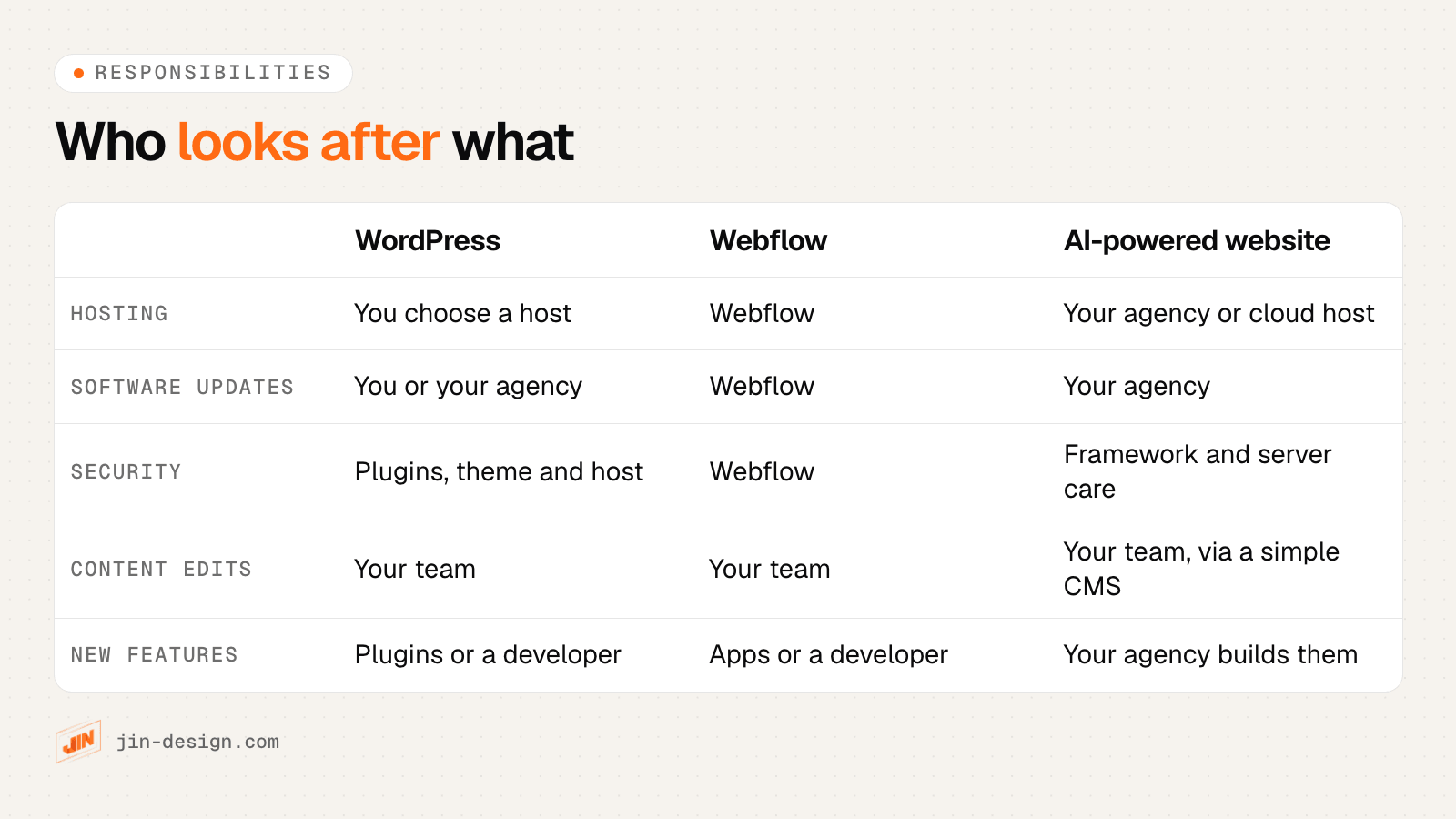
On WordPress, someone needs to:
- Update plugins and themes, and test them before they go live
- Take backups, and know how to restore one
- Check with your hosting provider that PHP is on a supported version
- Watch for security problems
On Webflow, the platform handles hosting, updates and backups. Your part is content, any custom code, and staying within your plan’s limits.
On an AI-powered website, there is no plugin stack. Your agency keeps the framework and packages up to date, and the hosting provider looks after the server. This is usually as part of a maintenance plan.
Speed and SEO
All three can rank well on Google. Content, structure and speed matter far more than the platform.
- WordPress: speed depends on the theme, the plugins you add and the hosting. An SEO plugin usually handles titles, sitemaps and schema.
- Webflow: hosting includes a global CDN, and SEO settings such as sitemaps, redirects and schema are built in.
- AI-powered website: pages are compiled ahead of time and lean, and SEO settings live in the code, so nothing depends on a plugin.
E-commerce
- WordPress with WooCommerce is the most flexible choice for a growing catalogue, with a wide choice of payment gateways.
- Webflow e-commerce suits smaller stores within each plan’s product limit.
- An AI-powered website can have a custom checkout or connect to a commerce platform, which suits stores with specific needs.
Check that your preferred payment methods are supported before you choose.
What you can take with you if you leave
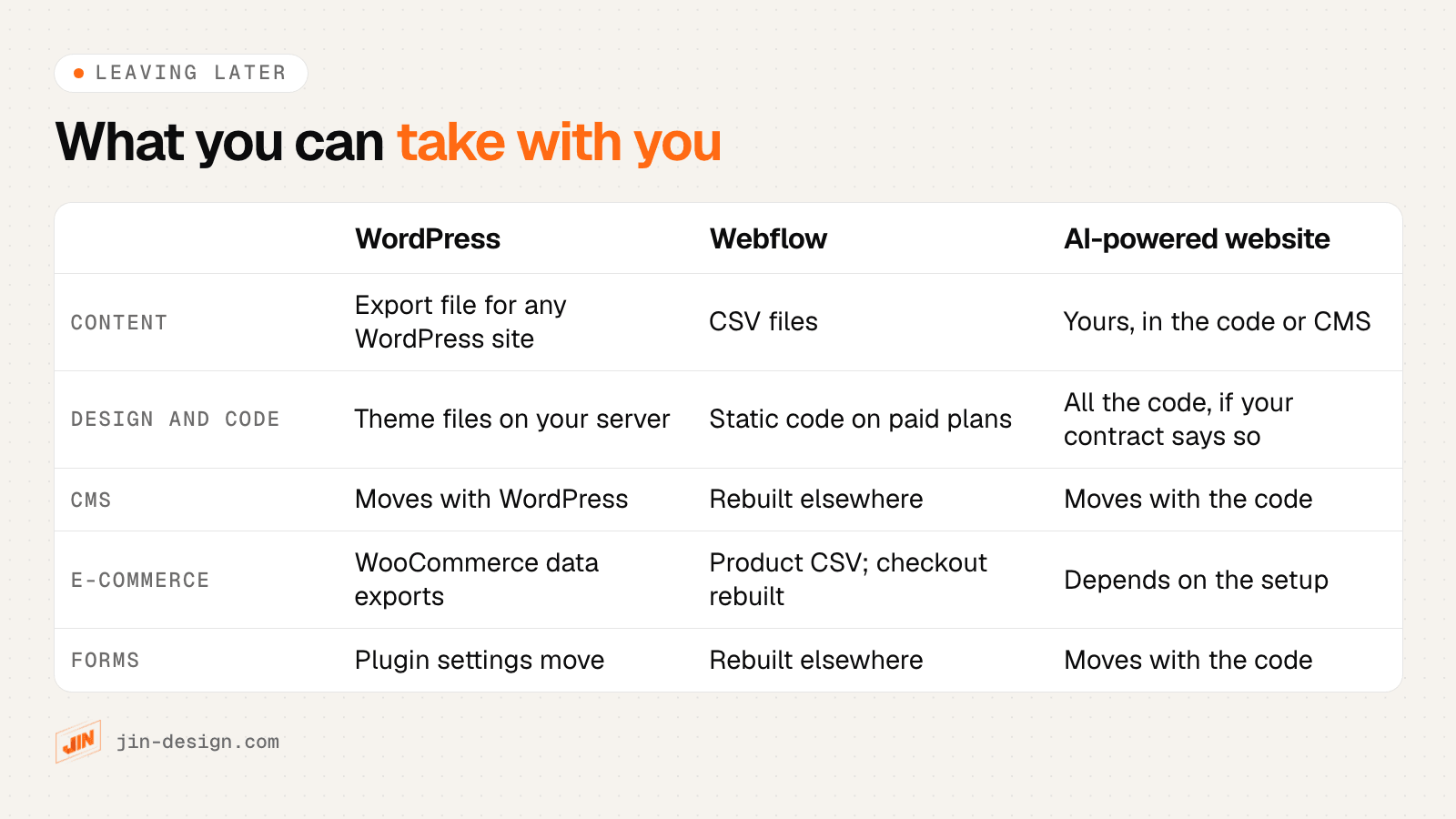
Whichever you choose, make sure the domain, hosting and logins are in your company’s name.
What drives the cost
We do not quote prices here, because they depend on the project. These are the main cost drivers:
- WordPress: hosting, premium themes and plugins, development, and ongoing maintenance.
- Webflow: a site plan for each website, workspace seats, e-commerce plans if you sell, and development.
- AI-powered website: the build, hosting, a maintenance plan, and development for new features.
Compare the cost over three years, not just the build. Hosting and maintenance add up on every platform.
Moving platforms without losing rankings
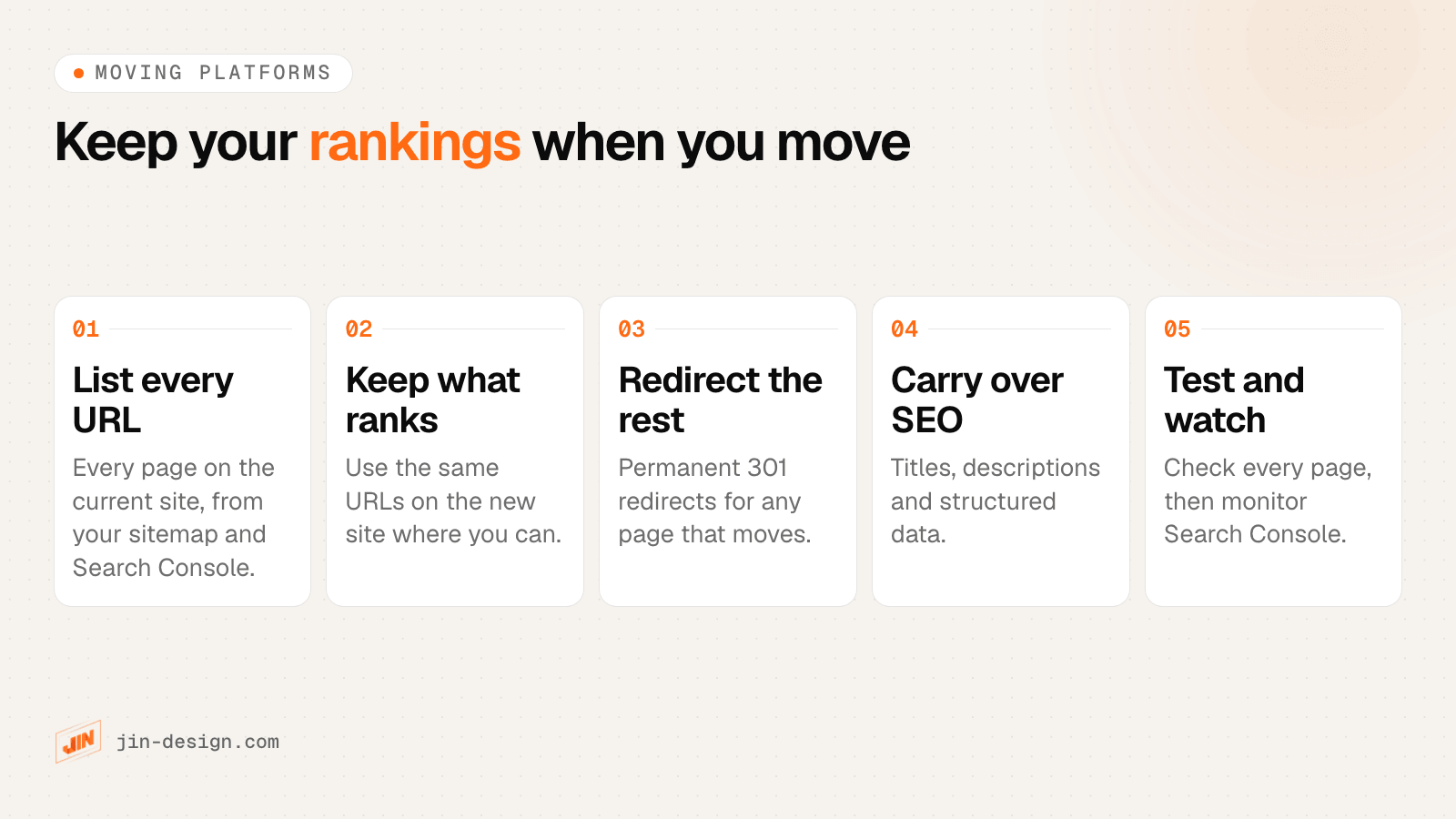
We moved this website from WordPress to an AI-powered build this way, keeping the pages that rank and redirecting the rest.
Which should you choose?
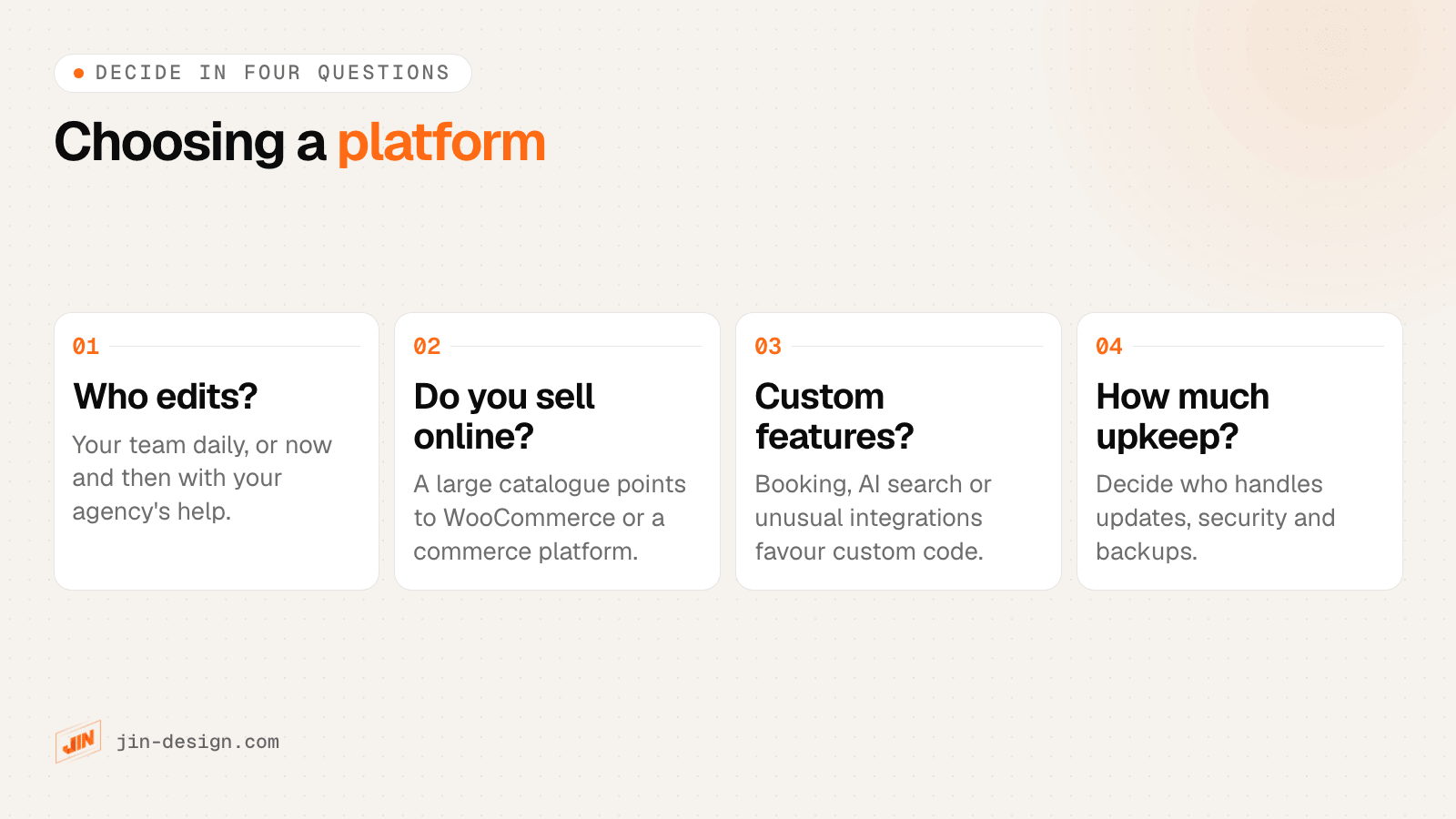
If you already rank well on WordPress and the site works, improving what you have may be the best move. If you are starting fresh or rebuilding, the four questions above will usually point to one option.
Still not sure? Tell us how your team works and what the site needs to do, and we will recommend one. You can also compare all five platforms we build on, including WooCommerce and Elementor, on our platforms page.
Frequently asked questions
Is Webflow better than WordPress for SEO?
Both can rank well. Webflow has SEO settings built in, such as metadata, sitemaps, redirects and schema. WordPress usually gets the same controls through an SEO plugin. Rankings depend far more on content, speed and structure than on the platform.
Is an AI-powered website the same as an AI website builder?
No. An AI website builder generates a site from a prompt inside its own platform. An AI-powered website, as we use the term, is custom-coded on a modern framework. You own the code.
Can my team edit an AI-powered website without a developer?
Yes, for everyday content. We set up a simple way to edit text, images and posts. Larger changes such as new page layouts or features are done by a developer. If your team edits many pages every day, WordPress or Webflow may suit you better.
Can I move from Webflow to WordPress, or the other way?
Yes. Content can be exported (Webflow exports CMS and product data as CSV, and WordPress exports content as a WXR file), but the design and features are rebuilt on the new platform. Plan redirects so your existing pages keep their rankings.
Will I lose my Google rankings if I change platform?
Not if the move is planned. Keep URLs where you can, add permanent redirects for any that change, carry over titles, descriptions and structured data, and watch Google Search Console after launch.
Do I need a developer for maintenance?
On WordPress, someone needs to keep the core, plugins and theme updated and take backups, while the hosting provider keeps PHP current. On Webflow, the platform handles hosting and updates. On an AI-powered website there is no plugin stack, but the framework and its packages still need care, usually through a maintenance plan.
Which is best for an online store in Singapore?
For a large or growing catalogue, WordPress with WooCommerce or a dedicated commerce platform is usually the practical choice. Webflow e-commerce suits smaller catalogues within its plan limits. A custom build suits stores with unusual checkout or integration needs.