Landing Pages for Google Ads in Singapore: Requirements and Examples
Google Ads landing page requirements in Singapore: what Quality Score checks, message match, mobile speed, PDPA consent, WhatsApp and call tracking, examples.
The short answer
- 01
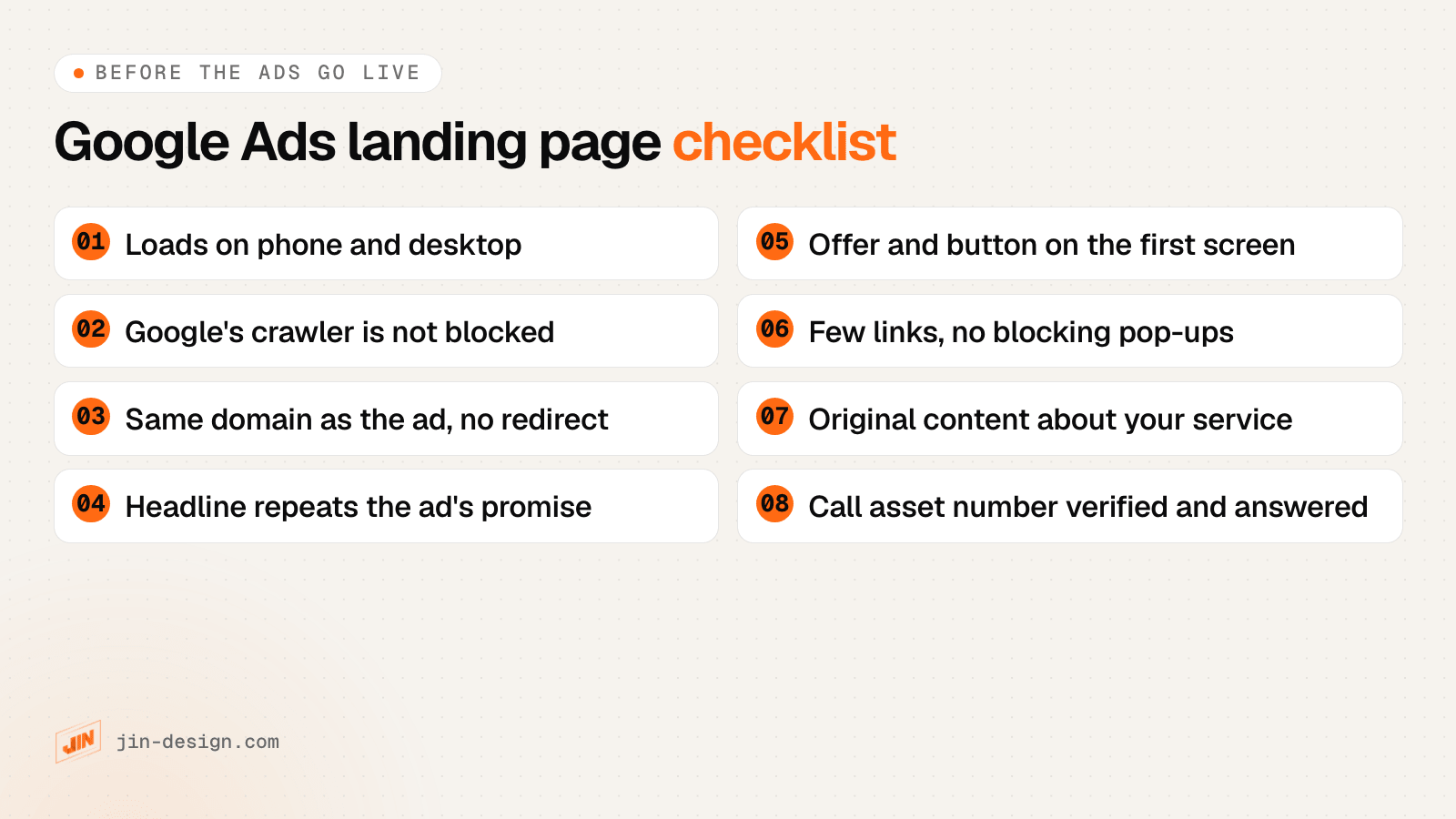
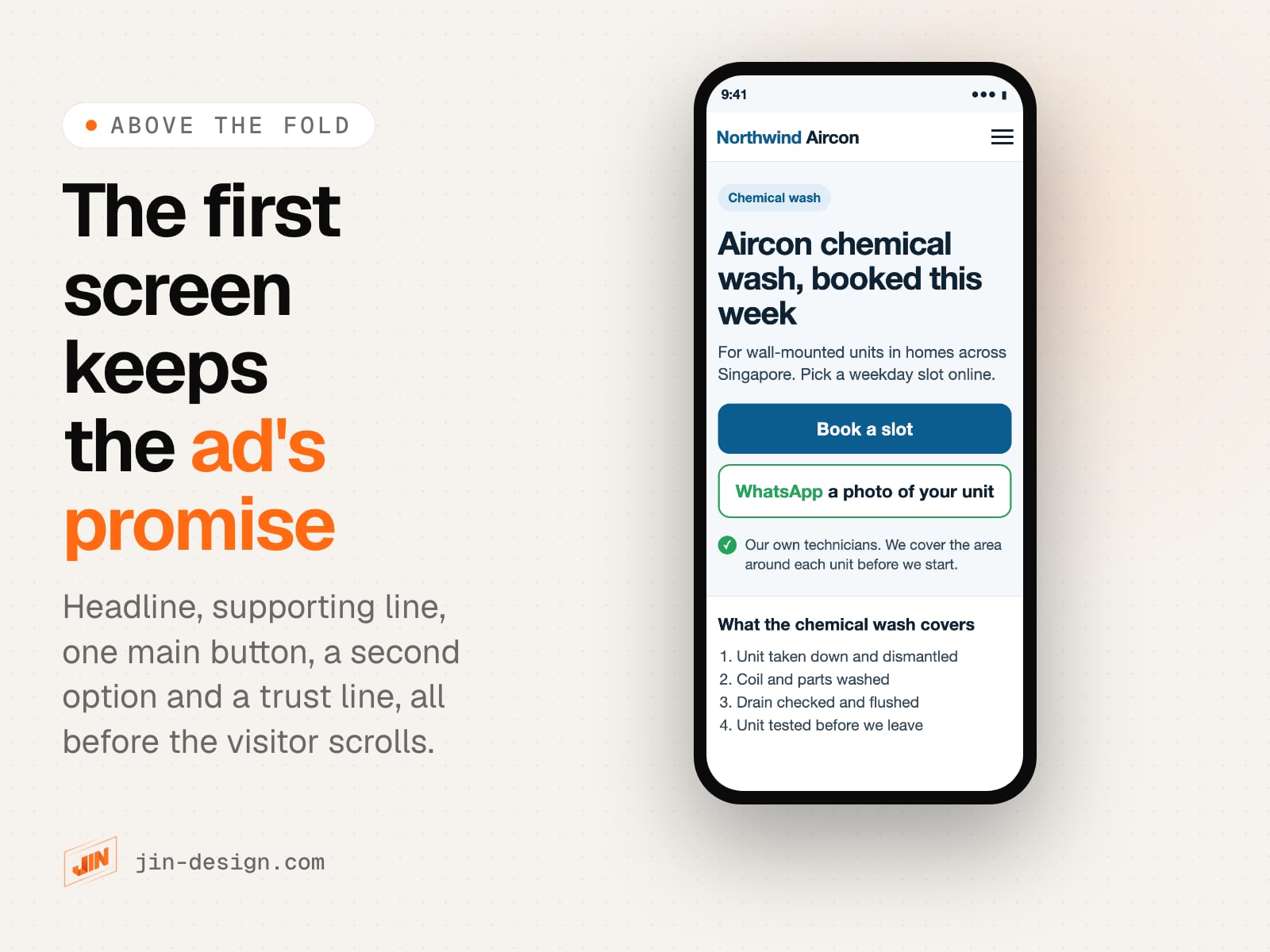
Keep the ad's promise in the first screen. The words of the keyword and the ad should appear in the page headline, with the offer and one clear button visible on a phone without scrolling. Google rates how relevant and useful the page is as landing page experience.
- 02
Count every way people contact you. Track the form, WhatsApp and call buttons as separate conversions. Google forwarding numbers are not offered in Singapore, so Google Ads can count taps on your number but not the calls themselves.
- 03
Check the rules before you design. Forms need a PDPA notice of purpose. Clinics, financial firms and property agents have advertising rules from MOH, Google and CEA that decide what the page may show.
A Google Ads landing page has to meet Google’s destination requirements before the ad can run: it must work, be crawlable, stay on the ad’s domain and offer original content. It converts in Singapore when its first screen repeats the promise of the keyword and the ad, it loads quickly on a phone, it offers the way your customers prefer to get in touch, and every form, WhatsApp tap and call tap is tracked as a conversion so Google Ads can learn from it. Clinics, financial firms and property agents also have advertising rules that apply to the page itself.
We design and build landing pages for ad campaigns and set up the tracking behind them. This guide covers what Google requires and measures, worked examples for Singapore businesses, the Singapore details that change how you build and track the page, and a free landing page brief you can fill in before design starts. For the building blocks of any landing page, see our earlier article on what makes a good landing page.
How does Google Ads judge a landing page?
Google Ads gives each keyword a Quality Score from 1 to 10, built from three components. Each component is rated Above average, Average or Below average, compared with other advertisers whose ads showed for the exact same search over the last 90 days, according to Google’s Quality Score help page.
| Component | What Google measures | What your landing page controls |
|---|---|---|
| Expected click-through rate | How likely your ad is to be clicked when it shows | Little directly. It depends on the ad and the keyword. |
| Ad relevance | How closely the ad matches the intent behind the search | The ad, but the page decides which promises the ad can honestly make |
| Landing page experience | How relevant and useful the page is to people who click | Nearly all of it |
Google calls Quality Score a diagnostic tool and says it is not an input in the ad auction. The measurements behind it still count. Ad Rank, which decides whether and where your ad shows, uses your bid alongside auction-time measures of expected click-through rate, ad relevance and landing page experience. A more useful page can earn better positions without a higher bid.
Google’s landing page help entry lists what landing page experience is represented by: how useful and relevant the information on the page is, how easy it is to navigate, the number of links on the page, and the expectations people have from the ad they clicked.
What are the Google Ads landing page requirements?
A Google Ads landing page has to pass two separate checks. Policy decides whether the ad may run at all. Quality Score, covered above, decides how well it competes once it does.
The policy side is Google’s destination requirements. An ad whose landing page breaks them can be disapproved. These are the violation types that apply to an ordinary business website, in Google’s own names:
| Google’s violation name | What it means | What to check on your page |
|---|---|---|
| Destination not working | The page fails to load properly or returns errors to Google’s crawlers on common devices | Open the final URL on a phone and a desktop after every change to the site |
| Destination not crawlable | Google Ads cannot crawl the page or its content | Bot protection, firewall rules and password screens let Google’s crawler through |
| Destination not accessible | The page cannot be reached from the location you target | Nothing blocks visitors in Singapore, including a hosting or firewall country rule |
| Destination mismatch | The display URL, final URL or redirects lead to a different domain or content than the ad suggests | The final URL stays on your own domain, with no redirect to another site |
| Destination experience | The page is hard to navigate, triggers unwanted downloads or has abusive ad experiences | No pop-up that covers the page on arrival, no automatic downloads |
| Insufficient original content | The page exists mainly to show ads, copies other sources without adding value, or only redirects | The page describes your own service in your own words, not a supplier’s copy |
| Unverified phone number | A phone number in a call asset, location asset or call-only ad has not been verified by Google | The number is your working Singapore line, linked to your business, and verified in Google Ads |
| Unacceptable phone number | The number is inaccurate, inactive or not linked to your business; a fax, premium, vanity or virtual number; not local to Singapore; or has no active voicemail | The number in your call asset is your own Singapore line, answered or with voicemail |
Two cases come up often enough to name:
- Bot protection that blocks Google. A firewall rule or challenge page that stops Google’s crawler can get ads disapproved. Test the final URL after any security change.
- WhatsApp as the final URL. A wa.me link redirects to whatsapp.com, which is a different domain from your ad. Put the WhatsApp button on your landing page instead, where you can also track it.
What is message match on a Google Ads landing page?
Message match means the searcher sees the same words and promise at every step: the keyword they typed, the ad they clicked and the first screen of the page. Google’s guide to optimising ads and landing pages puts it the same way: match the page to the ad’s promise, repeat the ad’s call to action, and place key information near the top so visitors do not have to scroll for it.
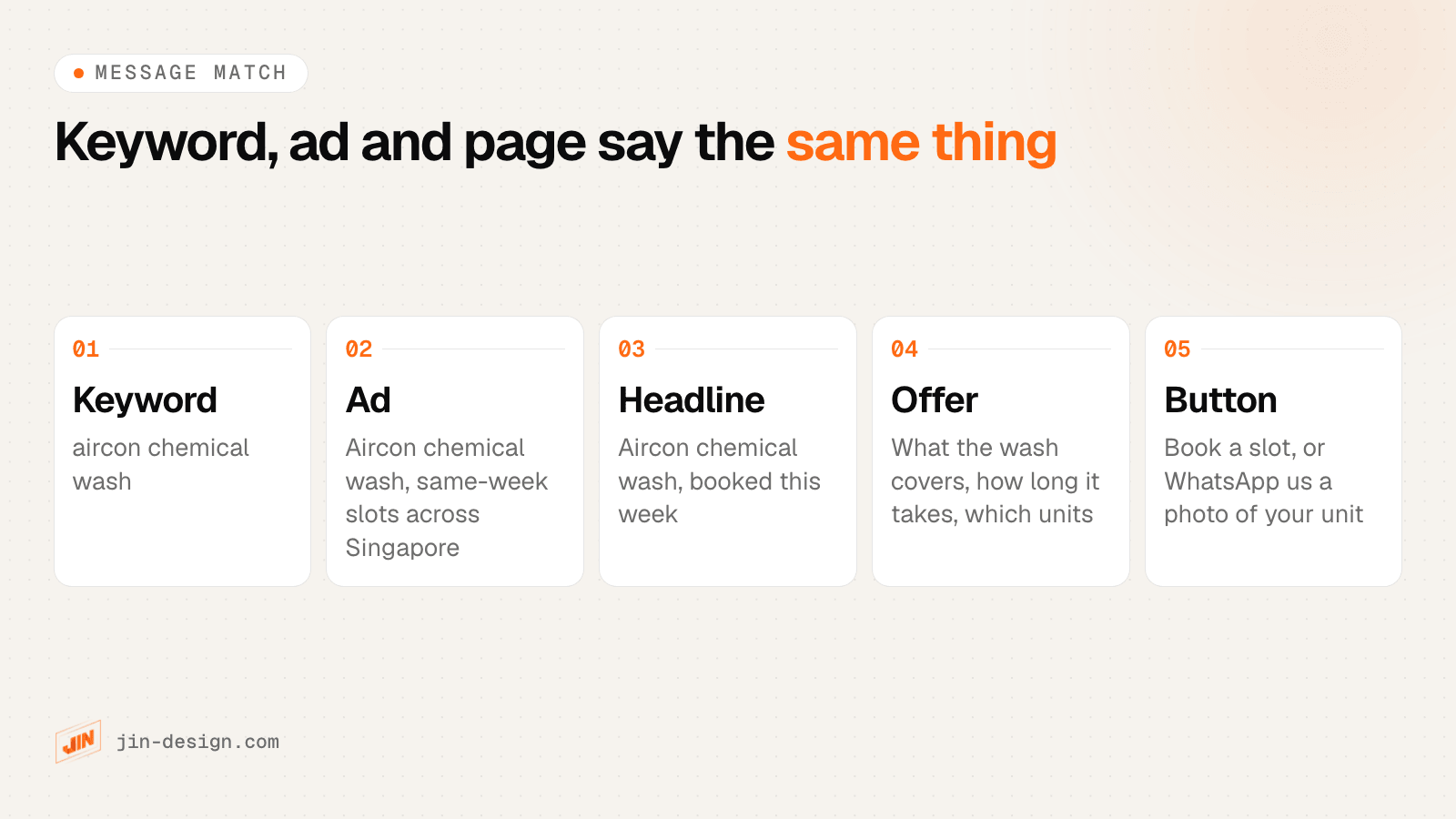
Here is a worked example for Northwind Aircon, a fictional aircon servicing company in Singapore. It runs two ad groups with different searchers behind them:
| Ad group: chemical wash | Ad group: aircon not cold | |
|---|---|---|
| Keyword theme | aircon chemical wash, chemical overhaul | aircon not cold, aircon leaking water |
| Who is searching | Planning maintenance, comparing what is included | Has a problem today, wants it fixed |
| Ad promise | Chemical wash, same-week slots | Technician visit to find the fault |
| Page headline | Aircon chemical wash, booked this week | Aircon not cold? We find the fault first |
| First screen on a phone | What the wash covers, unit types, booking button | Common causes, how the visit works, WhatsApp a photo, call button |
One general “aircon services” page would serve both groups worse. The planner wants a checklist of what is included; the person with a dripping unit wants to talk to someone now. The words in the first screen tell each of them they are in the right place.
The same page can also show in Google’s organic results. Check how its title and description will look with our free SERP preview tool.
Should each Google Ads campaign have its own landing page?
Give a theme its own page when the searcher, the offer or the next step is different. Share one page when only small details change.
| Situation | Own page or shared? | Why |
|---|---|---|
| Different services or problems | Own page | The promise and the questions differ |
| Same service, different areas of Singapore | Usually shared | The offer is the same. Mention the areas you cover. |
| Homeowners and businesses | Own page | Proof, objections and the form fields differ |
| Ads in English and Chinese | Own page per language | The page should be in the language of the ad |
| A small budget and few clicks | Start with one page for the top-spending theme | Fewer pages to build, track and improve |
A good test: read the ad, then look only at the page’s first screen on your phone. If the ad’s main words are not there, the ad group needs a better match, either a new page or a different section of an existing one at its own URL.
Google Ads landing page examples for Singapore businesses
The aircon example above is one pattern. Here is how the same thinking changes for three other fictional Singapore businesses. Each example is an outline of the first screen and the main action, not a real company’s page.
| Tuition centre | Dental clinic | Office cleaning company | |
|---|---|---|---|
| Search behind the ad | psle maths tuition tampines | wisdom tooth extraction | office cleaning services singapore |
| Page headline | PSLE Maths tuition in small groups, near Tampines MRT | Wisdom tooth extraction: what happens at your consultation | Weekly office cleaning, quoted after a site visit |
| First screen | Class size, timings, a trial lesson offer | Who treats you, what the first visit involves, clinic hours | Areas covered, contract options, the quote button |
| Main action | Trial lesson form: child’s level and preferred day | Appointment request form, with the clinic phone number | Quote form: office size and how often |
| Proof on the page | Tutors’ qualifications, the syllabus each class follows | Dentists’ names and qualifications, plain answers to common questions | Types of offices served, insurance cover, a sample cleaning checklist |
| Singapore rule to check | Ask only for the child’s level, not the school or NRIC (PDPA) | MOH advertising rules: factual claims only, no before-and-after photos, superlatives or testimonials outside regulation 14 | If you are GST-registered, any price you show must include GST at 9% |
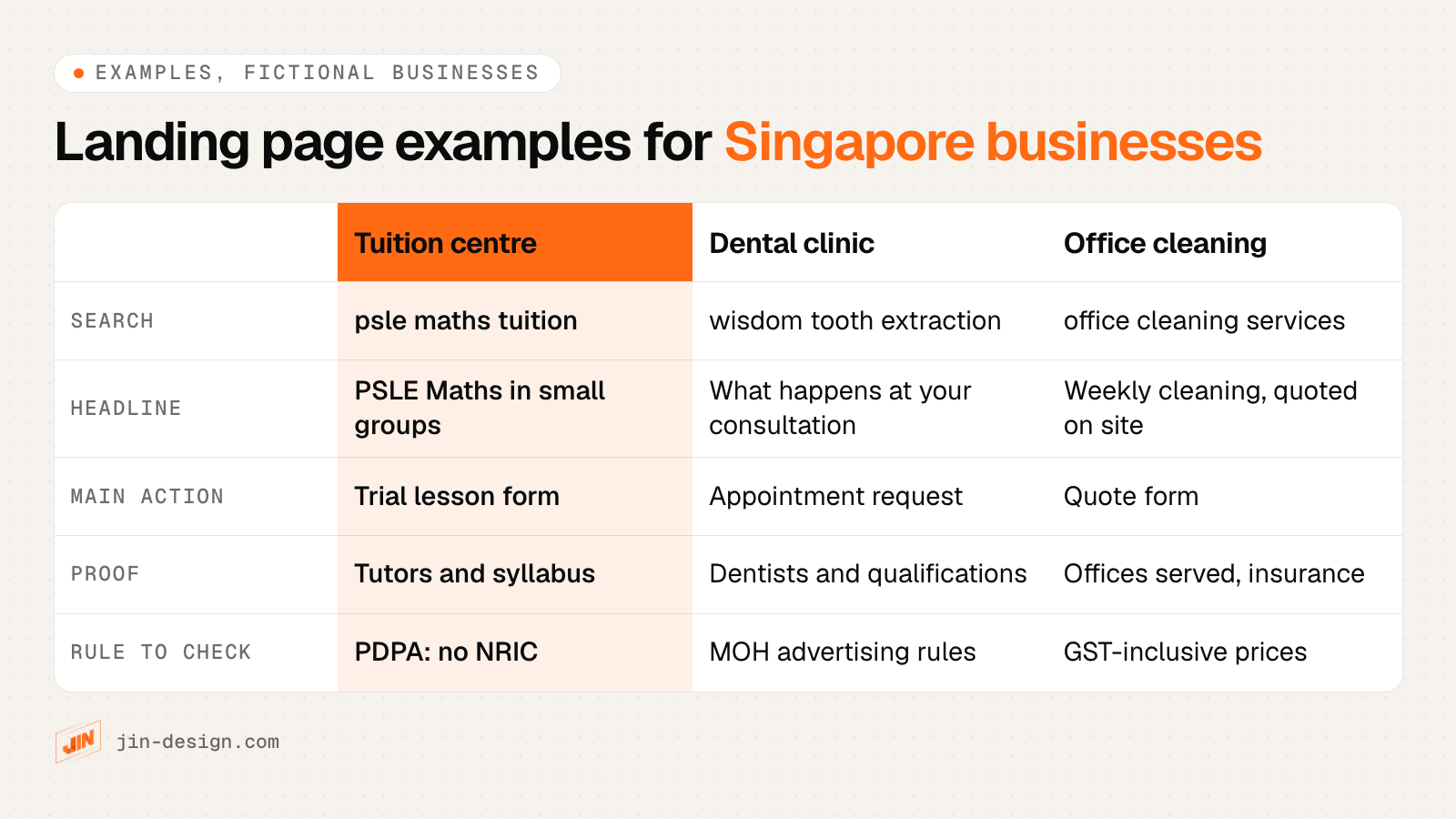
Two things the examples have in common. The headline uses the searcher’s words, so the visitor knows at a glance they are in the right place. The form asks only what the business needs to reply, which keeps the PDPA side simple and makes the form quicker to finish.
The clinic example also shows where Google’s general advice and Singapore rules differ. Google suggests adding customer reviews to landing pages, but MOH’s regulations only allow a clinic to show a patient’s review on its own website or social media under the conditions in regulation 14, covered in the section on regulated sectors below.
Free download
Landing page brief (Word). Write down the campaign goal, keyword themes, the promise in the ad, the page outline, the tracking plan and compliance notes on one document, with guidance under every heading and a filled example for a fictional Singapore business.
How fast should a Google Ads landing page load on mobile?
Fast enough to pass Google’s Core Web Vitals on a phone. According to web.dev, a page is in the good range when its largest content appears within 2.5 seconds (LCP), it responds to taps within 200 milliseconds (INP) and its layout shifts no more than 0.1 (CLS). web.dev recommends measuring them at the 75th percentile of visits, separately for mobile and desktop, so the target has to hold for most visitors on ordinary phones.
Check the field data, not only the lab score, in PageSpeed Insights. A new page may not have enough visits for field data yet; test it on a mid-range phone on mobile data in the meantime.
Landing pages tend to slow down for the same few reasons:
- An autoplay video or a large image slider in the first screen
- A chat widget that loads before the content
- Several tracking and remarketing tags added over time
- Pop-ups that appear on arrival, which Google also lists as clutter to avoid
- Web fonts and images that are larger than the screen needs
Remove what the first screen does not need, load the rest after it, and keep one tag manager for every tracking script. Our speed optimisation work covers this for existing pages.
Form, WhatsApp or call: which should a Singapore landing page use?
Choose by what the customer needs to tell you before you can help. Offer two options at most, and make one of them the main button.
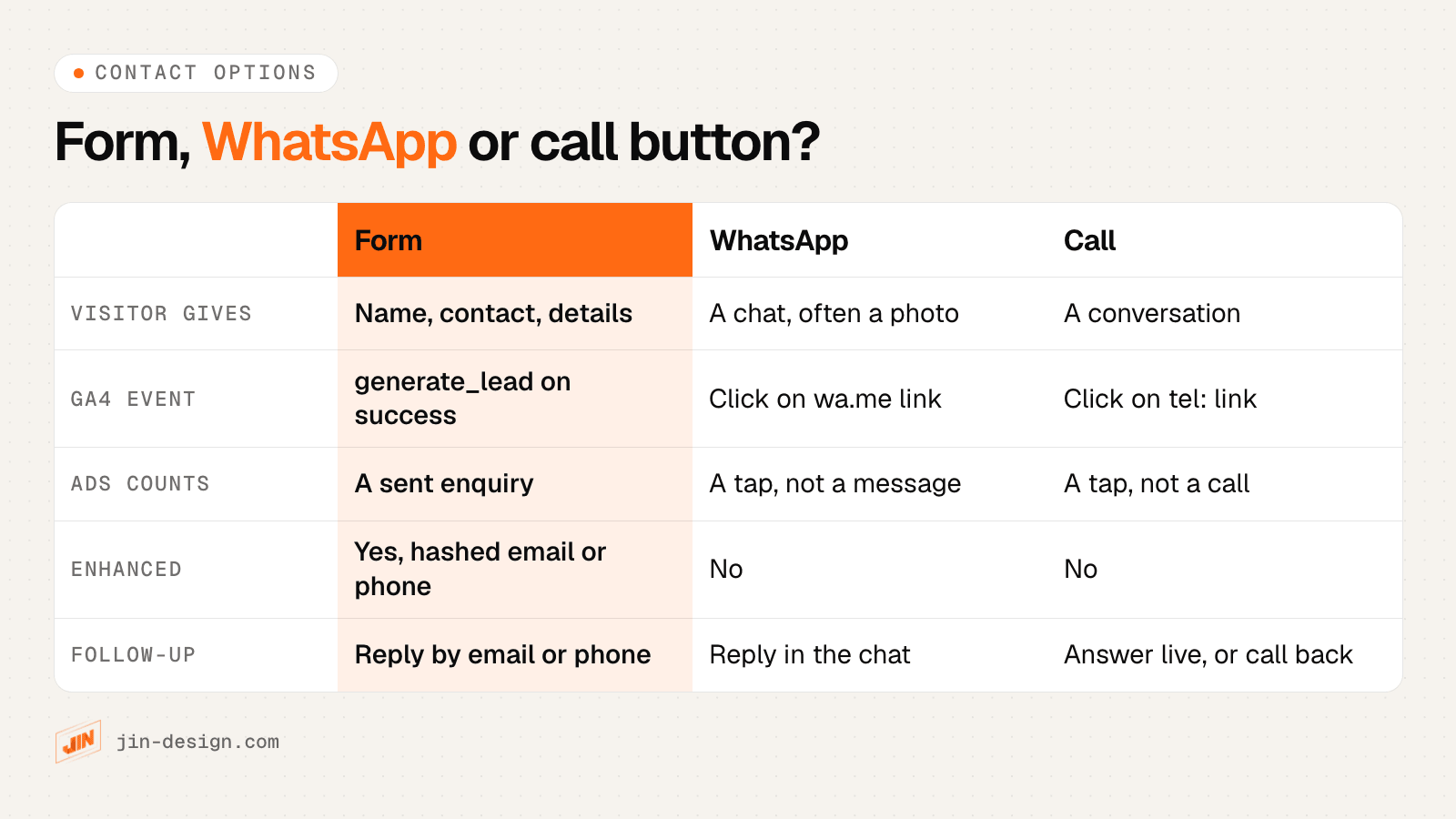
- Form: best when you need details to quote, such as a renovation, an event or a B2B service. It is also the only option of the three that can send hashed contact details to Google Ads for enhanced conversions.
- WhatsApp: best for quick questions and jobs a photo explains, such as a faulty unit or a damaged item. Pre-fill the message with a short reference for the campaign, for example “Hi, I’m asking about the chemical wash (CW)”, so your team can tell which ad the chat came from.
- Call: best for urgent jobs where people want to speak to someone now. Show your opening hours next to the button so evening clicks are not wasted.
Call tracking works differently in Singapore. Tracking real phone calls in Google Ads, including how long they lasted, relies on Google forwarding numbers, and Google’s list of countries where they are available does not include Singapore (checked October 2026). What you can track is a tap on the number, using Google’s option to measure phone number clicks on a mobile website. WhatsApp works the same way: the tap is tracked, the message is not.
That makes taps a weaker signal than a submitted form. Compare them each month with the calls and chats your team actually received. In Pulse, the analytics dashboard we build into our clients’ websites, form enquiries and taps on phone, email and WhatsApp links are counted together as conversions, and each enquiry shows the button and page that sent it.
How do you track landing page conversions in GA4 and Google Ads?
Set up the tracking and test it before the campaign spends anything. This is the order we follow:
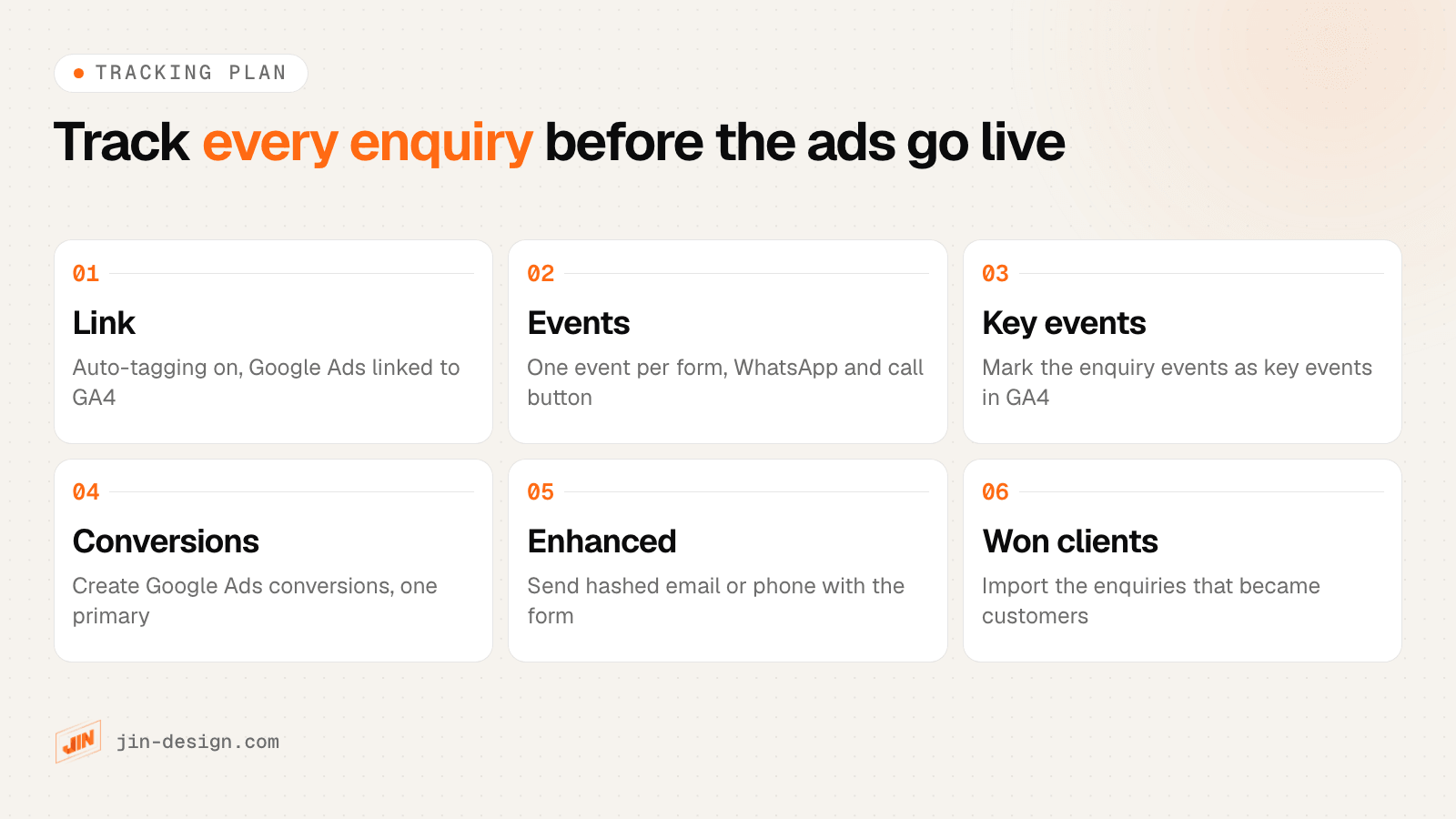
- Link the accounts. Keep auto-tagging switched on in Google Ads and link it to your GA4 property. Google Ads clicks then arrive with a click ID and need no UTM tags. Tag every other link you share, such as Meta ads, WhatsApp broadcasts and emails, with our UTM builder.
- Create one event per contact option. For the form, use GA4’s recommended event generate_lead, fired when the submission succeeds rather than when the button is pressed. For the buttons, fire events such as
whatsapp_clickandphone_clickon taps ofwa.meandtel:links. - Mark them as key events in GA4. Google now calls important GA4 actions key events, and you create Google Ads conversions from them once the accounts are linked.
- Choose one primary conversion. Primary conversion actions are the ones Google Ads uses for bidding, as long as the campaign uses the goal that contains them. Start with the form enquiry as primary and the taps as secondary, then review once you know how many taps become real conversations.
- Turn on enhanced conversions for the form. Enhanced conversions send the email or phone number from the form, hashed with SHA-256, so Google can match more conversions to ad clicks. Mention it in your privacy policy.
- Import the enquiries that became customers. Not every enquiry is worth the same. Sending “won” results back lets Google Ads learn which clicks bring paying customers.
We have built the last step into our own website. Each enquiry stores the Google click ID it arrived with (gclid, or gbraid or wbraid for some iPhone clicks), and the site produces a daily file with two conversions: “Website enquiry” when the form arrives, and “Won client” when we mark the enquiry as won. It is built and ready to connect to Google Ads. This is the kind of setup our tracking and analytics service covers.
What should a PDPA consent line say on a landing page form?
The PDPC’s data protection obligations include notifying people of the purposes for which you collect their personal data, and only collecting, using or disclosing it for purposes they have consented to, with a way to withdraw that consent. On a landing page form, that usually means a line like this next to the submit button:
By sending this form, you agree that Northwind Aircon may use your name, phone number and email to reply to your enquiry and arrange your service. See our privacy policy.
Then add a separate, optional, unticked box for marketing:
☐ I would also like to receive offers and maintenance reminders by WhatsApp, SMS or email.
A few points that matter on Singapore landing pages:
- Check the Do Not Call Registry before marketing. Before you send a marketing message by call, text or fax to a Singapore number, the PDPC requires you to check the number against the DNC Registry. Its guide to the DNC provisions explains the exceptions: you need no check if the person has given clear and unambiguous consent to receive the message, and messages whose only purpose relates to an ongoing relationship, such as a membership or account, are not covered by the DNC rules at all (PDPA Eighth Schedule, paragraph 1(1)(e)). A one-off purchase is not an ongoing relationship, and a message that also promotes something else is still covered. The PDPC also explains how to check numbers against the registry.
- Do not ask for NRIC numbers. The PDPC’s advisory guidelines on NRIC numbers say organisations generally should not collect them unless the law requires it or identity must be verified to a high degree of fidelity. A quote request does not need one.
- Ask only for what you need to reply. Every extra field is one more thing to protect, and one more reason to leave the form.
- Say how ad measurement uses the data. If the form sends hashed details to Google Ads or Meta, your privacy policy should explain it.
This is general guidance, not legal advice. If your business handles sensitive data, check the wording with your data protection officer.
What advertising rules apply to clinic, finance and property landing pages in Singapore?
Some sectors have rules that decide what the page may say and show. Check them before you write the page, because they change the design as well as the copy.
| Sector | Rule | What it means for the landing page |
|---|---|---|
| Licensed healthcare, such as medical and dental clinics | MOH’s Healthcare Services (Advertisement) Regulations 2021 | Factual, substantiated claims only. No before-and-after or after-only photos, no laudatory statements or superlatives, no comparisons with other providers. |
| Financial services | Google’s financial services verification for Singapore, required since 30 August 2022 | Verify the advertiser with Google, based on MAS licensing or the other listed registers, before the campaign starts |
| Property | CEA’s Practice Guidelines on Ethical Advertising, PG 02-11, on the CEA practice guidelines page | Show the salesperson’s name and CEA registration number, the estate agent’s name and licence number, and the salesperson’s registered contact number |
For clinics, the healthcare regulations cover more than claims. Regulation 5 also says an advertisement must not solicit or encourage the use of the service. Reviews, testimonials and endorsements are not allowed in advertisements, except that regulation 14 lets a licensee show a patient’s review or testimonial on its own website or social media account if the person gave it directly to the licensee, was not paid or given any other benefit for it, and it has not been substantively edited or reproduced. Regulation 6(4) stops advertising through push messages, such as SMS or WhatsApp, without the person’s prior written consent, which matters if a clinic’s form asks for a marketing opt-in. Regulation 15 stops a clinic advertising a programme that gives patients a gift or other benefit based on the value or type of healthcare service they buy, where the purpose or effect is to encourage use of the service; payment plans shown only when payment is asked for, and some corporate social responsibility and charity programmes, are exempt. Regulation 16 covers links: the clinic’s website must not link to another website whose content breaks the same kinds of rules, such as misleading claims, before-and-after photos, superlatives or testimonials, and once the clinic becomes aware of such a link it must remove it straight away. The regulations apply to advertisements by a licensee, or someone acting for it, that can be seen by a person in Singapore, which includes a landing page.
In practice, a clinic landing page leans on facts: the service, who provides it, what to expect at the visit, opening hours, location and clear answers to common questions. That is often what a nervous patient wants to read anyway.
For property, the CEA guideline applies to online advertising, and it also requires the owner’s consent before a property is advertised. For financial products, verification with Google is about whether the ads can run at all; what the page says about the product follows the rules of your licence, so involve your compliance team.
How much traffic do you need to A/B test a Google Ads landing page?
More than most small Singapore campaigns get in a month. Here is a worked example, using the standard sample size calculation for comparing two conversion rates, at 95% confidence and 80% power.
Say Northwind Aircon’s chemical wash page gets about 80 paid clicks a day, and 4 in every 100 visitors send an enquiry. These are example numbers for a fictional business, not benchmarks. It wants to test a new first screen against the current one, splitting visitors evenly.
| Improvement you want to detect | Visitors needed per version | Total visitors | Days at 80 clicks a day |
|---|---|---|---|
| From 4 to 5 enquiries per 100 | 6,745 | 13,490 | About 169 |
| From 4 to 6 enquiries per 100 | 1,863 | 3,726 | About 47 |
The smaller the difference, the more visitors you need, and the required number grows quickly. At this traffic level, a test can only find large differences in a reasonable time. That points to testing changes big enough to matter, such as a different offer, WhatsApp instead of a form as the main button, or a new first screen, rather than a button colour.
A few practical rules:
- Use a proper split. Google Ads custom experiments share a campaign’s traffic and budget between the original and the experiment. Google recommends a cookie-based split, so each person sees one version, and a 50% split.
- Decide the sample size before you start, and do not stop the test the day one version pulls ahead.
- Run whole weeks. Searches and enquiries can differ between weekdays and weekends, so stopping mid-week can skew the result.
- Watch behaviour while you wait. Heatmaps, scroll depth and the journey of each enquiry show where people hesitate, which is often enough to find the next thing to fix.
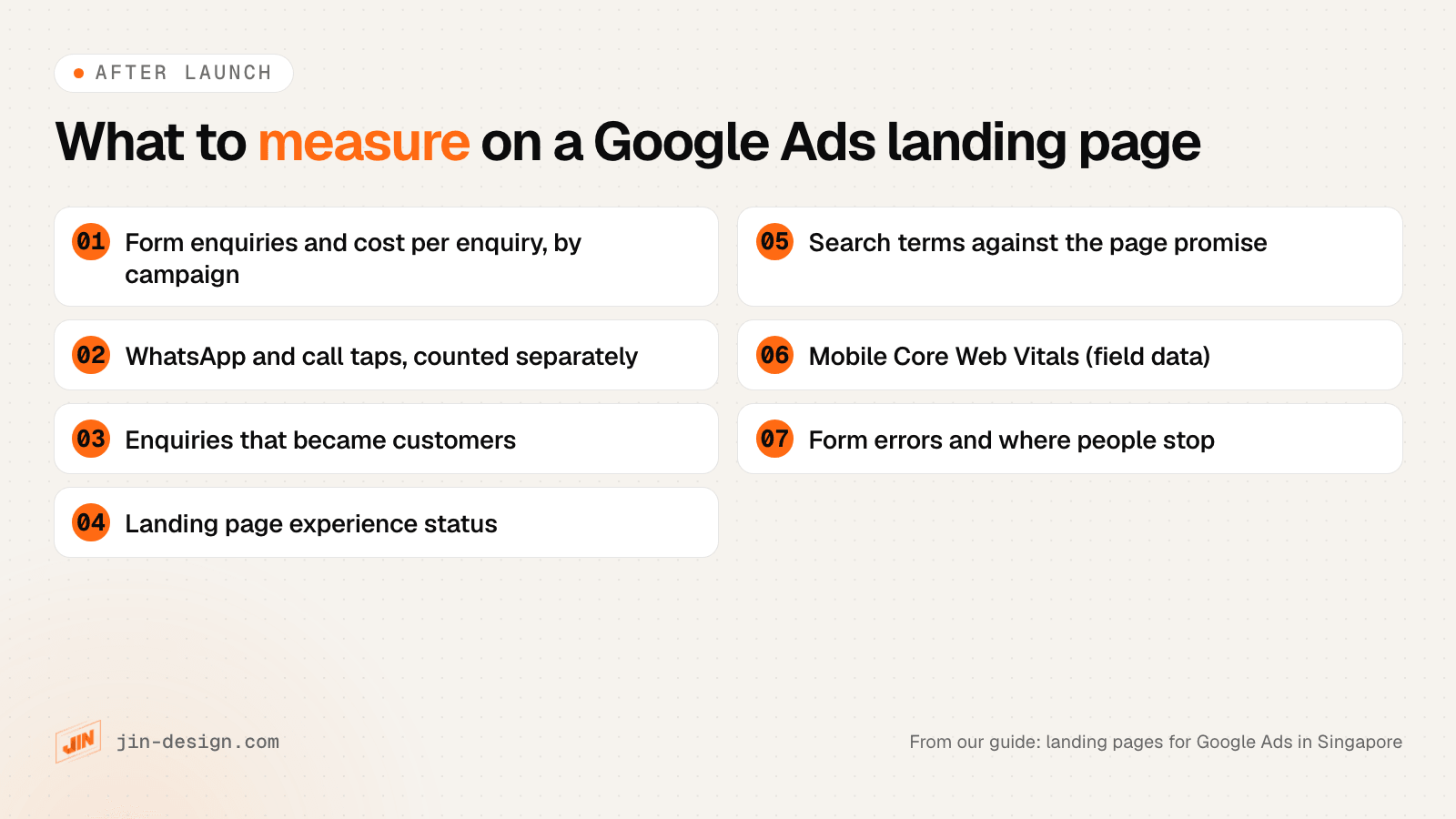
What should you measure after a Google Ads landing page goes live?
Check the first week for tracking errors, then review monthly.
In the first week:
- Send a test enquiry through each contact option and confirm it appears in GA4 and in Google Ads.
- Compare the enquiries in your inbox with the conversions Google Ads reports. A large gap means the tracking or the form needs fixing.
- Check that the page loads and the ads are approved for every ad group pointing at it.
Every month:
- Form enquiries and cost per enquiry, split by campaign, so you can see which themes pay their way.
- WhatsApp and call taps, counted separately from form enquiries, and compared with the chats and calls your team received.
- Enquiries that became customers. Cost per enquiry can hide campaigns that bring many low-quality leads.
- Landing page experience status. In Google Ads, add the Quality Score columns to the keywords report and look for keywords rated Below average.
- The landing pages report. Under Campaigns, then Insights and reports, Google Ads lists each landing page with its clicks and a mobile-friendly click rate. A rate below 100% means some mobile clicks reached a page Google did not consider mobile-friendly.
- Search terms against the page. If people reach the page with searches it does not answer, add negative keywords or a new ad group and page.
- Mobile Core Web Vitals in PageSpeed Insights, after any change to the page or its tags.
- Form errors and drop-off. Fields that people abandon, or errors on phone number formats, are quick wins.
Need help with landing pages for Google Ads in Singapore?
We design, write and build landing pages for Google Ads, and set up conversion tracking and analytics for forms, WhatsApp and call buttons, so you can see which campaigns bring in enquiries and clients. Start with the landing page brief, or talk to us about your campaign.
If you are choosing a team to run the ads themselves, our guides to SEM and PPC agencies in Singapore and Facebook and Instagram ads agencies cover what to ask.
Frequently asked questions
What are the landing page requirements for Google Ads?
Under Google's destination requirements, the page must work, be crawlable by Google Ads, be reachable in the country you target, stay on the same domain as the ad without redirecting elsewhere, offer original content and be easy to navigate. Pages that break these rules can get ads disapproved. Separately, landing page experience in Quality Score rewards pages that are relevant and useful to the people who click.
What does Google Ads look at on a landing page?
Landing page experience is one of the three parts of Quality Score, alongside expected click-through rate and ad relevance. Google describes it as how relevant and useful the page is to people who click the ad. Google's own advice is to match the page to the ad's promise, repeat the ad's call to action, put key information near the top, keep the page fast on mobile and avoid clutter such as pop-ups.
Why is my Google Ads landing page experience below average?
Usually because the page does not answer what the keyword and ad promised, loads slowly on phones, or makes visitors hunt for the next step. Find the keywords rated Below average, compare their search terms with the page headline, and give themes that do not match a page of their own. The rating compares you with other advertisers on the same searches, so it can drop when competitors improve their pages.
Should I send Google Ads traffic to my homepage?
Usually not. A homepage speaks to every visitor, so the promise of a specific ad gets lost among other services. A page for each ad group theme repeats the ad's words, answers that searcher's questions and asks for one action. If budget is tight, start with a dedicated page for the campaign that spends the most.
Can I track phone calls from a landing page in Singapore?
Google Ads can count taps on a phone number on your mobile site, but tracking the calls themselves, with call length, needs a Google forwarding number. Google's list of countries where forwarding numbers are available does not include Singapore (checked October 2026). Count taps in Google Ads and GA4, and log the calls you actually receive so you can compare the two.
How do I track WhatsApp clicks as a Google Ads conversion?
Fire a GA4 event when someone taps a link to wa.me or api.whatsapp.com, mark it as a key event, then create a Google Ads conversion from it in the linked accounts. It counts taps, not messages sent, so keep it as a secondary conversion until you know how many taps become real chats.
Do I need a PDPA consent checkbox on a landing page form?
You need to tell people why you are collecting their details and only use them for that purpose, under the PDPC's notification and consent obligations. A clear line next to the submit button covers replying to the enquiry. Marketing messages need their own optional, unticked opt-in. Before sending marketing calls or texts to Singapore numbers, check them against the Do Not Call Registry, unless the person gave clear and unambiguous consent. Messages whose only purpose relates to an ongoing relationship, such as a membership or account, are outside the DNC rules; a one-off purchase is not an ongoing relationship.
How much traffic do I need to A/B test a landing page?
More than most small campaigns get. In our worked example, a page converting 4 in 100 visitors needs about 6,745 visitors per version to reliably detect a rise to 5 in 100, at 95% confidence and 80% power. Spotting a rise to 6 in 100 needs about 1,863 per version. With small budgets, test big changes such as the offer or the main contact option.