





Free website brief template (Word)
A Word document for describing a new website or a redesign before you ask agencies for quotes. Fill in each section, send the same brief to every agency, and ask for proposals priced against it, so the quotes you get back can be compared line by line.
Free downloadWord fileNo sign-upBy JIN Design
What is inside
- Sections for goals and how success is measured, audience, pages and layouts, content, features and integrations, platform and editing, your existing site, tracking, PDPA and accessibility, budget, timeline and decision makers
- Grey guidance text under every heading that explains what to write; delete it once filled in
- Tables for the page list and layouts, who supplies each piece of content, integrations by product name, tracking and the people who decide
- A PDPA and accessibility checklist with Word check boxes you can click, and links to the PDPC, the PDPA and WCAG 2.2
- A list of what to ask back in each proposal, so agencies price against the same sections
- Part 2: the whole brief filled in for a fictional Singapore tuition centre, with no prices
Word document (.docx), no macros. Free to use for your own website and for websites you manage for clients; please do not resell the file.
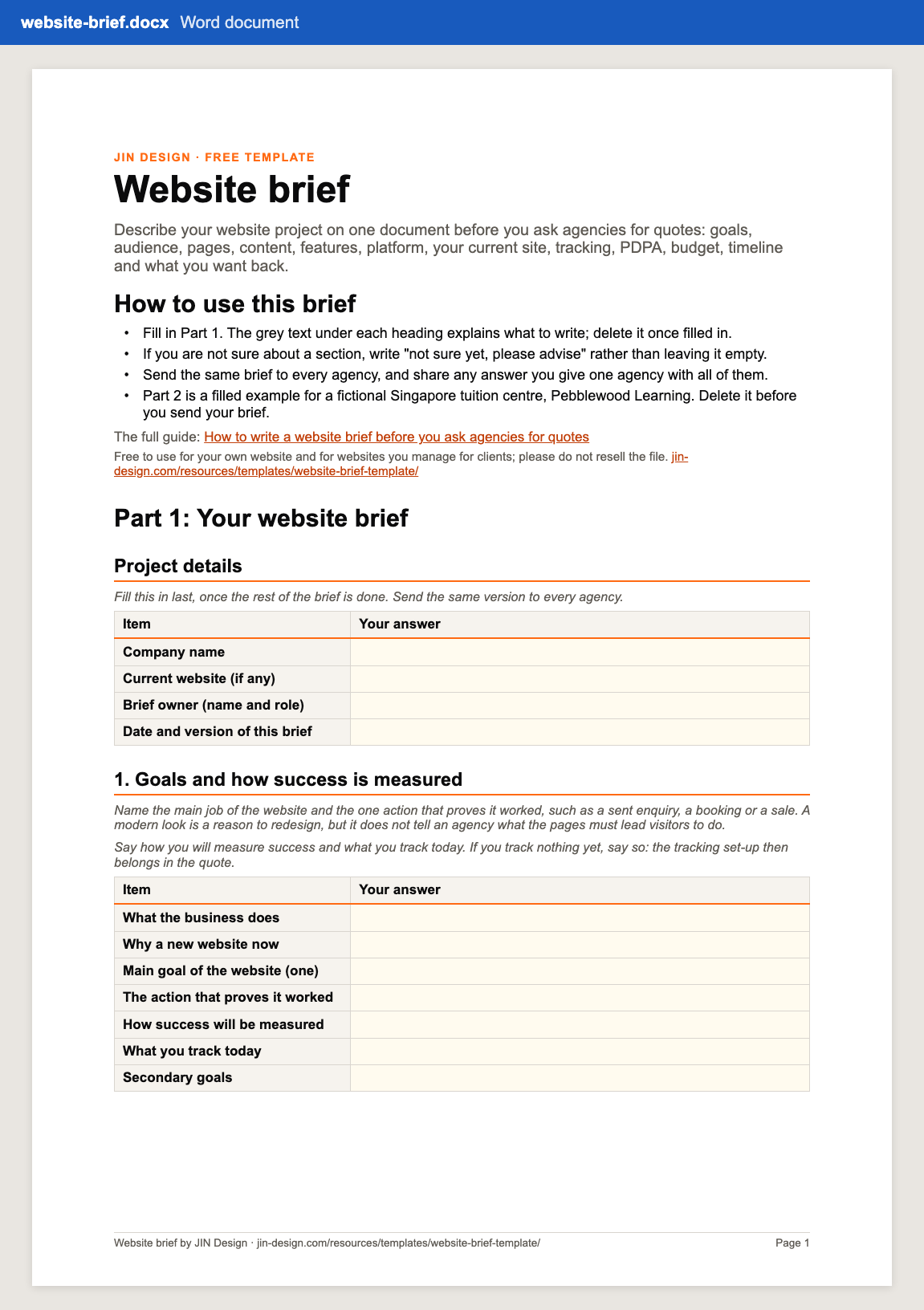
How to use the website brief
- Download the file and open it in Microsoft Word. Read the short "How to use this brief" list on the first page.
- Fill in sections 1 to 5 first: the goal, the audience, the pages grouped by layout, who supplies the content and the integrations you need, named by product.
- Fill in the platform, your existing site and the tracking you need. If you have a website, attach a list of your most visited pages.
- Click the check boxes in the PDPA and accessibility section, add a budget range or say how you want options priced, and name the people who decide.
- Click what you want back in section 12, delete the grey guidance and Part 2, and send the same brief to every agency on your shortlist.
Why send agencies a website brief before asking for quotes?
An agency prices the work it expects to do. When a brief does not say how many layouts the site needs, who writes the copy or whether an old site has to move, each agency fills the gap with its own assumption, and the quotes stop being comparable.
A written brief gives every agency the same project to price. Section 12 asks each one to price against the brief's sections and list its assumptions and exclusions, so the differences between proposals are easy to see. Our guide on how to write a website brief explains every section, with a condensed version of the filled example.
What should the existing site section of a website brief cover?
If you already have a website, this section protects your Google traffic. Google's guide to moving a site with URL changes asks you to map every old URL to its new one, use server-side permanent redirects and keep them for at least a year. When we moved jin-design.com off WordPress, our redirect list ran to more than 250 old addresses.
The brief asks for your page count, your most visited pages and who holds the domain, hosting and email accounts, so agencies can price the redirect work and nothing is lost at launch. Our free sitemap checker lists the pages in your current sitemap.
Can a grant pay for the website in your brief?
Only in specific cases. Enterprise Singapore replaced PSG, EDG and MRA with the EDGE Grant on 30 September 2026, and its list of pre-approved single-function solutions has no category for a company website on its own.
An E-Commerce Online Shop (B2C) package can get up to 50% support for SMEs on a cost capped at S$5,000, covering software costs for 12 months. The package should match the vendor quotation exactly, and you must not start work or pay a deposit before you apply. The budget section of the brief has a line for the grant you plan to use, so agencies can quote accordingly. Our guide to grants for Singapore SME websites covers the details.
Website brief questions
Is the website brief template free?
Yes. Download it with no sign-up. It is free to use for your own website and for websites you manage for clients. Please do not resell the file.
Which app should I use to open it?
It is a standard Word document (.docx) with real headings and tables and no macros, made for Microsoft Word. If you use a different app, check the tables after opening the file.
Does the brief ask agencies for prices?
It asks each agency to price against the sections of your brief, with options on separate lines and running costs and GST shown clearly. The template itself has no prices from us or anyone else, and the filled example has none either.
Can I send the filled brief straight to agencies?
Yes, that is what it is for. Delete the grey guidance text and Part 2 first, so agencies see only your answers, and send the same version to every agency you ask.
More free templates
All templates →- Website scope worksheetList your pages, features and content, total three years of running costs, and compare up to three agency quotes side by side.
- Website maintenance checklistWeekly, monthly, quarterly and yearly website tasks with why each matters and how to check it, plus an incident log.
- Online store launch checklistEvery task from setup to the first 30 days after launch, with owners, due dates from your launch date and a test order log.
Start with a free consultation
Tell us about your website and we will tell you what we would change first.