




Free website scope worksheet (Excel)
An Excel worksheet for planning a new website before you ask for quotes. Write down what the site needs, send the same scope to every agency, then compare their quotes line by line with three years of running costs added.
Free downloadExcel fileNo sign-upBy JIN Design
What is inside
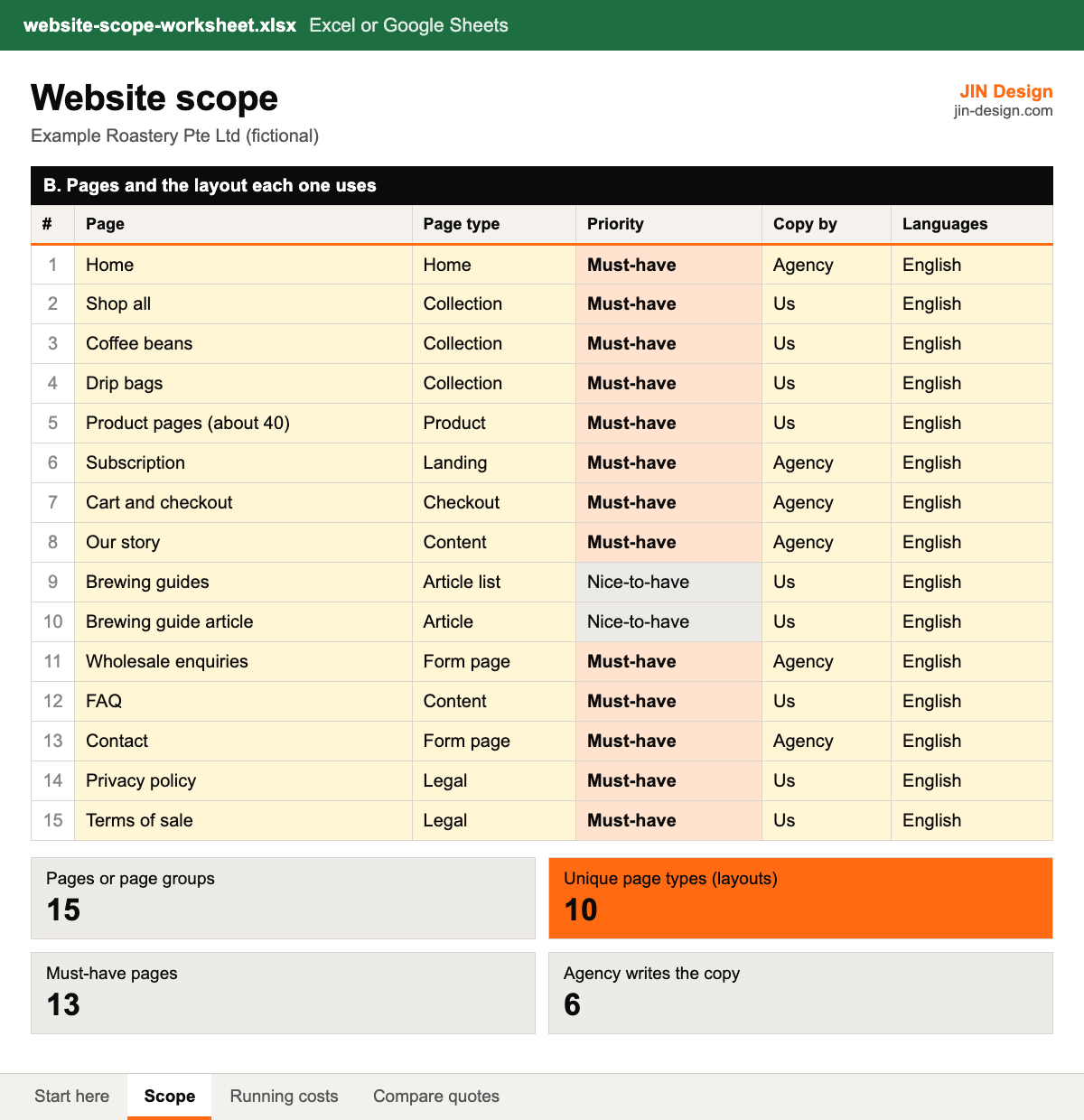
- A Scope tab for project basics, every page and the layout it uses, features and integrations, and the content you will supply
- Must-have and nice-to-have dropdowns, with a summary that counts unique page layouts for you
- A Running costs tab for one-off and yearly costs (domain, hosting or platform plan, email, apps, care plan) with a three-year total and GST
- A Compare quotes tab for up to three agencies: itemised lines, yearly costs, a three-year total and a what-is-included checklist
- Example rows for a fictional Singapore coffee roaster opening its own online store, ready to replace with your own
- No prices from us or anyone else: you type in the quotes you receive
Opens in Excel or Google Sheets. Free to use for your own website and for websites you manage for clients; please do not resell the file.
How to use the website scope worksheet
- Download the file and open it in Excel or Google Sheets. Read the Start here tab, then replace the example rows with your own.
- On the Scope tab, fill in the project basics, then list every page with its page type. Pages that share a layout get the same page type, for example every product page is "Product".
- Add features and integrations with the product you use for each, and the content you will supply with a date. Mark each line Must-have or Nice-to-have.
- Send the Scope tab to every agency you ask for a quote, and ask them to itemise their quote against it.
- Type each quote into the Compare quotes tab, mark what is included, and follow up on anything marked Unclear. Use the Running costs tab for a full three-year budget of the option you choose.
Why scope a website before asking for quotes?
Website quotes differ because each agency fills the gaps in a brief with its own assumptions. One assumes you supply the copy and the site reuses a few layouts; another assumes it writes everything and designs each page separately. Both can be fair prices for different projects.
A written scope removes most of that guesswork. When every agency prices the same pages, layouts, integrations and content, you can compare the quotes line by line. Our guide on how much a website costs in Singapore explains each cost driver in the worksheet.
How do you count page layouts for a website quote?
Design and build effort follows the number of different layouts more than the number of pages. Forty product pages that share one layout are one page type; a home page, an about page and a contact page are three.
In the Scope tab, give every page a page type. The summary counts the unique types for you, so you can see the figure most agencies will price. Group repeated pages into one row, such as "Product pages (about 40)", to keep the list short.
What running costs should a website budget include?
The build is paid once, but these come back every year: the domain renewal, hosting or a platform plan such as Shopify or Webflow, business email, paid apps, plugins or themes, and a care plan for updates, backups and fixes. They often go to different vendors, which is why they get left out when quotes are compared.
The Running costs tab counts monthly bills twelve times a year and one-off costs in year one only, then adds GST to any line you mark as excluding it. GST-registered businesses in Singapore charge GST at 9%, according to IRAS. The rate sits in one cell, so you can update it if it changes.
How do grants affect a website quote in Singapore?
Enterprise Singapore stopped accepting new PSG, EDG and MRA applications on 29 September 2026 and moved to the EDGE Grant. PSG run by other agencies for their own sectors moves to EDGE in phases from November 2026, according to the GoBusiness PSG FAQ.
Under EDGE, an e-commerce online shop from a pre-approved vendor can get up to 50% support for SMEs, on software costs capped at S$5,000 for 12 months. GST and maintenance are not supported, and you must not pay a deposit before you apply.
The list of pre-approved single-function solutions has no category for a company website on its own. If you are building an online shop and want to use EDGE, mark the line in the Compare quotes tab and check the package with the vendor before you apply.
Website scope worksheet questions
Is the website scope worksheet free?
Yes. Download it with no sign-up, and use and adapt it for your own projects.
Does it work in Google Sheets?
Yes. It is built for Excel and Google Sheets. Upload it to Google Drive and open it with Google Sheets; the dropdowns and formulas carry over.
Does the worksheet tell me what my website will cost?
No. It has no prices from us or any agency. It helps you describe the scope clearly, so the quotes you receive are comparable, and it adds up the quotes and running costs you type in.
Should I send the whole file to agencies?
Send the Scope tab, or the whole file with the Compare quotes tab cleared. Keep the comparison of other agencies' quotes to yourself.
Ready to move to AI-powered web?
Tell us about your website. We'll show you where it could work harder for you, without the sales pitch.