
Ecommerce Marketing in Singapore: A Practical Guide
Ecommerce marketing for Singapore online stores: GA4 tracking, product pages, Google Shopping, Meta ads, email under PDPA and GST-inclusive prices.
The short answer
- 01
Measure before you spend. Set up GA4's ecommerce events and test them with a real order, so every ad dollar can be traced to sales.
- 02
Fix the store, then buy traffic. Clear product pages with GST-inclusive prices and delivery costs shown early make Google Shopping, Meta ads and email work harder.
- 03
Keep the customers you win. Build an email list with PDPA consent, follow the Spam Control Act for bulk email, and send welcome and abandoned cart emails before chasing new channels.
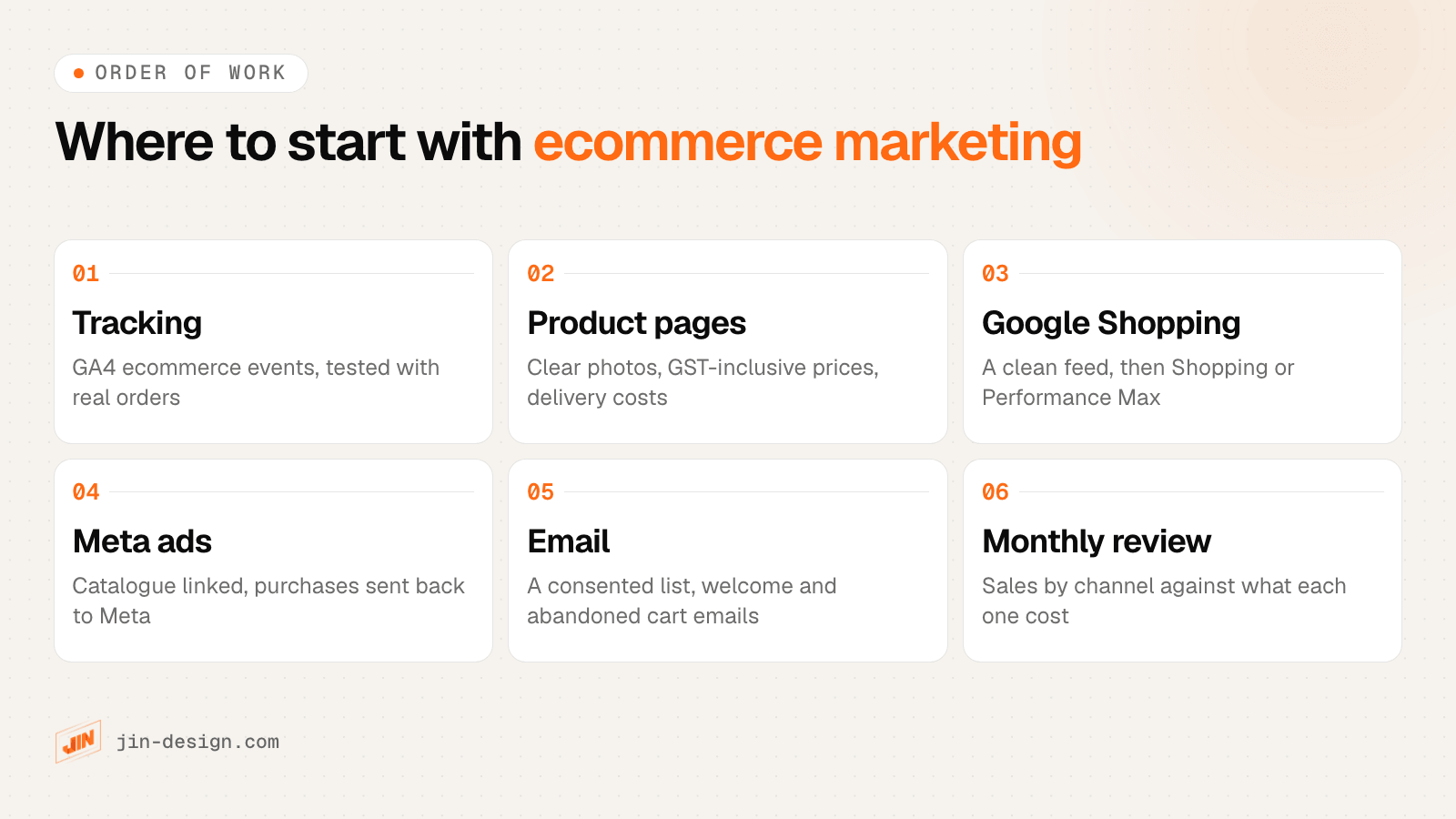
Ecommerce marketing in Singapore works best in a set order. First make sure you can measure sales, then make the product pages and checkout easy to buy from, then add paid traffic from Google Shopping and Meta, and use email to bring customers back. The Singapore details matter along the way: GST-inclusive prices, PayNow at checkout, PDPA consent and the Spam Control Act for marketing email.
We design and build online stores for Singapore businesses through our ecommerce website service, with tracking that ties each order to the campaign behind it. This guide turns the mistakes we see most often into what to do instead, channel by channel.
What does ecommerce marketing cover for a Singapore online store?
Ecommerce marketing is everything that brings shoppers to your store and turns them into repeat customers: search and Google Shopping, social ads, email, marketplaces, and the store itself.
SingStat’s retail sales release for August 2026 estimated that 15.7% of Singapore’s retail sales were made online, and 18.2% excluding motor vehicles. In the same month, online sales made up 63.7% of sales of computer and telecommunications equipment and 34.7% for furniture and household equipment. Shoppers are used to buying online, and they compare stores in a few taps.
That is why the store and the marketing cannot be planned apart. An ad can only bring someone to a page. Whether they buy depends on the page, the price, the delivery cost and the checkout.
How to set up ecommerce tracking in GA4 before you advertise
The most expensive mistake in ecommerce marketing is spending on ads before you can see which ones produce sales. Without purchase tracking, every channel looks equally good, or equally bad.
GA4 has a list of recommended events for online sales. Sending them fills GA4’s ecommerce reports, so you can follow shoppers from a product view to a purchase and see where they drop off.
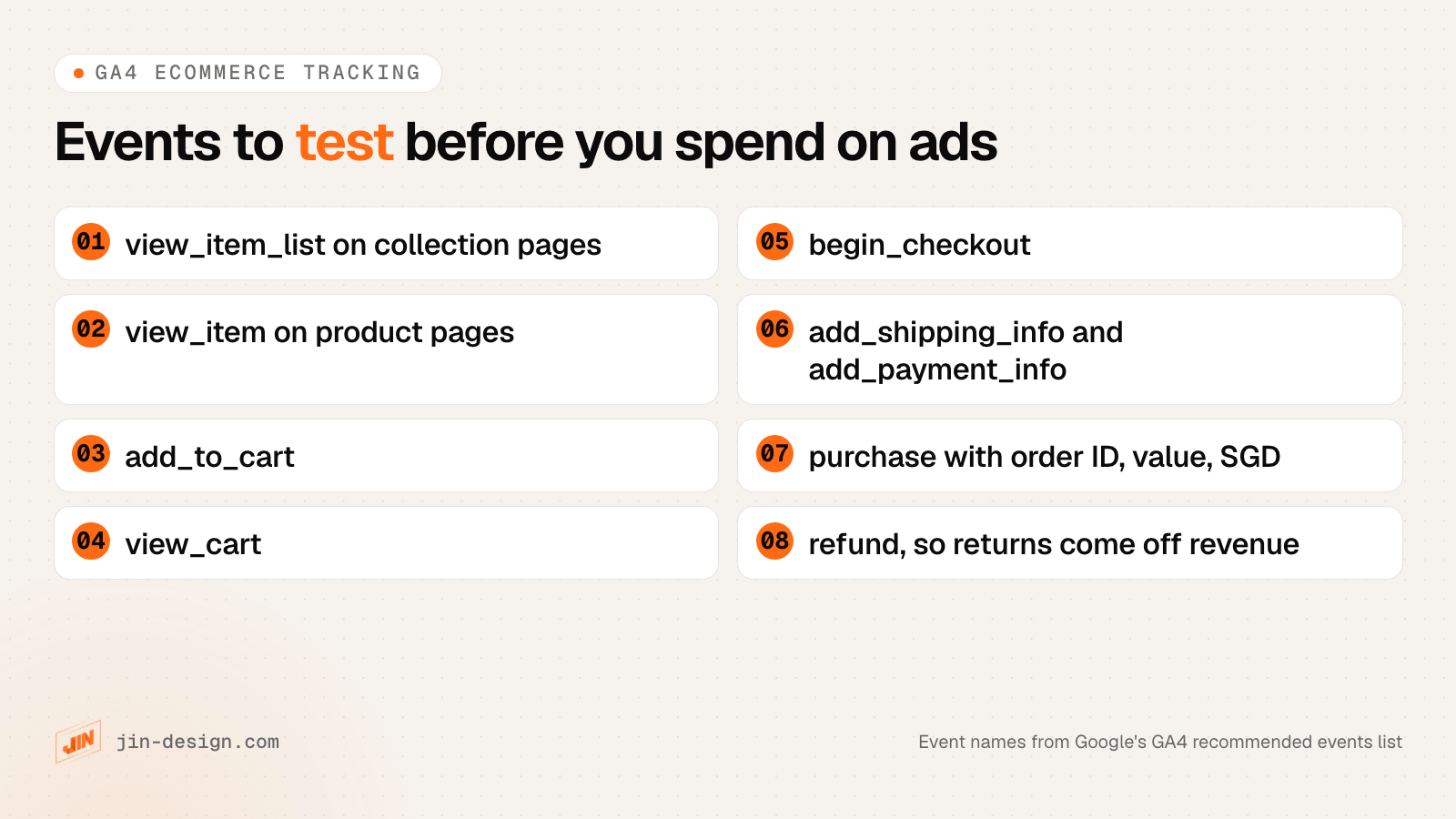
A few details decide whether the numbers can be trusted:
- The purchase event fires once, on the order confirmation, with the order ID, the value and the currency (SGD). Refreshing the thank-you page should not count a second sale.
- PayNow and other redirect payments return to your store. Some gateways send the shopper to a bank app or a payment page and back. Test that the purchase still records, and that GA4 does not credit the sale to the payment provider as the traffic source.
- Refunds are sent too, so revenue in GA4 is close to what you actually kept.
- Every campaign link is tagged. Google Ads tags its own clicks when auto-tagging is on. For Meta, email and WhatsApp links, add UTM tags; our free UTM builder builds them and flags names that GA4 sorts into the wrong channel.
Then place a real order with each payment method and compare GA4 with your store’s order list. If they disagree by more than a few orders a month, fix that before spending more. Our website analytics and tracking service sets up and tests these events, and on the stores we build each order also records the channel and campaign that brought the buyer.
Ecommerce product pages that make your marketing pay off
Paid traffic lands on product pages, so their quality decides how much each click is worth. Sending ads to the homepage and leaving out search and filters are still common mistakes, and the fixes are simple:
- Send ad traffic to the product or collection it mentions, not the homepage. For example, someone who clicked an ad for a rattan side table should land on that table.
- Give every product clear photos and a plain description: size, material, what is in the box, and care. Answer the questions customers ask your team on WhatsApp.
- Show the full price early. In Baymard Institute’s survey of US online shoppers, extra costs such as shipping, tax and fees were the most common reason for abandoning a checkout, given by 40% of those who abandoned one. Show the delivery fee, or the free delivery threshold, on the product page, not only at the last step.
- Offer the payment methods Singapore shoppers use, including PayNow and cards. Our guide to payment gateways for Singapore online stores compares the options.
- Add search and filters once you sell more than a handful of products, with filters for what people actually choose by: size, colour, price, material.
- Do not force account creation before checkout. Offer a guest checkout and invite people to create an account after they buy.
Google Shopping and Performance Max for Singapore stores
Google Shopping shows your products, with a photo and price, to people already searching for them. For most online stores it is the first paid channel to try.
It starts with Google Merchant Center, where you upload a product feed: titles, prices, availability, images and delivery costs. Singapore is one of the countries where Google offers free product listings, so a clean feed can earn free clicks before you spend anything. Shopify and WooCommerce both connect to Merchant Center through official Google integrations.
When you add paid campaigns, you have two main choices:
- Standard Shopping campaigns show your products in Shopping results and give you more control over which products get the budget.
- Performance Max uses the same feed but spreads ads across Google’s channels, including Search, YouTube and Display, and decides placement itself. It needs reliable purchase data to learn from, which is why tracking comes first.
Feed quality is where most of the gains are. Write titles the way people search, for example “Rattan side table, 45 cm, natural”, keep prices and stock in step with the store, and match the delivery fee in Merchant Center to what the checkout charges. If you are GST-registered, the feed price should be the same GST-inclusive price that the product page shows.
If you would rather hand campaigns to a specialist, our list of Google Ads and PPC agencies in Singapore sets out what to ask before you hire.
Meta ads for ecommerce in Singapore
Meta ads (Facebook and Instagram) reach people who are not searching yet. They suit products people buy once they see them: fashion, home, gifts, beauty, food.
What makes them work for a store:
- A product catalogue linked to your store, so ads can show the products a person viewed, and new shoppers see items from your range.
- Purchases sent back to Meta, through the Meta Pixel on the store and the Conversions API from the server. The server-side copy still records sales when a browser blocks the pixel, so Meta’s delivery learns from real orders. Shopify and WooCommerce both have Meta integrations that send these events.
- Creative made for the phone. Short video and clear product shots in the feed and Stories formats. Test different creative before you test different audiences.
Retargeting people who viewed a product or left a cart is usually the cheapest place to start, because they already know your store. Our guide to Facebook and Instagram ads agencies covers what agencies offer if you want help running them.
Email marketing and abandoned cart emails in Singapore
Email is often the channel that turns a first order into a second. You own the list, and a message costs far less to send than a click from an ad. Most stores start with a few automated emails rather than regular newsletters:
- A welcome email when someone joins your list, saying what they will receive and how often.
- An abandoned cart email a few hours after someone leaves items in the cart, showing what they left and the delivery fee.
- A post-purchase email with care tips or a related product, sent after delivery.
- A win-back email to customers who have not ordered in a while.
The rules in Singapore come from two laws. Under the PDPA, an email address is personal data: tell people what you will use it for and get their consent before sending marketing. Silence or inaction is not consent, so a pre-ticked box does not count. Under the Spam Control Act, unsolicited commercial email sent in bulk needs an unsubscribe facility and an <ADV> label, and unsubscribe requests must take effect within 10 business days.

In practice, our reading is this:
- At checkout, say what the email is for: order updates and a reminder if the cart is left unfinished. Keep the cart reminder about the cart.
- Ask for marketing consent separately, with an unticked box, and record when and where each person agreed.
- Put an unsubscribe link in every marketing email and honour it quickly, whatever the list size.
- SMS and WhatsApp marketing to Singapore numbers also fall under the PDPA’s Do Not Call rules: check the DNC Registry first unless you hold clear and unambiguous consent in evidential form.
This is general information, not legal advice. If your list came from somewhere other than your own sign-up forms, ask a lawyer before you send.
Marketplaces vs your own online store in Singapore
Shopee, Lazada, TikTok Shop and Amazon.sg bring shoppers who are already looking. Your own store brings none by itself, but it lets you set the design, the checkout and the customer relationship. Many Singapore sellers run both.
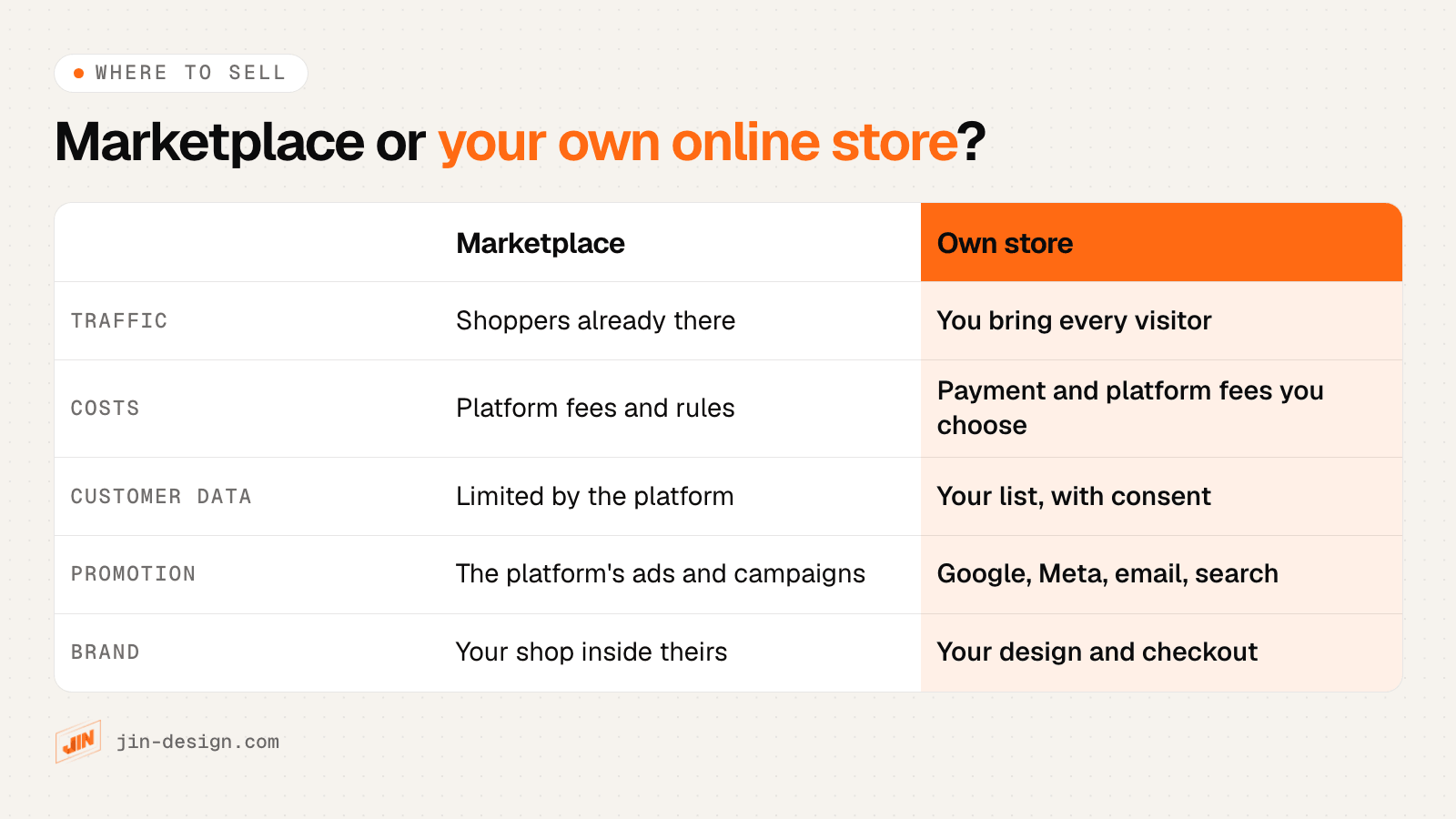
A common split is to use marketplaces to reach new buyers and test which products sell, and your own store for repeat customers, bundles, gift sets and anything that needs more explanation than a listing allows. Put a card in each marketplace parcel that invites buyers to your store, and check each marketplace’s rules on what you may include first.
When you plan your own store, the platform shapes what your marketing can do: the feeds, the tracking and the checkout options. Our overview of ecommerce platforms in Asia is a starting point.
GST-inclusive pricing in ads, feeds and product pages
If your business is GST-registered, IRAS requires you to display and quote prices inclusive of GST on all price displays, including advertisements and websites. GST is 9%. Where you show both a GST-inclusive and a GST-exclusive price, the inclusive price must be at least as prominent. IRAS says failing to comply may lead to a fine of up to $5,000.
For ecommerce marketing this touches more places than the product page:
- Product feeds for Google Merchant Center and the Meta catalogue.
- Ad copy and images that mention a price or a sale price.
- Email campaigns and promotion banners.
- The cart and checkout, so the price a shopper saw in the ad is the price they pay before delivery.
How to judge ecommerce advertising results
Judge each channel by the sales it brings against what it costs, using purchase data you have checked against your store’s orders.
- Revenue by channel after refunds, from GA4’s purchase data, compared with that channel’s spend for the month.
- Cost per order, compared with your margin on an average order, including delivery and payment fees.
- Repeat purchase rate, because a customer who orders three times can justify a higher first-order cost.
- Where shoppers drop off between product view, add to cart, checkout and purchase. A drop at the delivery step points to the fee, not the ad.
Compare whole months and change one thing at a time. No one can promise a set return from ads; results depend on your product, margins, competition and how well the store converts. Agency or platform benchmarks are a rough guide at best, because their stores and products differ from yours.
Ecommerce marketing checklist for Singapore stores
Run through this before you raise any ad budget:
- GA4 ecommerce events fire, and a real test order with each payment method, PayNow included, appears once with the right value.
- Every campaign link carries auto-tagging or UTM tags.
- Ads land on the product or collection they mention.
- Product pages show clear photos, a plain description, the GST-inclusive price and the delivery fee or threshold.
- Guest checkout is available, with the payment methods your customers use.
- The Merchant Center feed matches the store’s prices, stock and delivery fees.
- The Meta catalogue is linked and purchases reach Meta through the pixel and the Conversions API.
- Checkout says what the email is for, and marketing consent is a separate unticked box.
- Marketing emails carry an unsubscribe link, and requests are honoured promptly.
- Each month, you compare sales by channel with spend, after refunds.
Want a store built for ecommerce marketing?
We design and build online stores for Singapore businesses with PayNow checkout, product data ready for Google and Meta, and every order traced to the campaign behind it. See what our ecommerce website service includes, or talk to us about your store.
Frequently asked questions
What is ecommerce marketing?
Ecommerce marketing is everything you do to bring shoppers to an online store and turn them into repeat customers. It covers search and Google Shopping, social ads, email, marketplaces and the store itself: product pages, checkout and the tracking that tells you which of these channels produced each sale.
Which ecommerce advertising channel should a Singapore store start with?
Usually Google Shopping, because it reaches people already searching for the product, and Singapore is one of the countries where Google offers free product listings as well as Shopping ads. Meta ads suit products people buy on impulse or need to see first. Whichever you start with, set up GA4 purchase tracking and test it before the first campaign.
Should I sell on Shopee or Lazada, or build my own online store?
Many Singapore sellers do both. Marketplaces such as Shopee, Lazada, TikTok Shop and Amazon.sg bring shoppers who are already there, under the platform's fees and rules. Your own store means you bring every visitor, but you set the design and checkout and keep a customer list you can email with consent, which is what makes repeat sales cheaper.
Do I need consent to send marketing emails in Singapore?
Under the PDPA you need to tell people why you are collecting their email address and get their consent before using it for marketing; silence or a pre-ticked box is not consent. If you send unsolicited commercial email in bulk, the Spam Control Act also requires an unsubscribe facility and an <ADV> label. This is general information, not legal advice.
Can I send abandoned cart emails in Singapore?
In our reading, yes, if the shopper gave their email at checkout and you told them it would be used for order updates and reminders about their cart. Keep the reminder about the cart itself, keep marketing consent as a separate unticked box, and stop if they ask. This is general information, not legal advice.
Do prices in ads and product feeds need to include GST?
If your business is GST-registered, yes. IRAS requires GST-registered businesses to show GST-inclusive prices on all price displays, including advertisements and websites, and the GST-inclusive price must be at least as prominent as any GST-exclusive one. The GST rate is 9%. Your product feed should carry the same price as the product page.
How do I know if my ecommerce marketing is working?
Compare the sales each channel brings with what it costs, month by month, using GA4 purchase data that matches your store's own order records. Look at revenue after refunds and at repeat purchases, not only clicks or add-to-carts. No one can promise a set return; results depend on the product, margins, competition and how well the store converts.