
Why Is Font Important? The Importance of Fonts on a Website
Why fonts matter on a website: readability, brand impression, WCAG accessibility and page speed, plus how to choose and pair fonts for English and Chinese.
The short answer
- 01
Fonts decide whether people read your page. Size, weight, contrast and line spacing matter more than the typeface itself. A thin grey font at a small size can fail WCAG's 4.5:1 contrast minimum even when it looks elegant on a designer's screen.
- 02
Fonts shape the first impression. Visitors judge tone from the letterforms before they read a word, so the font should suit your customers and your sector, and stay the same across your site, ads and print.
- 03
Fonts cost loading time. Each family and weight is a file to download. Use one or two families in WOFF2 with font-display set, and on English and Chinese sites choose the Chinese font on purpose instead of leaving it to the visitor's device.
Font is important because it decides how easily people can read your website and how your business comes across before they have read a single sentence. On the web it also affects accessibility and page speed: a thin, pale font can fail WCAG contrast rules, and every font file is something the browser downloads before your text looks right.
We choose and test fonts as part of every website design and UI/UX project we take on. This guide covers what fonts change on a website, the accessibility and loading rules that apply, how to handle English and Chinese on the same page, and how to choose and pair fonts without a design degree.
Why is font important on a website?
A website’s font affects four things a business owner cares about: whether visitors can read the page, what they think of the business, whether the site works for people with low vision, and how fast the page appears.
| What the font affects | What goes wrong | What to check |
|---|---|---|
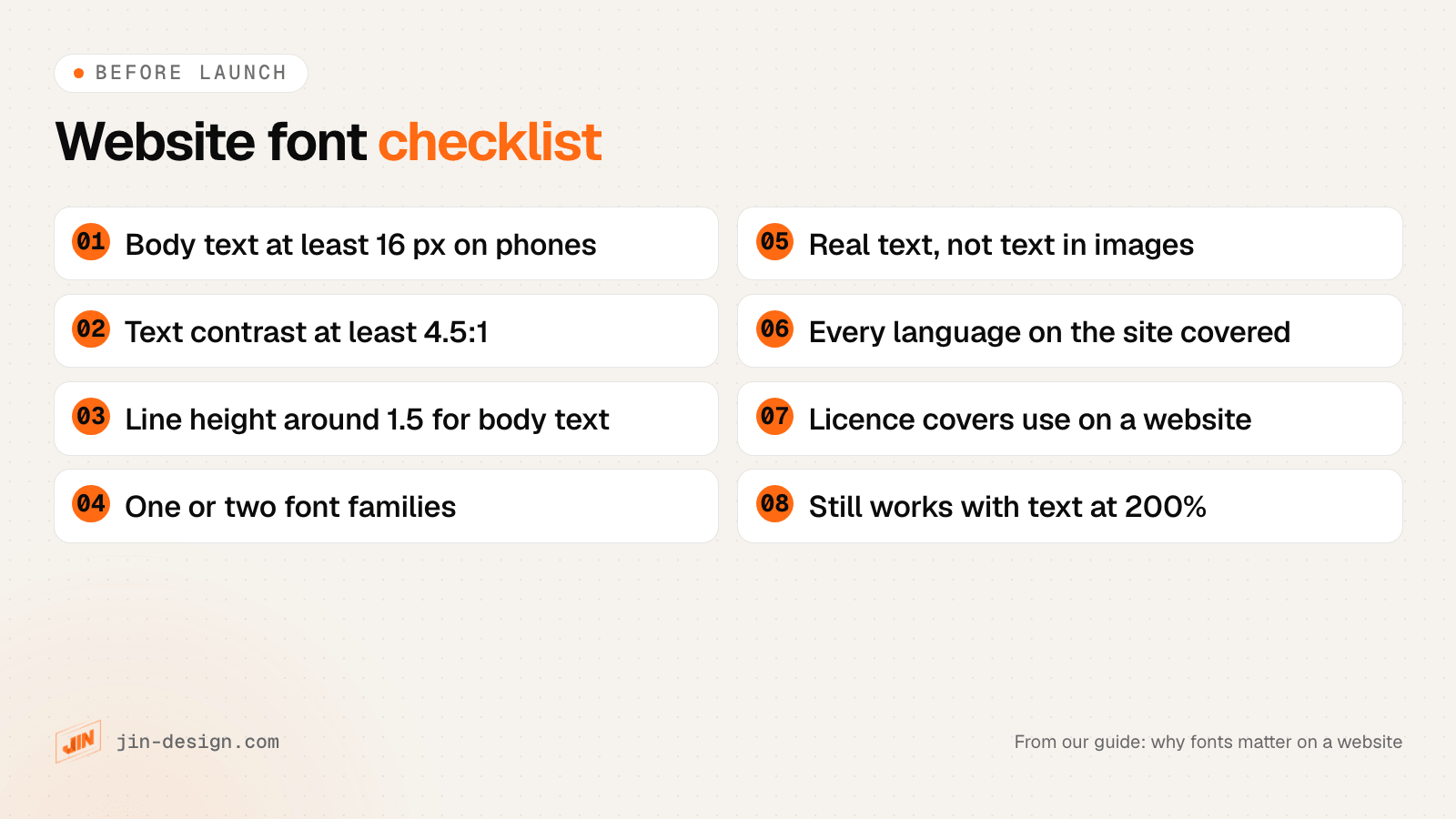
| Readability | Small, thin or pale text gets skimmed or skipped, especially on phones | Body text at 16 px or more, regular weight, line height around 1.5 |
| First impression | The tone of the letters clashes with the business, such as a playful script on a law firm site | Ask a few customers what the site feels like before they read it |
| Accessibility | Low-contrast or fixed-size text fails WCAG and shuts out readers with low vision | Contrast of at least 4.5:1, text that still works at 200% zoom |
| Page speed | Many font files, or large Chinese fonts, delay the text and shift the layout | One or two families, WOFF2 files, font-display set |
On a printed brochure, the font is a design choice. On a website it is also a technical one, because the font has to download, render on thousands of different screens and stay readable when a visitor zooms in.
How do fonts affect readability on a website?
Readability depends more on how a font is set than on which font you pick. The same typeface can be easy or hard to read depending on its size, weight, colour, line spacing and line length.
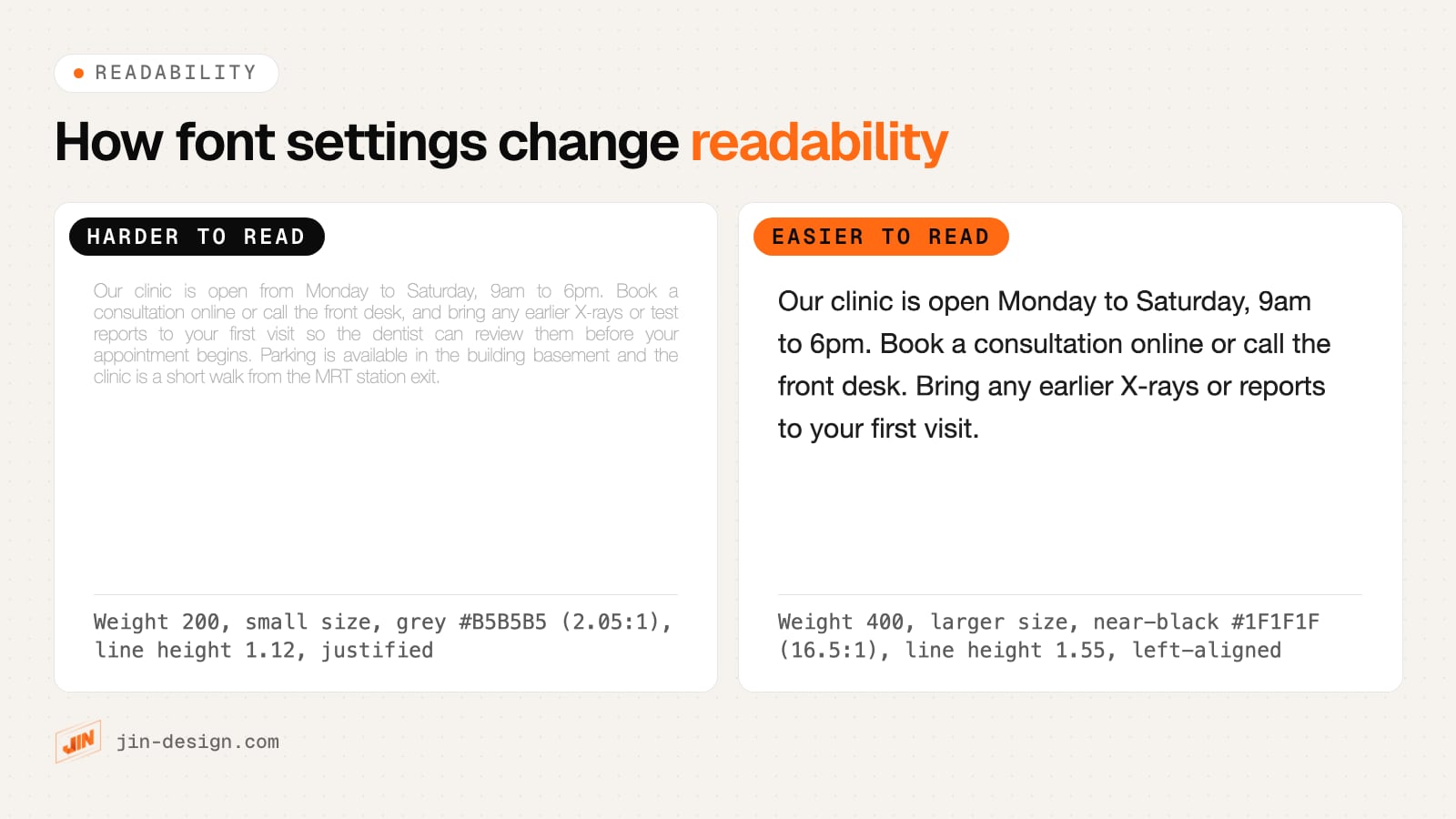
These are the settings that make the difference:
- Size. Most browsers default to 16 px, which is a sensible minimum for body text on phones. Some fonts look smaller than others at the same size, so judge by eye on a real phone.
- Weight. Light and thin weights look refined in a large heading and fade at body size. Keep paragraphs at a regular weight (400) and use light weights only for large text.
- Contrast. Pale grey text on white is popular in modern designs and often too faint. WCAG’s contrast minimum is 4.5:1 for normal text. Check your colours with our free contrast checker.
- Line height. Body text reads more comfortably with line spacing of about 1.5 times the font size. Tight spacing makes the eye lose its place when moving to the next line.
- Line length. Very long lines are tiring to follow. WCAG’s guidance on visual presentation uses 80 characters per line as a reference point, or 40 for Chinese, Japanese and Korean text.
- Alignment. Justified text on the web leaves uneven gaps between words, because browsers do not hyphenate words by default. Left-aligned text is easier to read.
Older readers notice all of this first. If many of your customers are older, or read your site on a phone outdoors, err towards larger, darker text.
Why do fonts matter for your brand?
People form an impression of a business from its letterforms before they read the words. A heavy serif can feel established and formal; a rounded sans-serif can feel friendly and approachable. The font is part of how you sound, in the same way your colours and photos are.
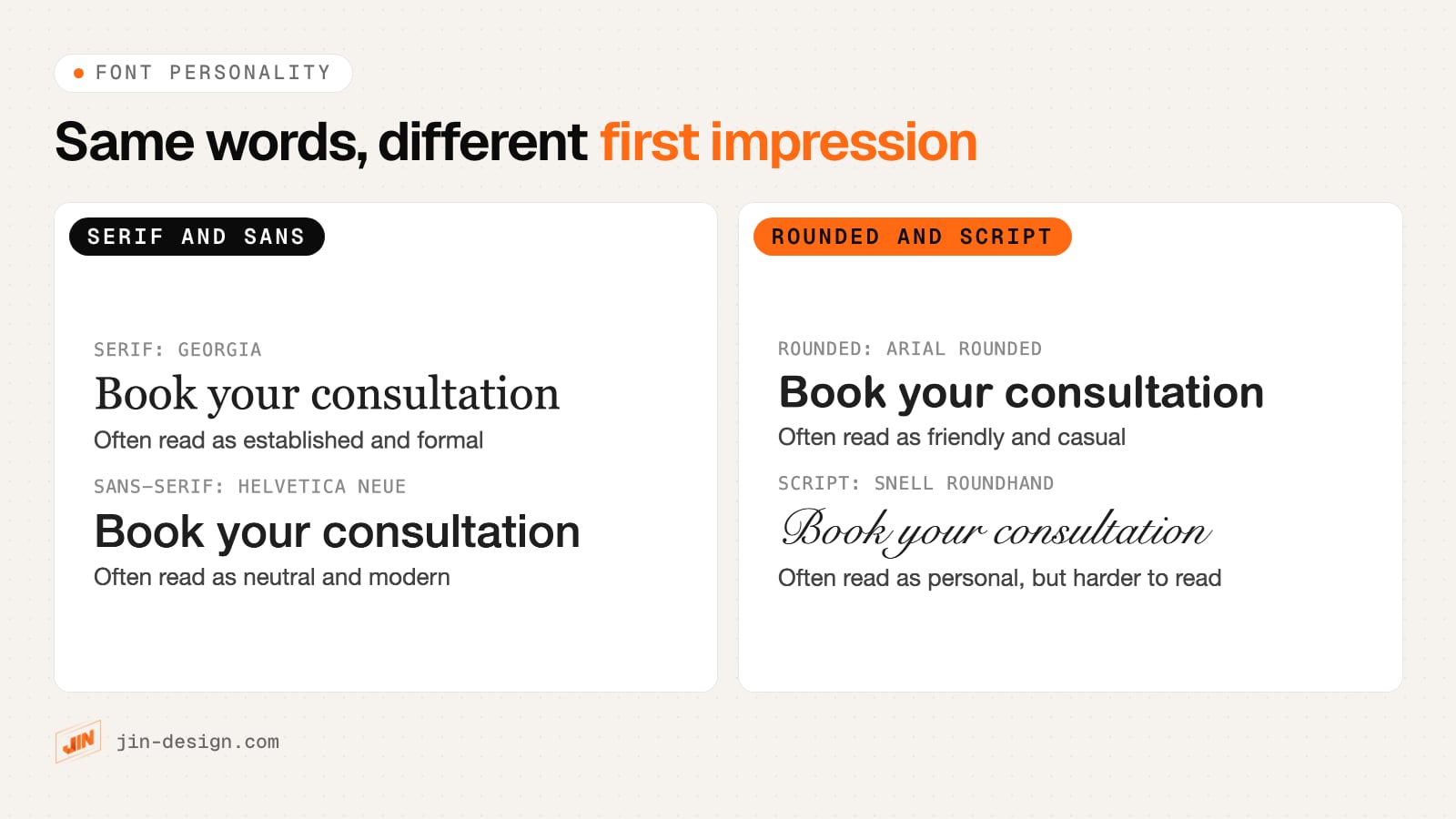
A few practical points for business websites:
- Match the font to your customers as well as your brand. A children’s enrichment centre can use a rounded font that would look out of place on an accounting firm’s site. The test is whether your customers would trust what they are reading.
- Keep it consistent. Use the same fonts on your website, proposals, ads and signage, so people recognise you. If your logo uses a custom or display font, you do not need to use it for body text: pick a readable font that sits well next to it.
- Use script and display fonts sparingly. They work for a logo or a short heading. Set a paragraph or a button in them and readability drops quickly.
- Check the font in every place it appears. A font that looks distinctive in a heading can look ordinary or cramped in a form label, a price table or a navigation menu.
Fonts are one part of how a site makes people feel. Our article on the role of emotion in web design covers the others.
What are the font accessibility rules for websites (WCAG)?
WCAG, the Web Content Accessibility Guidelines, does not tell you which font to use. It sets rules for how text behaves, and level AA is the usual target for business websites. These are the criteria that fonts and font settings affect most:
| WCAG 2.2 criterion (level AA) | What it requires | What it means for your fonts |
|---|---|---|
| 1.4.3 Contrast (Minimum) | Contrast of at least 4.5:1 for normal text and 3:1 for large text (18 pt, or 14 pt bold, about 24 px and 18.7 px) | Thin fonts render fainter than their colour suggests, so choose thicker strokes or go above the minimum |
| 1.4.4 Resize Text | Text can be resized up to 200% without losing content or functionality | Set sizes in relative units and test the page zoomed to 200% |
| 1.4.5 Images of Text | Use real text instead of pictures of text where the technology allows, apart from logos and similar cases | Load the brand font as a web font instead of putting headings or offers into images |
| 1.4.12 Text Spacing | Nothing breaks when a reader sets line height to 1.5, paragraph spacing to 2, letter spacing to 0.12 and word spacing to 0.16 times the font size | Avoid fixed-height boxes around text, which clip or overlap when spacing grows |
The large text thresholds have a catch that the W3C’s own explanation points out: they assume an ordinary font. Fonts with very thin strokes are harder to read at the same size and contrast, so treat the pass mark on a contrast checker as a minimum and aim higher for thin fonts.
For a business website, AA is a sensible target even where nothing requires it. It costs far less to choose a readable font and passing colours during design than to change them after launch.
Do web fonts slow down a website?
They can. Every font family, weight and style you use is a separate file the browser downloads before it can show text in that font. Until it arrives, the browser either shows nothing in that spot or shows a fallback font and then swaps, which can make the page jump. Google’s web.dev guidance on fonts sets out how to keep that cost low.
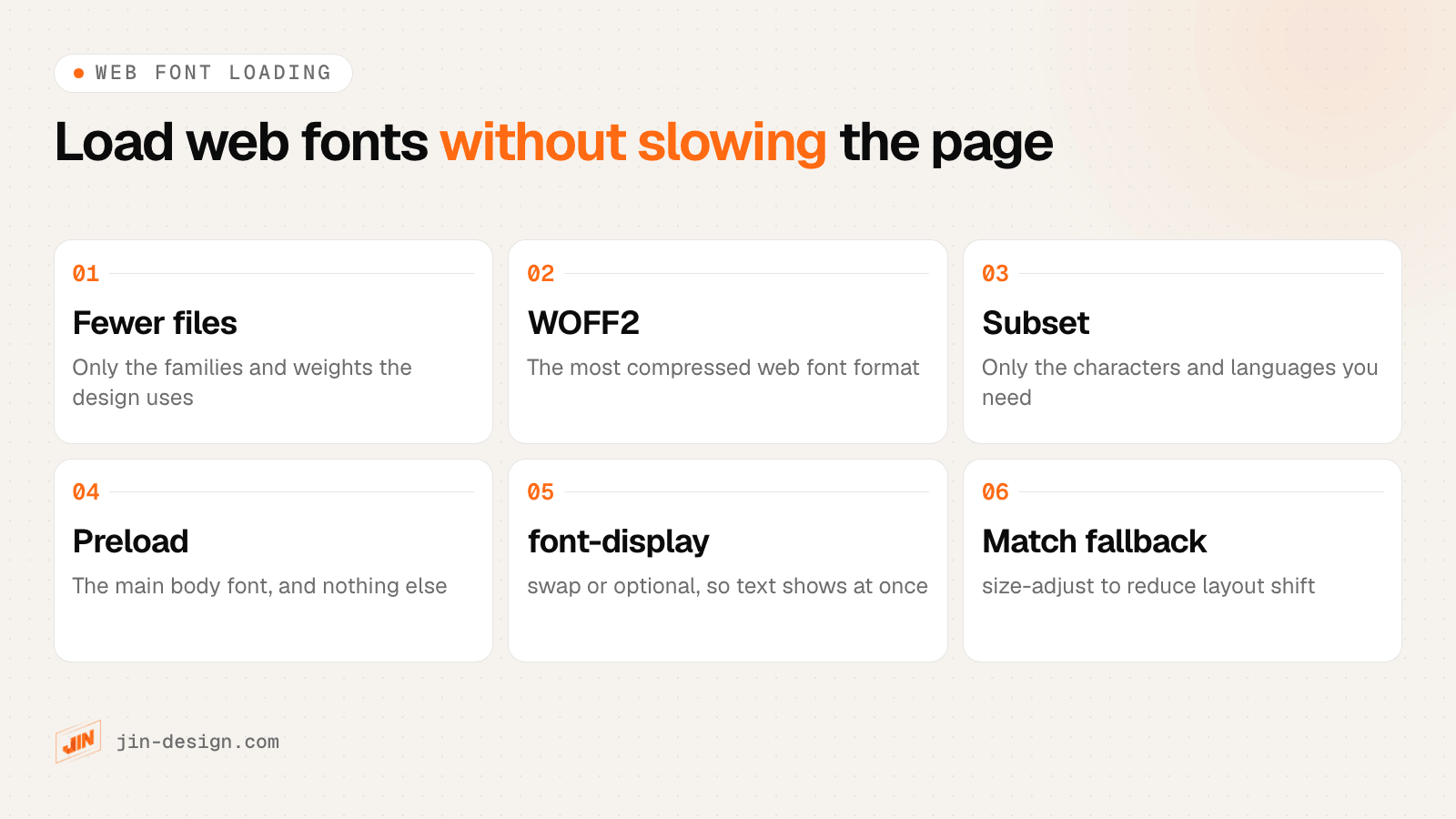
- Load fewer files. Two families in two weights each is four files. A variable font can replace several weights with one file, which helps when the design really uses many weights.
- Use WOFF2. web.dev describes it as the format with the broadest support and best compression, and suggests using only WOFF2.
- Subset. Strip out characters and languages your site never uses. Check first that the font’s licence allows subsetting.
- Preload carefully. Preloading the main body font helps the browser find it early, but web.dev warns that it takes bandwidth from other resources, so preload one or two files at most.
- Set font-display.
swapshows text straight away in a fallback font and swaps when the web font arrives.optionallimits the wait to about 100 milliseconds and may skip the web font on a slow connection, which avoids the jump entirely. - Match the fallback. The CSS
size-adjustdescriptor scales the fallback font to take up the same space as the web font, so the swap moves less of the page.
Self-hosting fonts on your own domain is not automatically faster than a font service, according to web.dev; it depends on your hosting and CDN. It does mean you can apply subsetting and caching yourself, and the visitor’s browser does not need to contact another server for fonts.
Slow fonts usually show up in Core Web Vitals as layout shift or a late largest contentful paint. If your site already feels slow, fonts are one of the first things we check in a website speed optimisation.
Fonts for English and Chinese websites in Singapore
Many Singapore businesses publish in English with some Chinese, Malay or Tamil: a bilingual clinic page, a menu, opening hours or a Chinese version of the site. Each script needs a font that contains its characters, and this is where many websites quietly go wrong.
Malay uses the Latin alphabet, so any Latin font you choose already covers it. Chinese and Tamil need fonts of their own. If your web font has no Chinese characters, the browser fills them in from whatever font the visitor’s device has: PingFang on Apple devices, Microsoft YaHei on Windows, Noto Sans CJK on most Android phones. The result can be a serif English heading next to sans-serif Chinese characters of a different weight.
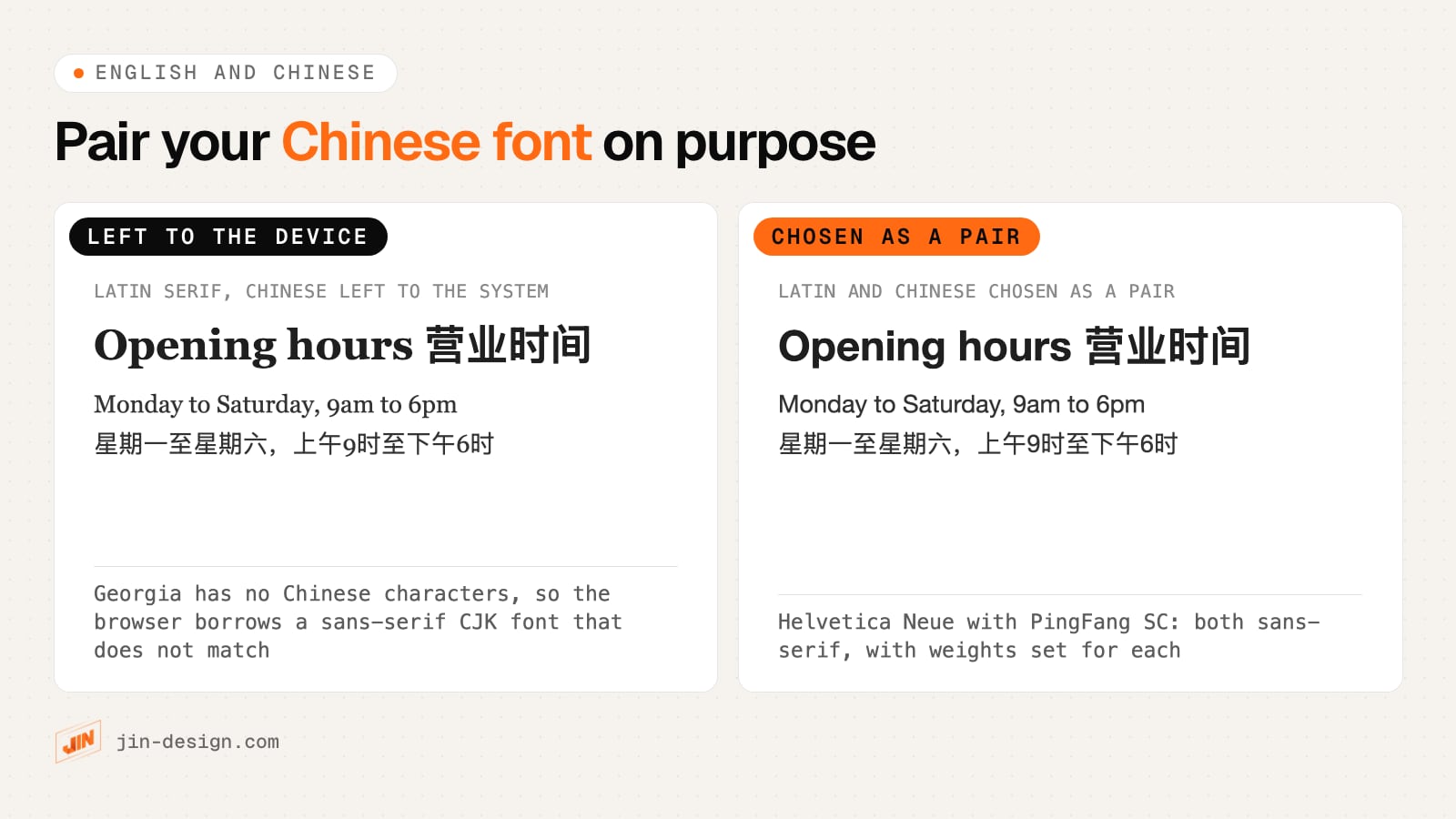
Chinese fonts are also far larger than Latin ones, because they contain thousands of characters. When we checked on 20 October 2026, Google Fonts served Noto Sans SC Regular as 101 separate slices adding up to about 2.4 MB, while the Latin file for Inter Regular was about 24 KB. Google explained when it launched Korean fonts that it splits large CJK fonts into slices so a browser downloads only the ones containing characters on the page. That makes Chinese web fonts workable, but each weight you add still multiplies the downloads.
For most bilingual business sites, a practical approach is:
- Pick a Latin font first, then a Chinese font of the same style: sans-serif with sans-serif, serif with serif (a Song or Ming style).
- Decide whether to load a Chinese web font at all. For a few lines of Chinese, a system font stack (PingFang SC, Microsoft YaHei, Noto Sans CJK SC) costs nothing to download and looks native on each device. For a full Chinese site with a strong brand style, a web font such as Noto Sans SC keeps it consistent.
- Mark up the language. Add
lang="zh-Hans"(orzh-Hantfor traditional characters) to Chinese content, so browsers and screen readers handle it correctly and you can style it separately. - Set Chinese text slightly larger and with more line height. Chinese characters are dense, and at the same pixel size they often look heavier and more crowded than the English next to them.
- Test Tamil separately if you use it. Many Latin and Chinese fonts have no Tamil characters, so it falls back too. Noto Sans Tamil is one free option.
A simple CSS starting point for a sans-serif bilingual site, where the Latin web font comes first and the device’s Chinese font fills in the rest:
body {
  font-family: "Inter", "PingFang SC", "Microsoft YaHei", "Noto Sans CJK SC", sans-serif;
}
:lang(zh) {
  font-size: 1.05em;
  line-height: 1.7;
}
How to choose fonts for a website
Choose the body font for readability first and the heading font for personality second. Body text is most of what visitors read, so it carries the most weight.
- Start with the content. List what the site has to hold: long articles, short service pages, price tables, forms, Chinese text. A font that suits a fashion homepage may not suit a dense table.
- Test the body font at real size on a phone. Read a full paragraph at 16 px. Check that similar characters are easy to tell apart, such as capital I, lowercase l and the number 1, or 0 and O.
- Check the weights and languages. You need at least a regular and a bold, ideally with italics, and every script your site uses.
- Check the licence. A desktop licence bought for print work may not cover use on a website. Google Fonts says its fonts can be used commercially, mostly under the SIL Open Font License; fonts from other foundries and marketplaces each have their own terms. Free download sites mix personal-use and commercial fonts, so read the licence for each one.
- Check the loading cost. Count the files the design needs and test the page in PageSpeed Insights.
- Look at it next to your logo and photos. The font should sit comfortably with your existing brand, not compete with it.
Good places to browse fonts for websites are Google Fonts and Adobe Fonts, which both show licence terms and language support. To identify a font you have seen elsewhere, MyFonts’ WhatTheFont matches an image to similar fonts.
How to pair fonts on a website
Most business websites need two roles: a heading font and a body font. There are two safe ways to fill them.
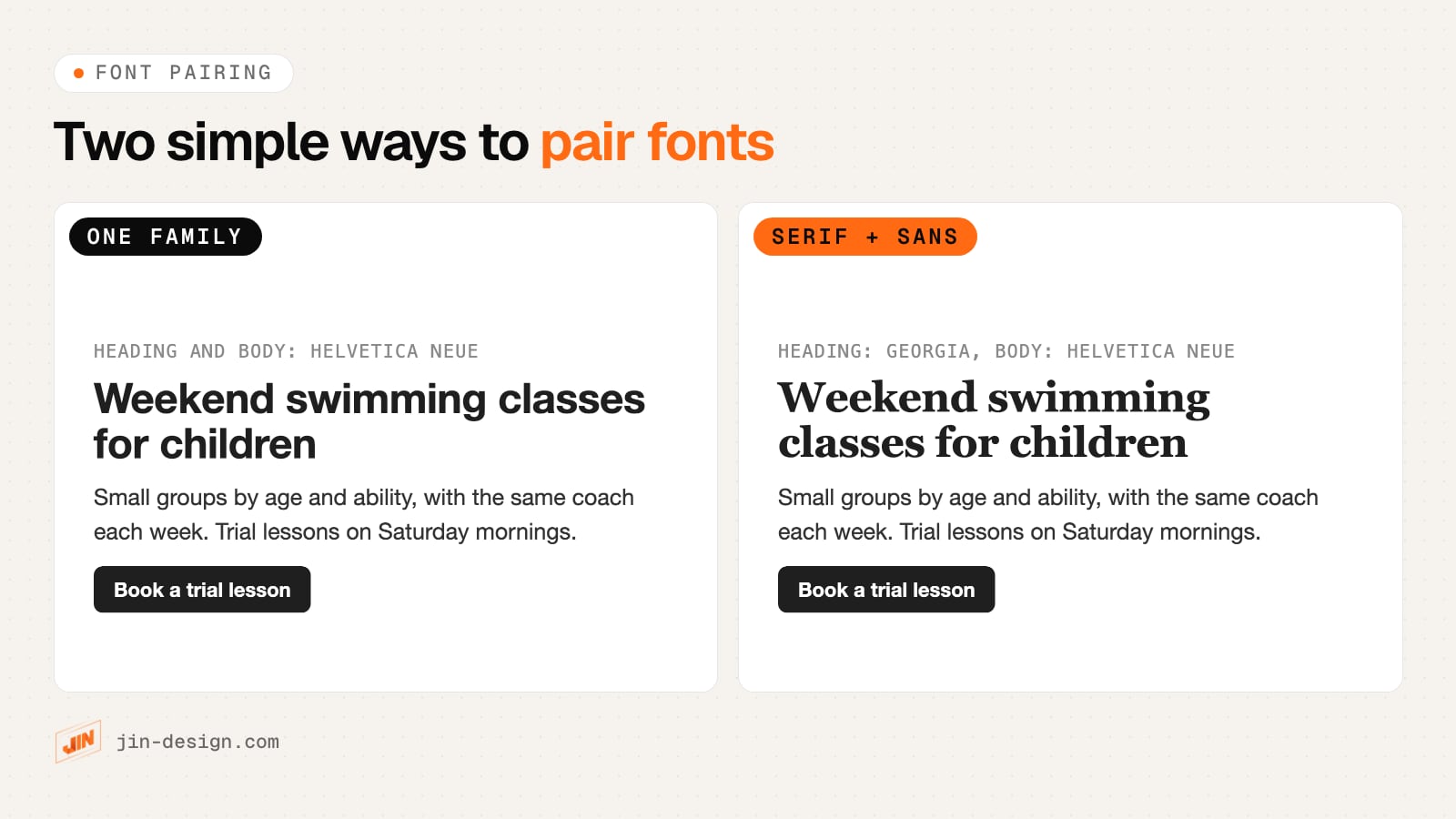
- One family, different weights. A bold heading and regular body text from the same family always match, and you load fewer files. It suits most service businesses.
- Serif headings with a sans-serif body (or the reverse). The contrast in style gives headings more character. Choose two fonts with similar proportions, especially a similar x-height (the height of lowercase letters), so they look related.
Rules that keep a pairing working:
- Avoid pairing two fonts that are similar but not the same, such as two geometric sans-serifs. They look like a mistake rather than a choice.
- Keep buttons, forms and navigation in the body font, so the interface reads as one system.
- Build hierarchy with size and weight before reaching for a third font.
- Write the pairing down in a short style guide (fonts, sizes, weights, line heights) so new pages and future designers stay consistent.
Common font mistakes on business websites
These are the problems we find most often when we review small business sites in Singapore. Most are quick to fix once you know to look for them:
- Body text in a light weight or pale grey that looks fine on a large monitor and fades on a phone.
- Headings or promotions saved as images, which cannot be read by screen readers or search engines, and blur when zoomed.
- Three or more font families, often because each page builder section added its own.
- Several weights loaded and never used, slowing every page.
- A serif English heading next to sans-serif Chinese from the device’s fallback font.
- Fonts downloaded from a free site under a personal-use licence and used on a commercial website.
- Text in fixed-height boxes that clips when a visitor enlarges it.
Need help choosing fonts for your website?
We choose, pair and test fonts as part of our website design and UI/UX design work, including bilingual English and Chinese sites, and we check readability, contrast and loading on real phones before launch. If you are planning a redesign, our guide to choosing a web design agency in Singapore covers what to ask, or talk to us about your site.
If you are building a page for a campaign, the same font rules apply to it; our article on what makes a good landing page covers the rest.
Frequently asked questions
Why is font important?
Font is important because it controls how easily people can read your words and how your business comes across before they read anything. On a website, the font settings also decide whether text meets accessibility rules such as WCAG's 4.5:1 contrast minimum, and every web font is a file the browser has to download, so fonts affect page speed too.
What is the difference between a font and a typeface?
A typeface is the design of the letters, such as Helvetica Neue or Georgia. A font is one specific version of it, such as Helvetica Neue Bold. In everyday use, and in most website builders, the two words mean the same thing.
How many fonts should a website use?
One or two font families are enough for most business websites: one for headings and one for body text, or a single family in different weights. Each extra family or weight is another file to download and another style to keep consistent.
What font size should body text be on a website?
Start at 16 pixels for body text, which is the default size in most browsers, and go larger for fonts that look small or for older readers.
Do fonts affect SEO?
Fonts do not change rankings directly, but they affect things search engines and visitors notice. Large or many font files can slow the page and cause layout shift, text placed inside images cannot be read as text, and hard-to-read pages lose visitors quickly.
Are Google Fonts free for commercial use?
Yes. The Google Fonts FAQ says you can use its fonts commercially, including in products you sell, under the licence that comes with each font, mostly the SIL Open Font License. Fonts from other sources vary, so check each licence covers use on a website.
Which fonts work for a website in English and Chinese?
Pair a Latin font with a Chinese font of the same style, such as a sans-serif with a sans-serif, and set both in your CSS. If you only load a Latin web font, the browser fills in Chinese characters from whatever the device has, such as PingFang on Apple devices or Microsoft YaHei on Windows, which may not match.