Domain vs Hosting: What's the Difference?
Domain vs hosting: the domain is your website's address and hosting is where its files live. How they connect, where email fits and .sg rules explained.

The short answer
- 01
A domain is your address; hosting is where your website lives. The domain (yourcompany.com.sg) is a name you rent yearly from a registrar. Hosting is the server space, rented from a web host, that stores the site's files and sends them to visitors.
- 02
Email is often a third service. Your domain's DNS records send website visitors to your web host and email to your email provider, which may be a different company from both.
- 03
Keep all of it in your company's name. The registrar account, the DNS and the hosting account should belong to your business, so you can renew, move or change suppliers without anyone's permission.
The difference between a domain and hosting is simple: your domain is your website’s address, and hosting is where the website’s files live. The domain (for example yourcompany.com.sg) is a name you register and renew every year through a registrar. Hosting is space on a server, rented from a web host, that stores your pages, images and database and sends them to every visitor. Business email is often a third service again, linked to the same domain.
We design and build websites for Singapore businesses, and almost every new project starts with the same question: where are the domain, hosting and email, and who controls them? This guide answers that, with how the pieces connect, the Singapore rules for .sg and .com.sg domains, what to keep in your own name, and how to change web host without losing your email or your domain.
What is the difference between a domain and hosting?
A domain is the name people type to find you; hosting is the computer that answers when they do. Think of a shop: the domain is the address on your name card, and hosting is the unit where the shop actually sits. You can move to a new unit and keep the same address on your cards, which is exactly what happens when you change web host.
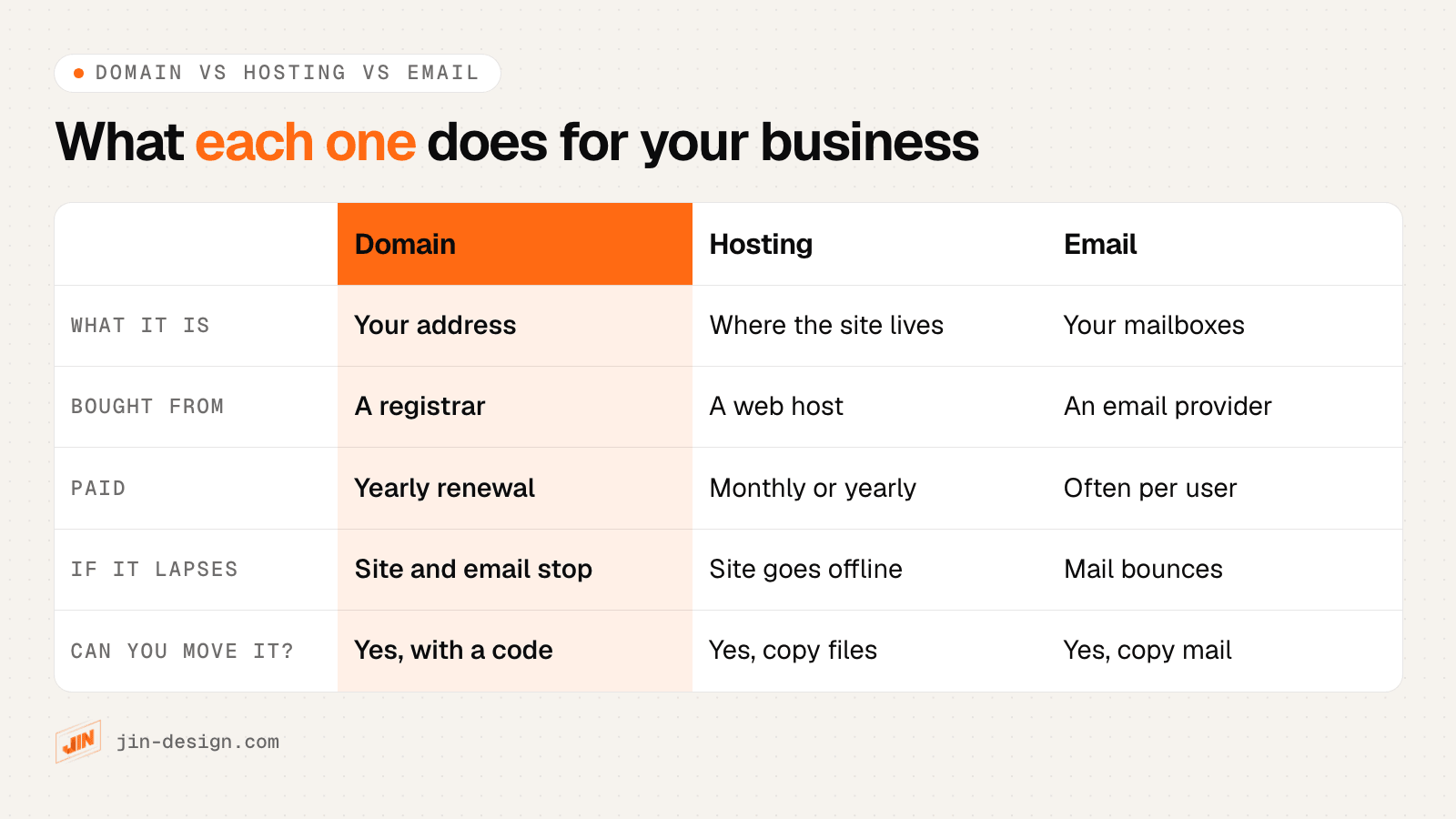
| Domain | Hosting | |
|---|---|---|
| What it is | Your website’s address, such as yourcompany.com.sg | Server space that stores and serves your website |
| Who you buy it from | A domain registrar | A web host (or a website builder that includes hosting) |
| How you pay | A yearly renewal, often for one or more years at a time | Monthly or yearly, depending on the plan |
| What you control | The registrant details and the DNS settings | The website’s files, database, backups and SSL certificate |
| If you stop paying | The address stops working for the site and email | The website goes offline; the domain stays yours |
| Can you move it? | Yes, to another registrar with a transfer code | Yes, by copying the site and pointing the domain to the new host |
The two are often bought on one bill, which is why they get mixed up. They are still separate services, with separate renewal dates and, sometimes, separate logins.
How do a domain and hosting work together?
A domain and hosting are joined by DNS, the system that turns your domain into the address of a real server. When someone types your domain, their device asks DNS where it lives, and your DNS records reply with the address of your web host for the website and of your email provider for mail.
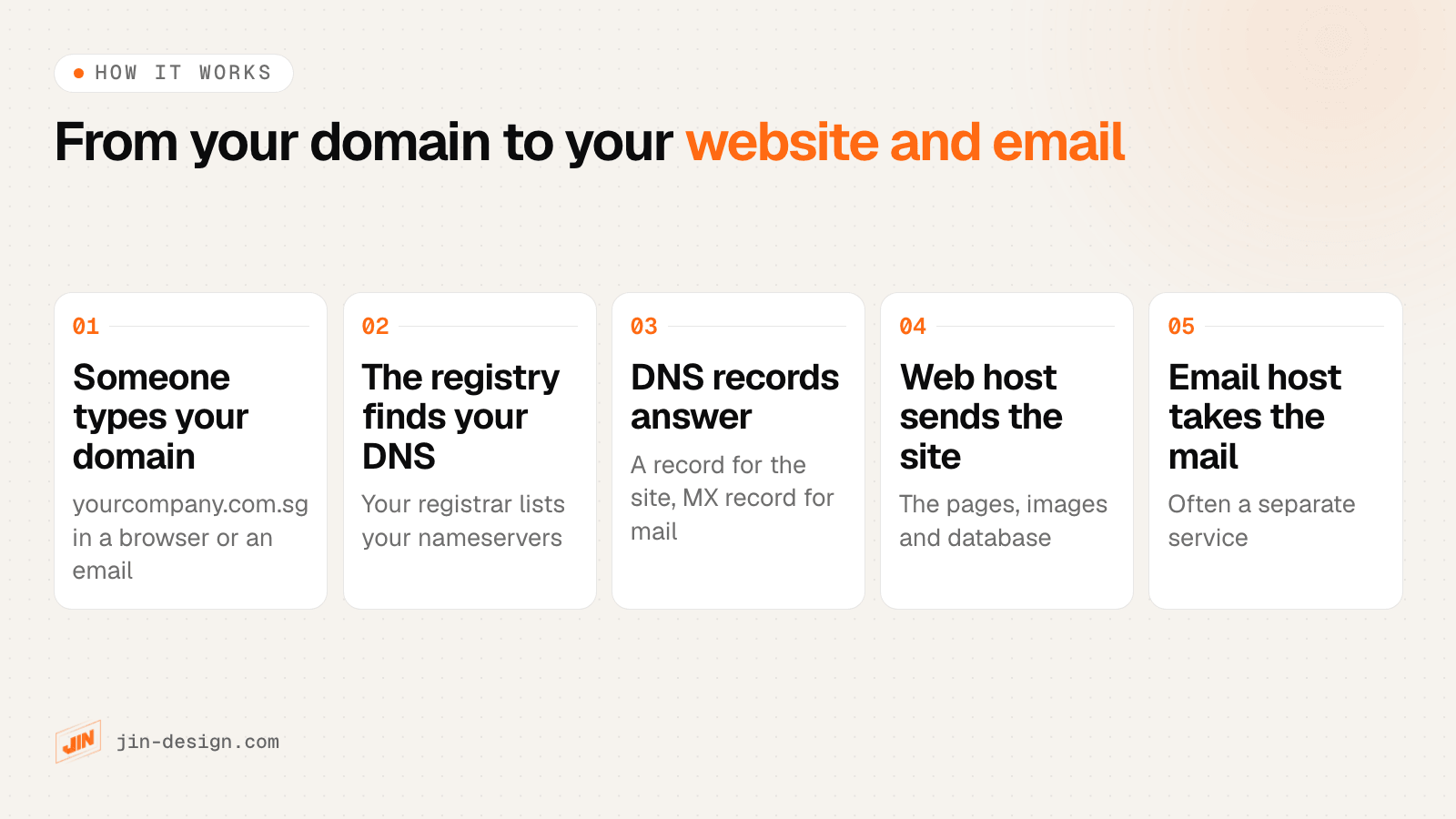
In practice:
- Someone types your domain into a browser, or sends an email to an address on it.
- The registry finds your DNS. Your registrar has told the registry (SGNIC for .sg) which nameservers hold your DNS records. That might be your registrar, your web host or a separate DNS service.
- Your DNS records answer. An A record (or CNAME) gives the address of your web host. An MX record names the servers that receive your email.
- Your web host sends the website: the pages, images and anything from the database.
- Your email host receives the mail, if an email was sent.
The practical point is that whoever controls your DNS controls where your website and your email go. That makes the DNS login as important as the domain itself.
Where does business email fit: domain, hosting or both?
Business email uses your domain but is usually not part of the website at all. Your MX records can send mail to Google Workspace, Microsoft 365, another email provider, or a mailbox included with your web hosting plan.
This is where most trouble starts. If your email sits on the same server as your old website, cancelling that hosting also deletes the mailboxes. And if a new host takes over your DNS without copying the MX, SPF, DKIM and DMARC records, mail stops arriving or lands in spam even though the website looks fine.
Before any change, find out which of these you have:
- Email on a separate provider (such as Google Workspace or Microsoft 365). You can change web host freely, as long as the email records are copied across.
- Email included with your web hosting. Move the mailboxes first, or plan the move as part of the hosting change.
- Email set up by a former supplier and nobody knows where. Look up your domain’s MX record with any DNS lookup tool; the server names usually reveal the provider.
Our guide to email hosting providers in Singapore explains the email records in plain English and how to switch email provider without downtime.
Do you need both a domain and hosting?
You need both for a website on your own address. The domain gives customers something to type and remember, and the hosting serves the site when they arrive.
There are a few exceptions:
- Website builders include hosting. On Wix, Squarespace or Shopify, the hosting is part of the subscription, so you only buy or connect a domain.
- A domain without hosting can be parked, forwarded to another site, or used only for email.
- Hosting without your own domain usually gives you a temporary address from the host or builder. It works for testing, but customers and search engines will see the provider’s name, not yours.
Should you buy your domain and hosting from the same company?
Buying both from one company is simpler, with one login and one bill. Keeping them apart makes it easier to change web host later, because the domain and DNS never have to move.
Neither choice is wrong. The questions that decide it:
- How likely are you to change web host or web designer? If it is likely, a separate registrar keeps the domain and DNS steady while the hosting changes around them.
- Who will manage the DNS? One clear owner of the DNS login matters more than which company provides it.
- Is email on the hosting plan? If so, cancelling the hosting affects email too, so note the dependency.
- Do you know every renewal date? Separate suppliers mean separate reminders; send them all to a shared inbox, not one person’s mailbox.
When we build a website, the hosting account is set up in the client’s name on a managed hosting platform, and the domain stays in the client’s name with whichever registrar they use. We look after the website itself; the accounts remain the client’s.
If you are choosing where the website should live, our guide to choosing a website hosting server compares the main types of hosting. For the domain side, see our list of domain name registrars in Singapore.
.sg and .com.sg domains: what Singapore businesses need to know
Every domain ending in .sg is run by the Singapore Network Information Centre (SGNIC), which sets the rules and works through accredited registrars. SGNIC does not sell names to the public and, in its own words, does not charge registrants directly, so you register and renew through a registrar on its list of registrars or one of their resellers.
The rules that affect most businesses, from SGNIC’s categories page, domain registration FAQ and VerifiedID@SG FAQ:
| Rule | What SGNIC says |
|---|---|
| Who can register .sg | Anyone. Foreign applicants must appoint a local agent as the administrative contact. |
| Who can register .com.sg | Commercial entities registered, or in the process of registering, with ACRA, Enterprise Singapore or a professional body in Singapore. Foreign companies need a local agent as administrative contact. |
| Verification | The administrative contact verifies a new .sg domain with Singpass (individuals) or Corppass (organisations) within 21 calendar days of registration. An organisation acting as administrative contact needs a valid UEN. |
| Missed verification | SGNIC suspends the domain, and a newly registered domain’s website and email stop working. The due date can be extended once, by 7 days. |
| Renewal | Renewal terms are 1 or 2 years, and the new expiry date cannot be more than 3 years after SGNIC receives the renewal. |
| Transfer | Get the domain transfer password from your current registrar and give it to the new one. The current registrar may ask you to settle outstanding payments; if it neither approves nor rejects the request, SGNIC approves the transfer after 7 days. |
| Privacy | SGNIC masks email addresses and phone numbers for the registrant, administrative and billing contacts in .sg WHOIS records. |
For a registered company, the usual choice is .com.sg, often with the matching .sg as well, pointed to the main domain. Have your company’s registered name and UEN ready, exactly as they appear in your business registration, and make sure the person named as administrative contact expects the verification request.
What happens if your domain or hosting expires?
If your domain expires, both your website and your email stop working, even though the website is still sitting on the host. If your hosting expires, the website goes offline, but the domain remains yours and can be pointed elsewhere.
SGNIC’s registrant guide describes what happens to a .sg domain that is not renewed by its expiry date:
- Post expiry grace period, 30 days. The domain is suspended and stops resolving to your website and email address. You can still renew it through your registrar.
- Deletion escrow period, a further 30 days. The domain stays suspended, and renewing it costs the renewal fee plus a reinstatement fee.
- Deletion. After that, the domain is deleted and anyone can register it.
Registrars set their own reminder and renewal deadlines inside these periods, so ask yours for the exact dates that apply to your domain. Hosting is simpler and harsher: when a plan lapses, many hosts suspend the account and later delete its files, so keep your own recent backup of the site.
Which domain and hosting accounts should be in your own name?
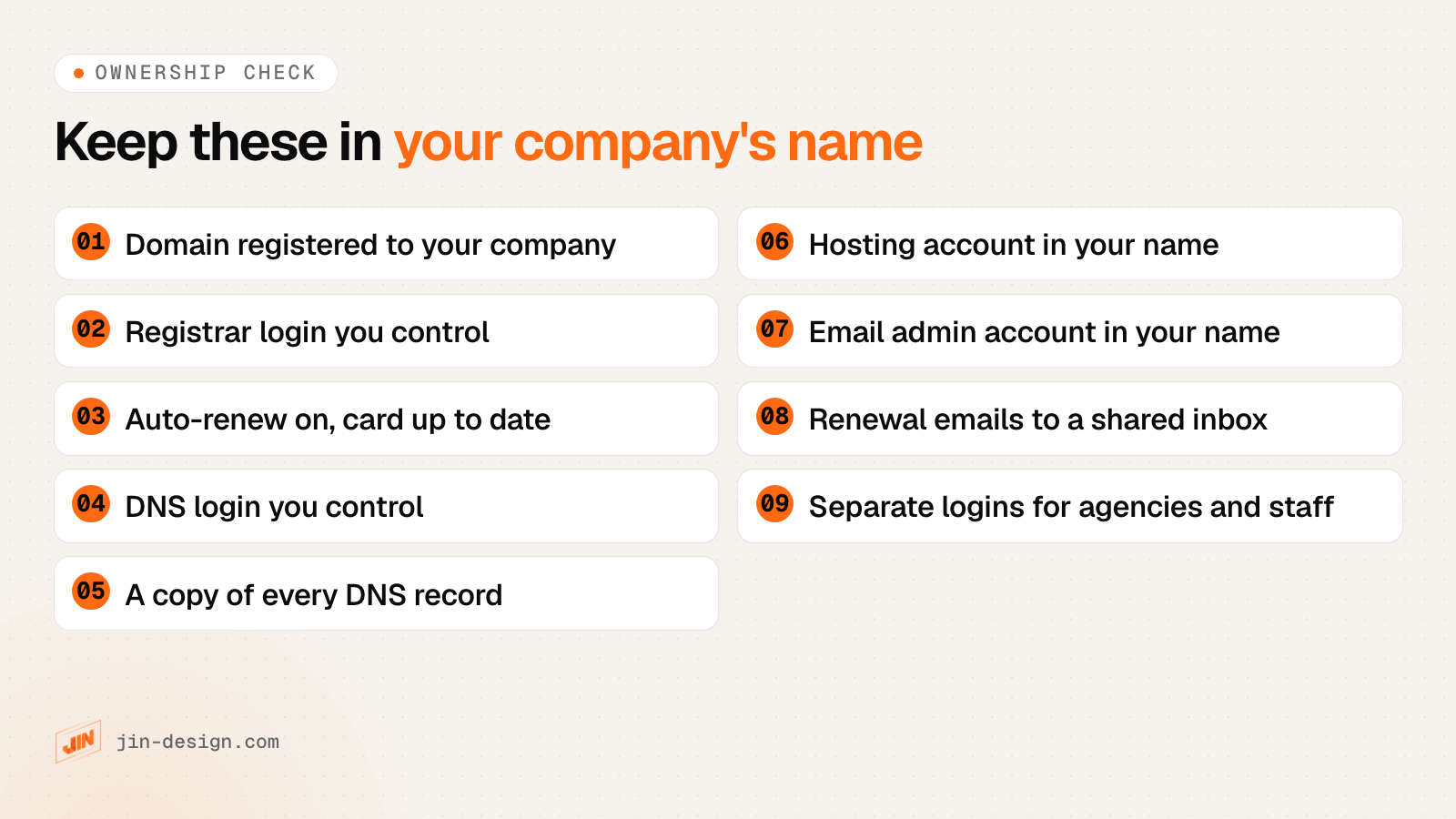
Keep the domain, the registrar login, the DNS and the hosting account in your company’s name, with logins your business controls. Agencies, freelancers and staff should get their own separate access, which you can remove when they leave.
SGNIC’s guide puts the reason plainly: the person holding the domain is whoever is listed as the registrant, and the owner of a company is not necessarily the holder of the domain. It advises registering in your company’s or your own name, rather than a hosting provider’s or an employee’s, so that expiry and renewal notices reach you.
What goes wrong when accounts sit in someone else’s name:
- The domain is registered to a former designer or staff member. You need their cooperation to renew, transfer or even change a DNS record.
- Renewal reminders go to an inbox nobody reads. The domain lapses, and the website and email stop together.
- The hosting account belongs to a supplier. Moving the site depends on them giving you a copy of the files and database.
A quick way to check: log in to your registrar and confirm the registrant is your company, the contact emails are current, auto-renew is on and the payment card will not expire before the renewal date. Then log in to your DNS and hosting accounts and export a copy of the DNS records. Keep that copy somewhere the business can find it.
Our website maintenance plans work the same way: we ask that your domain, hosting and admin accounts stay in your company’s name, with a separate login for us.
How to move hosting without losing your email or domain
To change web host safely, copy every DNS record first, check where your email lives, test the site on the new host, then change only the records that point to the website. The domain stays where it is throughout.
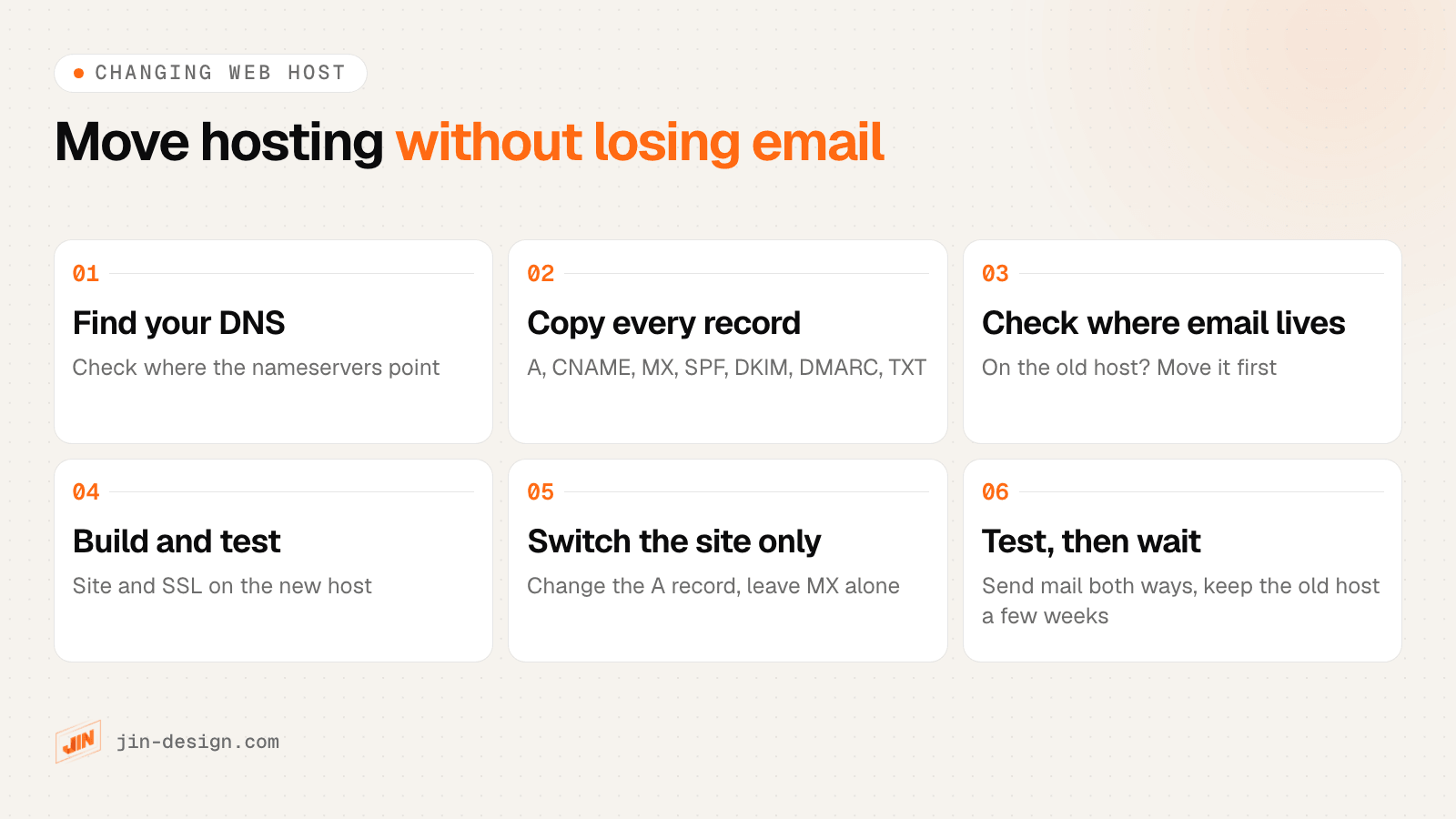
- Find where your DNS is managed. Look up your domain’s nameservers. They show whether DNS sits with your registrar, your old web host or a separate DNS service.
- Copy every DNS record. Export or screenshot all of them: A, CNAME, MX, TXT (including SPF and any verification records), DKIM and DMARC.
- Check where your email lives. If the mailboxes are on the old hosting, move them to an email provider (or the new host) before the old account closes.
- Set up and test the site on the new host. Copy the files and database, install the SSL certificate, and check the site on the host’s temporary address before going live.
- Switch the website only. If your DNS stays where it is, change just the A record (or CNAME) to the new host and leave the MX and email records alone. If the new host needs to take over the nameservers, recreate every record from your copy there first, then switch.
- Test, then keep the old host for a while. Visit the site, send email to and from your domain, and check the contact form still delivers. Keep the old hosting for a few weeks until you are sure nothing is still pointing at it.
DNS changes can take from minutes to a day or two to reach everyone, depending on the records’ TTL settings, so plan the switch for a quiet period. If you would rather have it handled, a website maintenance plan covers the website side of a move; the domain and hosting accounts stay in your name.
Domain, hosting and email in one business: a worked example
Here is an example of a typical setup, for a fictional company, Example Trading Pte Ltd:
- Domain: exampletrading.com.sg, registered to the company through an accredited registrar, renewed every 2 years with auto-renew on. The registrar also hosts the DNS.
- Hosting: a managed hosting plan in the company’s name, where the WordPress website runs. The DNS has an A record pointing to it.
- Email: Microsoft 365, paid per user. The DNS has Microsoft’s MX, SPF, DKIM and DMARC records.
When the company redesigns its website and moves it to a new host, only the A record changes. Email keeps flowing to Microsoft 365, and the domain never leaves the registrar. If instead the email had been on the old hosting plan, the company would need to move the mailboxes before cancelling that plan.
Planning a new website or moving an existing one?
We design and build websites for Singapore businesses and launch them on your own domain, with the domain and hosting accounts in your company’s name. See our web design service, or our website maintenance plans if you need an existing site looked after. Talk to us about your project.
Frequently asked questions
Do I need both a domain and hosting?
For a website on your own address, yes. The domain gives people a name to type, and hosting stores and serves the site. Website builders such as Wix, Squarespace or Shopify include the hosting in their plan, so you only connect your domain. A domain on its own can still be used for email or to redirect to another page.
Can I have a domain without hosting?
Yes. You can register a domain and leave it parked, forward it to another website or social profile, or use it only for email with an email provider. There will be no website on it until you connect it to hosting.
Can I move my website to a new host and keep my domain?
Yes. The domain stays with your registrar while you copy the site to the new host, then you point the domain's DNS records to it. Copy every existing DNS record first, especially the MX and email records, so your email keeps working.
Can I transfer my domain to another registrar?
Yes. Ask your current registrar for the transfer password (also called an auth code) and give it to the new registrar. For .sg domains, SGNIC says the current registrar may ask you to settle outstanding payments, and SGNIC approves the transfer after 7 days if that registrar neither approves nor rejects it.
Who owns my domain: me or my web designer?
Whoever is listed as the registrant in the registry's records holds the domain. SGNIC's own guide notes that the owner of a company is not necessarily the holder of the domain. Check that the registrant is your company and that the registrar login belongs to you, not to a designer or a former staff member.
Is a .com.sg domain better than .com for a Singapore business?
Both work for a Singapore website. A .com.sg shows visitors you are a registered Singapore business and is open only to entities registered with ACRA, Enterprise Singapore or a Singapore professional body. A .com suits a regional or global audience. Many businesses register both and point one to the other.
What is the difference between a domain registrar and a web host?
A registrar registers and renews your domain name with the registry, such as SGNIC for .sg. A web host rents you the server space that runs your website. Some companies offer both, but they remain separate services with separate renewals.